


kohesion
Inspiring
February 22, 2025
Answered

Text frame - balanced columns

  • February 22, 2025
  • 1 reply
  • 1982 views

BEGGING FOR HELP! Need to get this file to client yesterday...😱

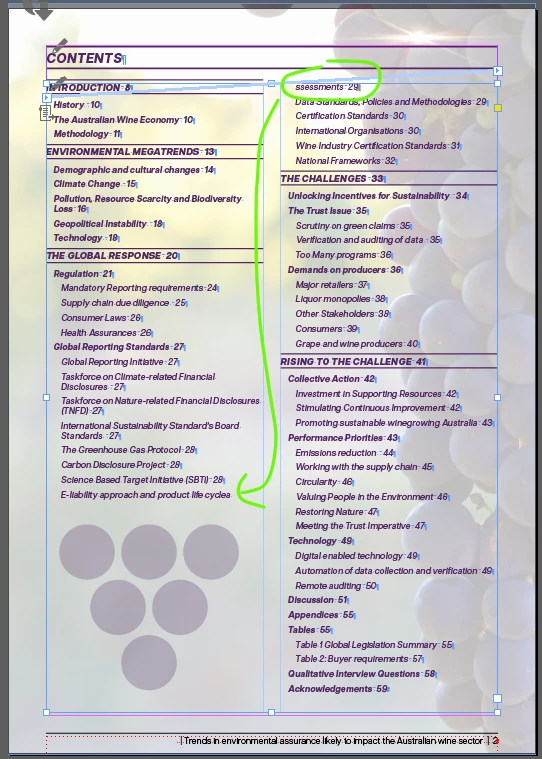
Does anyone know why one word insists on breaking to the next column?

'keep options' is turned off in it's paragraph style; there's not a single character style applied to the word AND columns are set to 'unbalanced' ... it makes no sense!


[basic Paragraph] style DOES have 'keep lines together' (At start/end of paragraph  | Start: 2 lines | End: 2 lines are the settings) Is it possibly something to do with that?! See pic for reference...

Correct answer jmlevy

Thank you so much! But... it's not ticked in the original document 😥 I don't understand why it shows in the copy and paste version but not the original?!


I should not have written "untick" but the problem is with "keep with next". Set it to 0 instead of 1 (lines).

1 reply

jmlevy
Community Expert
Community Expert
February 22, 2025

Did you check if there is a text wrap on the six circle triangle shape under your text? 

kohesion
kohesionAuthor
Inspiring
February 22, 2025

sadly, there is not. But was a good idea to check, thank you!

jmlevy
Community Expert
Community Expert
February 22, 2025

Can you share the file? Or just copy paste this frame in a new file and share it?