


Participant
September 6, 2024
Answered

Text Not Showing in InDesign Document but Visible in Story Editor

  • September 6, 2024
  • 2 replies
  • 1391 views

Hi all!


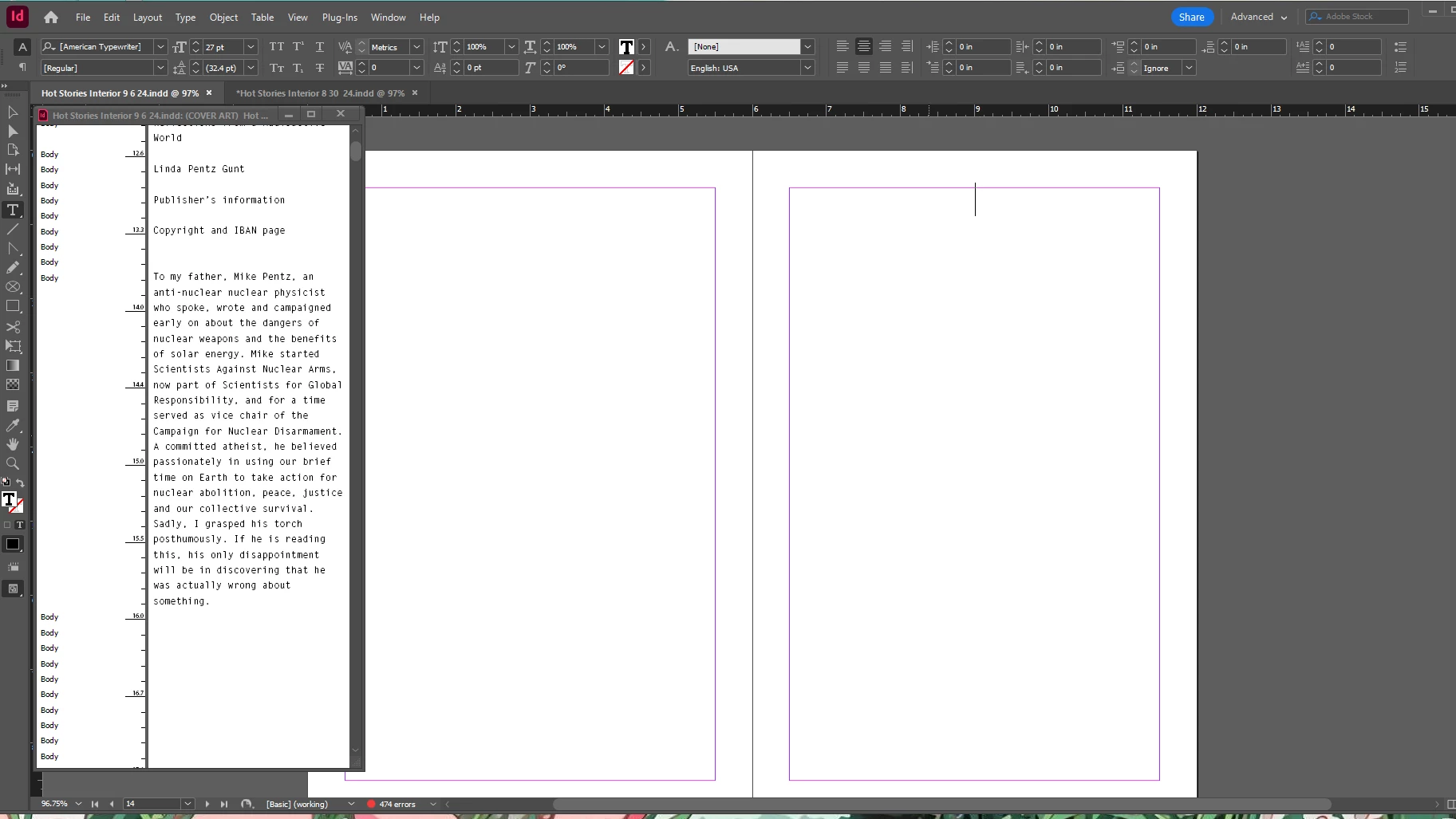
I placed a Word document into InDesign and it is not showing up on the actual document besides the first few pages. It is visible in Story Editor. I've tried creating a new document several times and it seems to be a recurring issue. Any ideas? Thank you! 
 

<Title renamed by MOD>

This topic has been closed for replies.
Correct answer ellie_9176

Update: I resaved the word document and replaced it and that worked so it must have been an issue with the original word document. Thanks again!

2 replies

James Gifford—NitroPress
Legend
September 6, 2024

You almost certainly have a hidden code or a document glitch that is holding up the import


  • Do a completely clean import using Place.
  • Go to the very last character that imports, the end of the visible text.
  • Tap Delete until the rest of the text appears (and probably continues flowing into more pages). It might be one tap, it mght be a dozen.


That deletes whatever Word file element is confusing ID. You'll need to review that and restore whatever characters, image, table etc. might have been deleted in the fix.

Participant
September 6, 2024

Thank you!


This unfortunately didn't help, I deleted all the previous text and it still didn't show the rest of the text. There must be something really wrong, I've tried to create new documents several times and it just keeps freezing my computer and forcing me to restart. I appreciate your help though!

ellie_9176AuthorCorrect answer
Participant
September 6, 2024

Update: I resaved the word document and replaced it and that worked so it must have been an issue with the original word document. Thanks again!

Abhishek Rao
Community Manager
Community Manager
September 6, 2024

Hi @ellie_9176,


Thank you for sharing your concern. I can understand how frustrating this must be. When text is visible in the Story Editor but not in the main layout, it often indicates an issue with text overflow or that the text frame is too small to display all the content.

Would you mind trying the below? 
1. Check for Overset Text: Look for a small red plus sign (+) at the bottom right corner of your text frame, indicating that there's more text than the frame can show. You can either expand the text frame or flow the text into a new one by clicking the red plus sign and placing the remaining text.

2. Make sure the text frame isn't hidden or placed on a non-visible layer. Also, ensure that the text color isn't set to [None] or the same as the background color.

3. If your document has multiple linked text frames, ensure they are all properly connected. You can do this by checking the flow indicators (the little boxes with arrows) in your text frames.


Additionally, please tell us about the InDesign version you are using and the details of the operating system. 


Please let me know if this resolves the issue, or if you need further assistance. We're here to help!


Thanks, 
Abhishek Rao