


OsakaWebbie
Inspiring
May 30, 2025
Question

Text refuses to align to bottom of frame

  • May 30, 2025
  • 5 replies
  • 1651 views

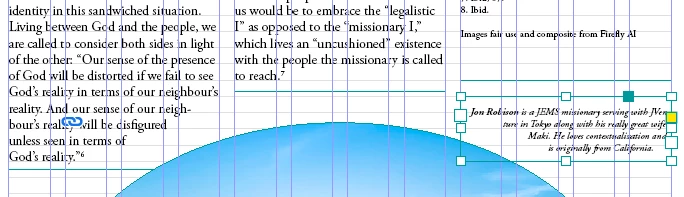
In my design of a magazine, the main text uses baseline grid, but each article's author bio is a smaller font with no alignment to the grid. The author bio in its own frame, with Text Frame Options -> Align=Bottom. As long as I make sure the bottom of the bio frame is on one of the grid lines, I normally can get things to look nice, with the bottom of the bio aligned with the bottom of text in other columns. But this time it's acting weird, probably related to wrapping around an image. No matter where I put the bio frame, I can't get the text to align to the bottom of the frame. I think InDesign is using its own algorithm to try to make the appearance of the lines pleasing, but I want to prioritize the text alignment in the frame over "beauty". Can I do that? Or is this a bug?


Here's a screenshot with context - the selected frame on the right side is the bio. If InDesign would make the text flush with the bottom of the text frame, it would align with "God's reality." on the left side.
 

5 replies

Community Expert
June 2, 2025

Hi @OsakaWebbie ,

thank you for the attached InDesign sample document.

I found a workaround for that strange situation.


Let's be clear that the situation with text wrap is this, image selected so that the path of the wrap ( 8 mm ) is visible:


When I added a path point to the text wrap's path with the Pen tool the text will move to the bottom:


I have no idea why this is necessary, but it does work. The trajectory of the path did not change.


Regards,
Uwe Laubender
( Adobe Community Expert )


OsakaWebbie
Inspiring
June 3, 2025

I tried adding anchor points (with no effect - see below), but just now I realized that you were adding them to the wrap boundary, not the object shape. But I don't see how to do that - how do you get the wrap boundary line to display for an ellipse? I only see those lines when the shape is a rectagle, as far as I can figure out.


OsakaWebbie
Inspiring
June 3, 2025

Ah, I turned text wrap off and then on again, and I could then see the line. But adding anchor points to that didn't fix the problem either.


rob day
Community Expert
Community Expert
May 30, 2025

Hi @OsakaWebbie , You are not showing invisibles, are you sure there are no returns at the end?


Robert at ID-Tasker
Legend
May 30, 2025

@rob day


OP already mentioned, that if this TextFrame is moved to the pasteboard - it aligns with the bottom of the TextFrame - so there are no extra hidden empty paragraphs.


Robert at ID-Tasker
Legend
May 30, 2025

@OsakaWebbie


Can you share a sample document - here ir privately?


Just this one page - without links. 


You can either scramble text or fill with "lorem ipsum". 


OsakaWebbie
Inspiring
May 30, 2025

I don't know how to share privately, but I'm not worried about it - see attached. I did need to remove the article text, because it was the last page of an article and trying to break the thread between frames didn't work right. But the problem is not dependent on the article text as long as you remember that the column on the left side of the image stops at the gridline where the bottom of the bio frame is currently, so I'm trying to align with that.


I'm aware that I might have to change the text wrapping shape of the image to get InDesign to do what I want (as Laubender suggested). I'm not sure yet how to do that with an ellipse, since the wrap path doesn't start out with handles, but I can figure that out (if necessary, turn off wrapping on the real image and add multiple invisible shapes with their own wrap - I've done that many times working with complex shapes). It's already clear from all the responses that there isn't a setting somewhere to prioritize layout over text wrap asthetics, which is what I was initially wondering - if there was such a setting, one of you wonderful people would have already mentioned it.

Robert at ID-Tasker
Legend
May 30, 2025

@OsakaWebbie 


It's strange... 


If I'll move it a few mm down - it won't align: 


And another few mm down - it will align: 


Participant
May 30, 2025

Hello,


InDesign's text frame is being affected by vertical justification or text wrap. Check that Vertical Justification is set to "Top," Align to Baseline Grid is off for the bio text, and there's no extra space after the paragraph.


Best Regard,

Sally

Community Expert
May 30, 2025

Hi @OsakaWebbie ,

will the text align to the bottom of the text frame if you move the text frame to the pasteboard?

If not check the inset values of the text frame. Set them to 0 for the bottom.

Also check if there are items on the page or applied parent page with text wrap enabled like it seems to be the case with the image inside the circle .


Regards,
Uwe Laubender
( Adobe Community Expert )

OsakaWebbie
Inspiring
May 30, 2025

Yes, if I move it to the pasteboard or anywhere else where there is no image with text wrap, it aligns to bottom as it should. That's why I said it seems to be InDesign prioritizing appearance of the text line lengths (which would change if moved up or down along the steeply angled edge of the image) over accuracy of following my "rules", and I was wondering if there is a way to force it to more strictly obey the alignment setting.

Community Expert
May 30, 2025

Hi @OsakaWebbie ,

if text wrap is the issue, I would check the image ( first candidate, but perhaps not the only one ) for text wrap.

Perhaps you could change the path of the wrap a bit so that your small text frame will not be affected so much.


Regards,
Uwe Laubender
( Adobe Community Expert )