



Text refuses to align to bottom of frame
In my design of a magazine, the main text uses baseline grid, but each article's author bio is a smaller font with no alignment to the grid. The author bio in its own frame, with Text Frame Options -> Align=Bottom. As long as I make sure the bottom of the bio frame is on one of the grid lines, I normally can get things to look nice, with the bottom of the bio aligned with the bottom of text in other columns. But this time it's acting weird, probably related to wrapping around an image. No matter where I put the bio frame, I can't get the text to align to the bottom of the frame. I think InDesign is using its own algorithm to try to make the appearance of the lines pleasing, but I want to prioritize the text alignment in the frame over "beauty". Can I do that? Or is this a bug?
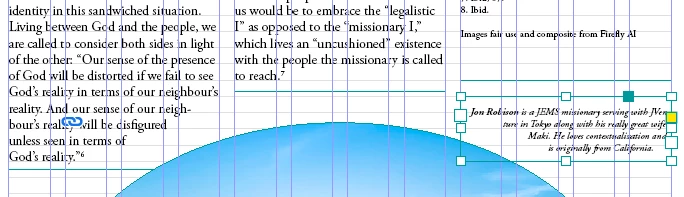
Here's a screenshot with context - the selected frame on the right side is the bio. If InDesign would make the text flush with the bottom of the text frame, it would align with "God's reality." on the left side.
 AdChoices