Tim Brosnan
Participating Frequently
May 14, 2022
Answered

text typed on path distorts when converted to outlines

  • May 14, 2022
  • 3 replies
  • 2310 views

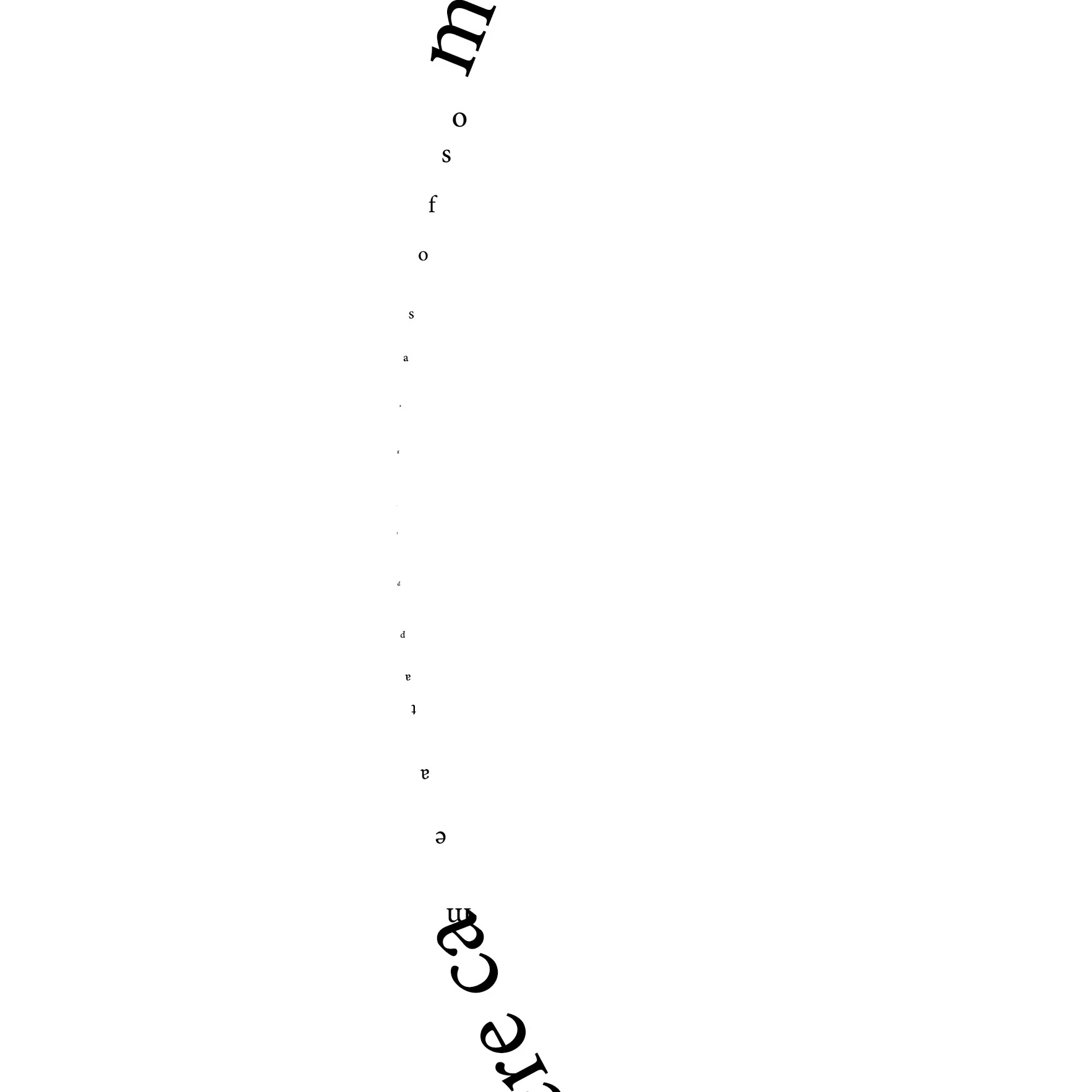
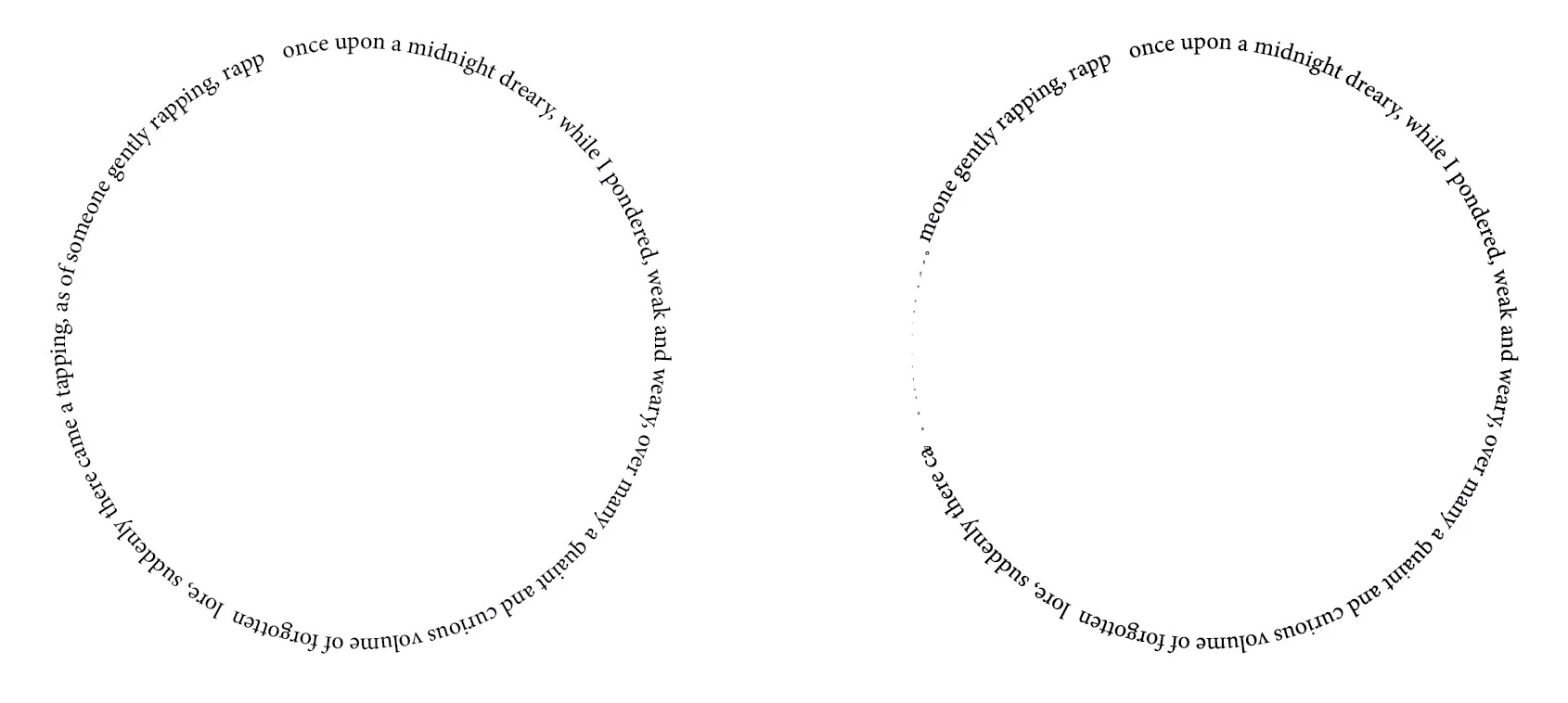
Using InDesign v17.2.1, text typed on a path becomes distorted when converted to outlines. As you'll see in the attached before/after images (overall comparison, detail of problem area), the converted text is mostly okay, but the last few words become almost illegibly small. The characters also become reoriented relative to the path ... some characters are vertical, others upside-down. I've tried changing fonts, creating new documents, and typing on paths of different shapes, but the problem persists. I was hoping that this problem would be addressed in the latest update, but it wasn't. 


I'm running Windows 11 v10.0.22000, build 22000.
Correct answer Laubender

Hi Tim,

this is a bug we discussed here in the forum about two or three times, I think.

What you could try: Scale the text path with the live type to about, let's say 400%, and then outline the text.

Scale the result back to 25%. That should do it…


Similar issue discussed here:

https://community.adobe.com/t5/indesign-discussions/strange-skewing-of-type-on-a-path-when-outlining-text/m-p/12704979#M462829


A bug with InDesign 2022. So if you have the chance to do this with the previous version, try it with InDesign 2021.


Regards,
Uwe Laubender

( ACP )

3 replies

Community Expert
May 16, 2022

Hi Tim,

I see that you already reported that bug on InDesign UserVoice:


text typed on path distorts when converted to outlines
Tim Brosnan, May 14, 2022
https://indesign.uservoice.com/forums/601180-adobe-indesign-bugs/suggestions/45173485-text-typed-on-path-distorts-when-converted-to-outl


Found also another report by Rainer Klute from December 2021:


»Create outlines« of text on a circle path is making weird things
Rainer Klute, December 13, 2021
https://indesign.uservoice.com/forums/601180-adobe-indesign-bugs/suggestions/44559447--create-outlines-of-text-on-a-circle-path-is-maki


Thanks,
Uwe Laubender
( Adobe Community Professional )

LaubenderCorrect answer
Community Expert
May 14, 2022

Hi Tim,

this is a bug we discussed here in the forum about two or three times, I think.

What you could try: Scale the text path with the live type to about, let's say 400%, and then outline the text.

Scale the result back to 25%. That should do it…


Similar issue discussed here:

https://community.adobe.com/t5/indesign-discussions/strange-skewing-of-type-on-a-path-when-outlining-text/m-p/12704979#M462829


A bug with InDesign 2022. So if you have the chance to do this with the previous version, try it with InDesign 2021.


Regards,
Uwe Laubender

( ACP )

Tim Brosnan
Participating Frequently
May 14, 2022

Works like a charm, Uwe. Glad to know the Community still has folks like you fielding the posts.

Willi Adelberger
Community Expert
May 14, 2022

It is boring, how often we have to declare: Never outline text in InDesign. It is a no-go. It is only for some graphic purposes, but never for production. There are 1000 reasons not to convert text to outllines. One of them you are experiencing now.


If you need to get an outline final file, do it in Acrobat Pro. There is a preflight setting to do it correctly. But do not do it in InDesign.

Tim Brosnan
Participating Frequently
May 14, 2022

Right, Willi. And condolences on your boredom. Nevertheless, I still think this is something that Adobe should make possible and my hope is that they'll do so if the tedium of such inquiries as mine becomes overwhelming.

Known Participant
June 7, 2024

Not every tool needs to do every job. You need to do something this "artistic," it's best done in the industry-standard "art" tool, not the industry-standard "page layout" tool.


Yes, I know, there's a persistent faction that thinks Adobe should have one app. Fortunately, reality disagrees. 🙂


(ETA: Still wondering why anyone converts text to outlines in 2022, except for shape manipulation in Illustrator.)


While one reason would be to satisfy Amazon's margin requirements that no text appear near within a certain distance of the bleed.   I have a situation where there are tabs along the edge of a page with text but that text needs to be outlined.  


"Yes, I know, there's a persistent faction that thinks Adobe should have one app. Fortunately, reality disagrees."


No, but it would be nice if they consolidated their tools and short cuts accross all their apps or have the same functionality. Like why is there no verticle text or reverse text option the North American version?  Why can't I have those options available without uninstalling and re-installing different regional versions?