


The only script I can find to move objects is very old and doesn't work
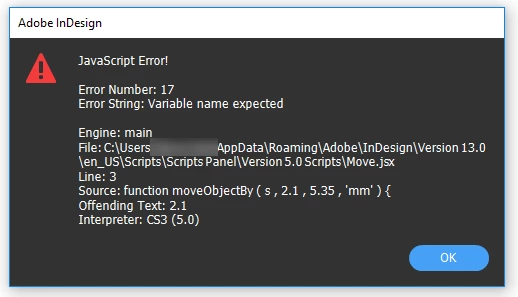
I want to be able to move an object by set X & Y amounts, e.g. 2.1mm down and 5.35mm sideways. I found a script here that claims to do that. It's for CS3 so I put it in a folder called Version 5.0 Scripts. The error it returns is this:
//
var s = app.selection[0]
function moveObjectBy ( s , 2.1 , 5.35 , 'mm' ) {
//-------------------------------------------------------------------------
//-- M O V E O B J E C T B Y
//-------------------------------------------------------------------------
//-- Generic: Yes for Adobe InDesign CS3
//-------------------------------------------------------------------------
//-- Purpse: To move the passed object down and to the right by the
//-- specified amount in the passed unit values.
//-- The significant thing here is that you do not need to worry about
//-- the current measurment system in use on the Adobe InDesign page.
//-- Another benifit of this routine is that some special objects
//-- can be constructed via plug-ins which prevent them from having
//-- thier bounds manipulated. Ads on MediaSpan jazbox pages are
//-- one of these types of objects.
//-------------------------------------------------------------------------
//-- Parameters: 4
//-- o: The Adobe InDesign object to move. There are many things
//-- that can be moved. Any page item ( text frame, graphic
//-- frame, unassigned frames, graphic line, group, etc. If
//-- it can be modified using controls in the Object menu in
//-- Adobe InDesign, likely it can me moved by this function.
//-- down: The amount to move the object down. If you want to move
//-- the object up, then use a negative value.
//-- right: The amount to move the object to the right. Again, use
//-- a negative value to move the item to the left.
//-- unit: A string. Can be any of a large number of choices.
//-- For example: 'pica', 'point', 'mm', 'centimeter', 'inches'
//-- or 'pc', 'pt', 'millimeters', 'cm', 'i'
//-------------------------------------------------------------------------
//-- Returns: True if successful. False if something prevented the item
//-- from moving. For example, locked objects cannot be moved.
//-------------------------------------------------------------------------
//-- Sample Use:
//~ var s = app.selection[0]
//~ moveObjectBy ( s , 0 , 2.54 , 'cm' ) // right 1 inch
//~ moveObjectBy ( s , 3 , undefined , 'picas' ) // down a half
//~ moveObjectBy ( s , 0 , -1 , 'in' ) // back to the left 1 inch
//~ moveObjectBy ( s , -36 ) // return to the starting place
//-------------------------------------------------------------------------
//-- Written: 2009.07.17 from scratch during flight US377 from EWR to CLT
//-- Written by: Jon S. Winters of electronic publishing support
//-- eps@electronicpublishingsupport.com
//-------------------------------------------------------------------------
//-- Verify there are good numberic values for down and right or set to 0
if ( isNaN ( down ) ) { down = 0 } ;
if ( isNaN ( right ) ) { right = 0 } ;
//-- Assume points (my favorite for scripts) if the unit isn't passed.
if ( unit == undefined ) { var unit = 'points' ; }
//-- Make sure that we passed a lowercase value.
unit = String ( unit ).toLowerCase() ;
try {
//-- Convert to ExtendScript unit values. This is unique to
//-- ExtendScript and is not part of JavaScript or ECMAScript.
//-- Note, there appears to be a bug in how this works. Picas
//-- converts to 'pc' and move won't take that, so back to
//-- picas the string will be converted.
var downUnitsToMove = String ( new UnitValue ( down , unit ) ).replace ( 'pc', 'picas') ;
var rightUnitsToMove = String ( new UnitValue ( right , unit ) ).replace ( 'pc', 'picas') ;
//-- Most objects support a .move method. Try it then return true.
o.move( undefined , [ rightUnitsToMove , downUnitsToMove ] ) ;
return true ;
}
catch (err) {
//-- if any of the conversions to unit values failed or if
//-- the passed object cannot be moved this way, then
//-- return an error.
return false ;
}
}
//
Message was edited by: Steve to remove user info
 AdChoices