SEASCAPE
Known Participant
January 21, 2018
Answered

TOC does not display anything except title of the TOC

  • January 21, 2018
  • 5 replies
  • 4696 views

This is the most frustrating problem!  Have spent almost 2 days on this.  I've created 4 documents:

1. A Fonts Doc (FD) where I created ALL fonts in this project.  The other 3 Docs imported their paragraph styles from this Fonts doc.

2.  A one page doc (D1) which contains entries from 3 paragraph styles, P1,P2,P3

3. A one page dco (D2) which cantains entries from e different paragraph styles, P4,P5,P6

4. A table of contents page (TOC).

Remember--D1,D2, and TOC had their font sets imported from FD.

I created a TOC for the TOC page.

The TOC included all 6 paragraph styles and a TOC PageTitle Style.

I did check "Include Book Documents".

I also saved each document and the book (I created a book BK from TOC, D1, and D2).

I synced the book.

I always "Update the Toc.

NOTHING displays in the TOC except the Title of the TOC page.

Here's a link to a screen capture showing most of the settings.

Any help greatly appreciated!

Bty, Chrome, Windows 10 Pro
This topic has been closed for replies.
Correct answer Barb Binder

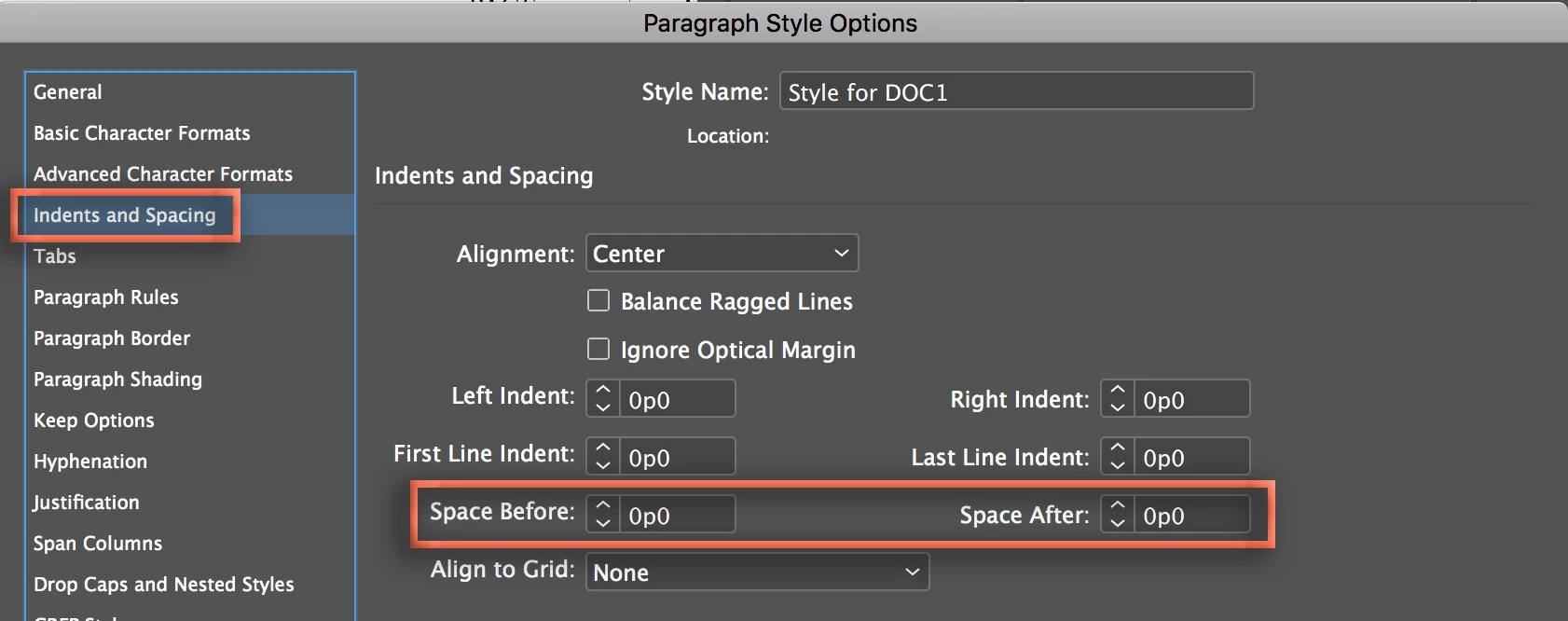
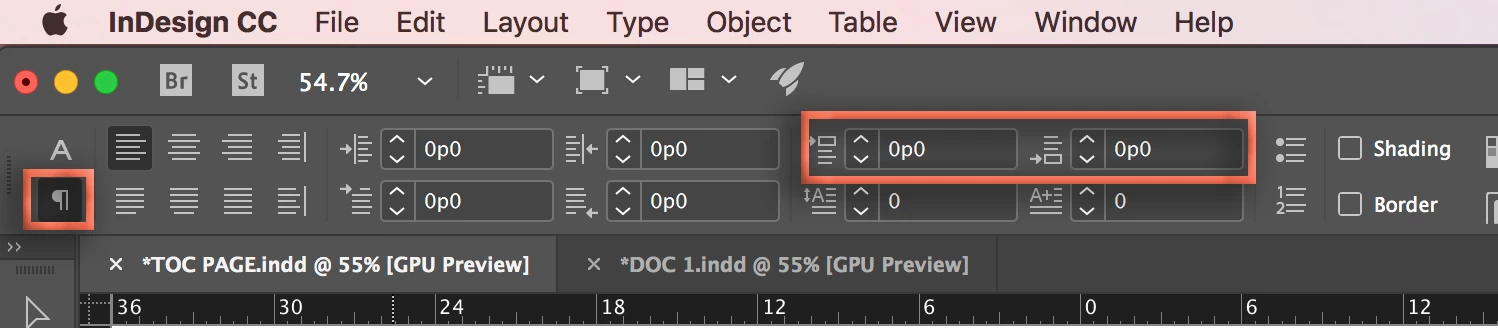
You need to add vertical spacing values before and/or after to your paragraph styles.

~Barb


You can define Space before and after on the Control panel:

Or in Paragraph Style Options:

Leading is the spacing between lines of text. For more details on spacing controls, see Apply leading in InDesign​ and Format paragraphs in Adobe InDesign.

~Barab

5 replies

Barb Binder
Community Expert
January 21, 2018

Those are all chapter titles, right? In both documents? And will they look the same in all six instances in the document files, and the same in all six instances in the TOC?

In that case, all you need is one tag called something like "Chapter Title". InDesign will collect the text using that tag in chronological order.

~Barb

~Barb at Rocky Mountain Training
Anna Lander
Inspiring
January 21, 2018

Hi, I have a (maybe) strange question. Do the paragraph styles contain Start Paragraph = New <Frame, Page etc.>?
Did you think to create the new (text) styles for your TOC entry?

SEASCAPE
SEASCAPEAuthor
Known Participant
January 21, 2018

I selected [Same Style] for Entry Style on each one.  I'm not sure if that's what you are asking!

Anna Lander
Inspiring
January 21, 2018

Well, I don't see the files and maybe guess too complex figure, but when you use in TOC the same styles as in titles, some advanced settings might provide such issues. For example, Size, Spacing, Start Paragraph etc. So it could be better to create one style for titles and another style for TOC entries.

But if your Title stiles don't have any advanced settings, it's not so needed.

Barb Binder
Community Expert
January 21, 2018

I know you said you did all this, but here's what I'd be looking for:

  1. Does your book .indb file list TOC, D1, D2? Is it saved?
  2. In the TOC InDesign .indd file:
    1. After you select Layout > Create Table of Contents do the paragraphs P1, P2, P3, P4, P5, P6 appear in the list under the heading Include Paragraph Styles? Do any variations of those names still appear in the left column under the heading Other Styles? A common issue is using different folders for the paragraph tags in different files.
    2. Is Include Book Documents checked, and does the correct book name appear to the right of that command in parentheses?
    3. Is Replace Table of Contents checked?

~Barb

~Barb at Rocky Mountain Training
SEASCAPE
SEASCAPEAuthor
Known Participant
January 21, 2018

Yes to all your questions, Barb.  I've been very careful to update the toc, save the bookfile, sync the book file, etc.  I'm very obsessive about that.  I'm sorry about the screen capture:  here's a corrcet link:  Capture — imgbb.com

Please note that what I've referred to as P1, P2, P3, etc in my example are actually C1, C2, C3, etc in the screen shot of the real book.

As you can see, in "Other Styles", all of the styles have been move to the "Include Paragraph Styles" window. 

I'm here for the rest of the afternoon so please let me know if there is any other info you need.  Thank you!

Barb Binder
Community Expert
January 21, 2018

Are you comfortable packaging the book and putting it on dropbox so that I can take a look? You can put the link here (public or message me (private).

~Barb

~Barb at Rocky Mountain Training
Derek Cross
Community Expert
January 21, 2018

To post a screen shot use the "Insert Image" facility.

Barb Binder
Community Expert
January 21, 2018

Hi Seascape:

The screen shot would be great, but it didn't show up. Use this button to add it to your reponse:

~Barb

~Barb at Rocky Mountain Training