


Participating Frequently
November 4, 2016
Question

ToC Not Ordering all Text Objects Correctly

  • November 4, 2016
  • 1 reply
  • 10864 views

I’m working on a document in InDesign and I’m trying to create a table of contents. I’ve created paragraphs styles for Headings and Subheadings and applied them accordingly in the document. I’ve also created paragraph styles that dictate how the ToC itself should appear, and used them when creating the ToC.  However, when I create the ToC  it doesn’t pull some the page headings properly.
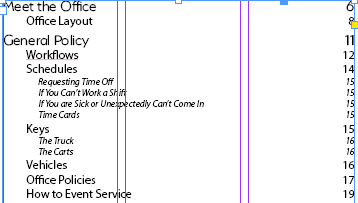
Capture.PNG

Here is a snapshot of my document.

As you can see, the ToC has the order of (Workflows → Schedules → Keys → Vehicles)

when the document itself is ordered (Workflows → Keys → Schedules → Vehicles).

What’s more, if I change the order of the headings in the document the ToC won’t reflect it even if I update it or create a new ToC all together. Additionally, it was working properly in earlier versions of my document but then stopped working. I contacted Adobe Chat support and they couldn't help me. They said it might be something to do with linking, but when I asked for more detail they couldn't explain it and suggested I post on a forum. How can this be fixed?

Many Thanks

This topic has been closed for replies.

1 reply

Peter Spier
Brainiac
November 4, 2016

Without seeing even a screen shot of the file it's hard to say, but the most common reason for out-of-order TOC entries is the text frames are arranged badly. ID starts in the upper left, then moves down the page looking for things to include before moving to the right and starting at the top again, so a frame low on the page, but further to the left, gets picked up before a frame higher on the page, but further to the right.

Participating Frequently
November 4, 2016

Hi Peter. Here are two screenshots of my document. The large black boxes are to cover sensitive information and are only for screenshot purposes.

New Participant
October 21, 2021

I know this is a little late however I had this problem today and found this post, so it was good to read through the replies. Thank you.

A little trick I discovered is within the "Layers" of the document, if you:

1. Reorder the text box layers to be in the heirarchy you require

2. Update your TOC

All is fixed! I hope this helps any future enquiries as it is quite simple and requires not physical movement of any items on your page. 🙂