monikab27492253
Participating Frequently
September 25, 2020
Answered

TOC - some headings are repeated again at the end of TOC

  • September 25, 2020
  • 7 replies
  • 2584 views

Recently I encountered a problem when updating TOC:
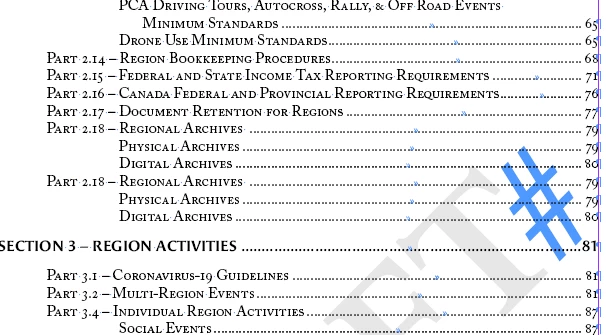
I get the message "Do you want the table of contents to include items in overset text?" and the thing is I do not see anything as overset text - anyway, when I click 'yes', then I get all headings in TOC and even too much (too many headings)... (EXAMPLE: the last 'main' heading is "9", but then I get all headings starting with "5.2" repeated again in TOC).
If I choose "no" ("Do you want table...?") - then, TOC looks fine; however, the problem exists and I would like to find the root cause.

I would be grateful for any ideas... maybe someone had a similar problem?
Correct answer 76Porsche

I am having this exact same issue. If I tell it not to include the items in "overset text," it does not duplicate, so I guess that is the workaround at this point. Seems like a bug. I may try rebuilding the file when I have time to see if it is just a buggy file.


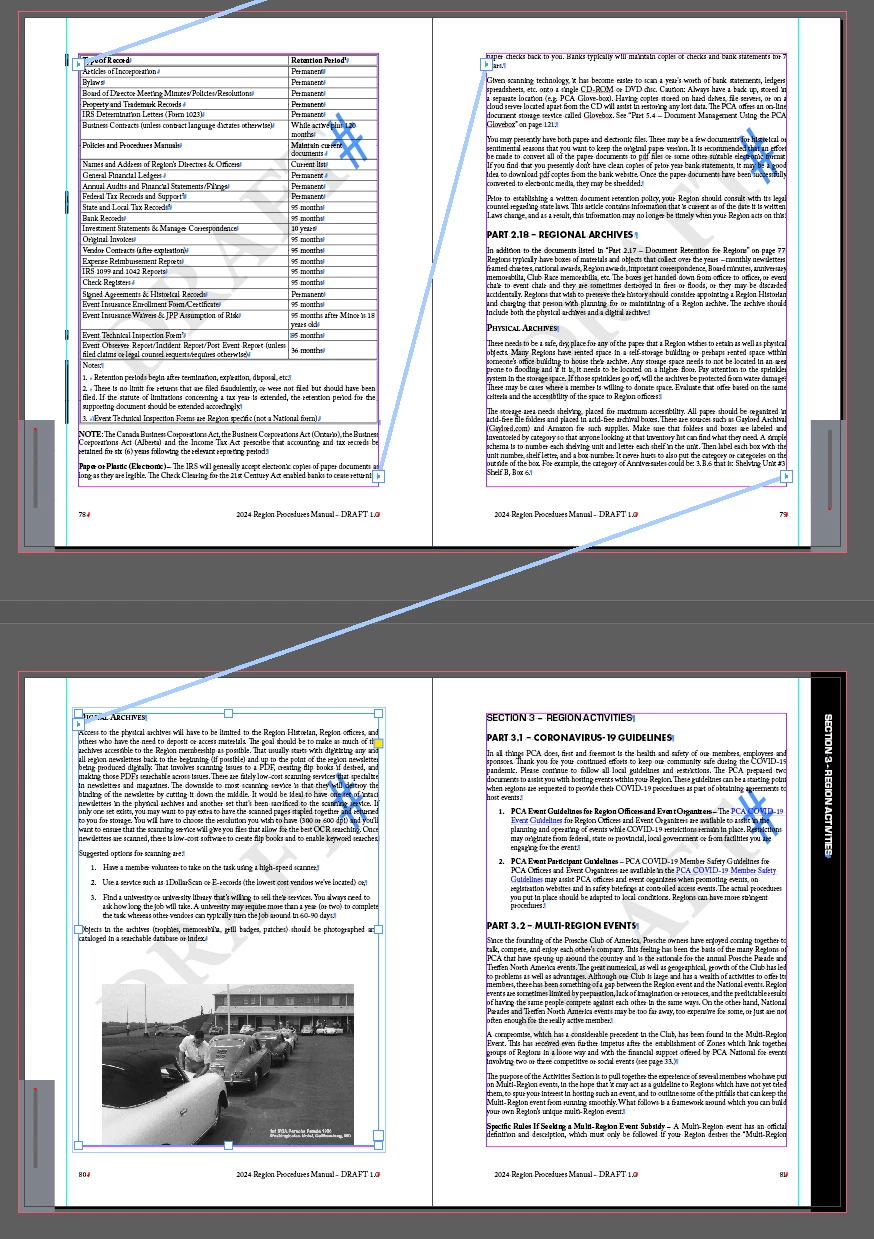
I have a similar issue. At the end of a story the last two TOC entries repeat twice when I get the overset warning. However, when the last paragraph ends before the text flows into the last frame of the story, I don't get the error. The text is not overset as I can see the hash mark at the end of the story.


I tried deleting the last frame in the story (now the text IS overset). I get the warning when rebuilding the TOC, but the TOC doesn't repeat the last two entries. Here is what my layout looks like:


7 replies

hammer0909
Community Expert
Community Expert
December 6, 2023

Honestly it sounds like somewhere in your document you have overset text that you're not seeing but it contains styles that the TOC is recognizing and is generating TOC entries for your content. Look in your preflight panel to see if you have any overset text errors. It will show you where the overset text is so you can remove it. This often happens when you're copying and pasting content and you forget that you pasted conent that you're not visually seeing.

Participant
December 7, 2023

Chad, The pre-flight form is clear (this has been stated multiple time by many other users). The strange part is that when the frame on the last part of the story is removed (resulting in actual overset text), the table of contents error goes away.

  • Thinking maybe something about the "page" itself was the issue, I deleted the frame and page, then created a new page and flowed the overset text into it. The error came back.
  • I also inspected each spread in the story with the Layers panel. I found a few layers that didn't seem to have any content and deleted them. Still get the error.
  • If I select the No option when updating the TOC, the two extra sections do not get listed.
  • I cut the offending text out of the document and pasted it into Notepad (PC) to strip any formatting. Cut the text from Notepad and pasted back into ID. Updated the TOC, I get the warning about overset text and selected Yes to include overset text, but there are no repeated heading in the TOC. I did not format the text I pasted.
  • After re-applying the heading formats, the duplicate heading for the last two heading reappeared!

Unfortunately, the story I am having issues with is one of the longer ones in the document. I will try deleting each page of text, then the associated frame until I locate the offending item. The weird part is that when I started working on this document a few days ago the TOC compiled just fine.


Participant
February 8, 2022

I have the same problem. My TOC repeat headings at the end of TOC, I don't have overset text, but TOC is asking if I want to show overset text..is that a bug from Indesign? Is there a solution? Thank you.

cbdunn70
Inspiring
February 8, 2022

We might need a new thread on this. I see this is marked "correct answer" above, but it is clearly still an issue. That answer also does not seem to solve anything. I have not received any reply or response to my post from Sept. 2021 above. ~ CD

Participant
March 31, 2022

I am having this exact same issue. If I tell it not to include the items in "overset text," it does not duplicate, so I guess that is the workaround at this point. Seems like a bug. I may try rebuilding the file when I have time to see if it is just a buggy file.


vladan saveljic
Inspiring
September 29, 2020

regarding the page numbers in your TOC, are they also correct where the headings repeat themselves?

Could you replace your text with placeholder text at least up to the first heading that repeats and share the file with us?

Could you try to save your file as idml and then open it and save as a new indd file?


monikab27492253
Participating Frequently
September 29, 2020

yes, page numbering is correct (for those repeating headings)

Ok, I will prepare the file with placeholder text ASAP

vladan saveljic
Inspiring
September 29, 2020

I edited my post a minute ago and you may not have seen it.
I was wondering if you can save your file as idml

hammer0909
Community Expert
Community Expert
September 28, 2020

The TOC typically doesn't lie. So there must be some text that is overset that is formatted using styles that the TOC feature is grabbing. Double check the style that is applied to that text. Sometimes it may not look like the text that the TOC is grabbing but is actually formatted using an overridden style. Also, depending on how your book is organized, sometimes you may need to create another style called "Heading No TOC" or something to that effect to prevent the TOC from pulling in that text that you don't want included in the TOC.

monikab27492253
Participating Frequently
September 29, 2020

I already have styles for headings included in TOC (and styles for "fake" headings not included in TOC); however, the issue is that headings are repeated in order (indefinitely) and there is no overset text in the document.


My problem looks more or less like that: 

1 - Heading 1

1.1 - Subheading 1

1.2 - Subheading 2

1.3 - Subheading 3

2 - Heading 2

2.1 ..

2.2..

2.3..

3 - Heading 3

3.1 ..

3.2...

4 - Heading 4 (the last chapter in the document)

1.3 - Subheading 3

2 - Heading 2

2.1 ..

2.2..

2.3..

3 - Heading 3

3.1 ..

3.2...

4 - Heading 4

1.3 - Subheading 3

2 - Heading 2

2.1 ..

2.2..

2.3..

3 - Heading 3

3.1 ..

3.2...

4 - Heading 4

(...) and it's repeated over and over again..


As you can see from the example given above, headings are repeated and TOC takes headings from "1.3 and repeats the rest over and over again".


Community Expert
September 28, 2020

It's clear enough that the overset text contains these things. 

You can find overset text using the Preflight Panel https://indesignsecrets.com/how-to-find-overset-text-in-indesign-fast.php


monikab27492253
Participating Frequently
September 29, 2020

Yeah, unfortunately that's not the case... there is no overset text (Preflight shows no errors)

I was also looking at 'story editor' and nothing unusual over there.

vladan saveljic
Inspiring
September 28, 2020

Could you share your InDesign file with us?

monikab27492253
Participating Frequently
September 28, 2020

I'm sorry but this is a corporate document and I cannot share that file now. 

I can tell you that I've been trying many things - removing/adding new text frames & deleting/inserting new pages, pasting content in a new document without formatting ..

whenever I have at least one "Overset text" ERROR in the file, then the TOC is working.. if I don't have any errors in the document, then TOC looks weird (heading from certain point repeated over and over again in TOC).


monikab27492253
Participating Frequently
September 28, 2020

One extra thing.. I noticed that if the last frame in the document is "with overset text", then TOC works fine. However, if I fix the 'overset text' by adding a frame to fit the text, then the problem described above occurs.

I tried cleaning formatting, removing the last paragraph, but nothing seems to work...

Participant
December 7, 2023

I see the same thing! See my comments.