manuelb27477138
Inspiring
November 6, 2020
Answered

Translate Index References with Array

  • November 6, 2020
  • 1 reply
  • 309 views

Hello,

I have this script to translate the Index Reference from English to another languages, but the script stop before finish to translate all words, specialy in large books.

I need clic on Run de Script several times, in order to translate all index entries. 


Please, do you know why the script stopped continuosly?


The script:


var myTerms = [
    
    ['text','translation'],
    ['text text\(s\)','translation translation\(s\)'],
    ['text\’s','translation\’s'],
    ['text\, text','translation\, translation'],
    ['text\-text','translation\-translation'],
    ['text ö','translation ö'],
    ['text \& text','translation \& translation']

];
var doc = app.activeDocument;
for (var i=0; i<doc.indexes.length; i++) {  
        renameTopics(doc.indexes[i]);  
    } // for  
alert("Done!\n Sometimes with a large translations, is recomend run the script more than 3 times to be sure all words are translated.");
function renameTopics(myIndex)
{
var j;   
   for (var idx = 0; idx < myIndex.topics.length; idx++) {
    if( myTest(myIndex.topics[idx]) ) { renameTopics(myIndex.topics[idx]); }
       
       j=translateIt(myIndex.topics[idx].name+"", myTerms);
       if(j != null)
       {
           myIndex.topics[idx].name = j;
       }
   } //for    
}// fnc

function translateIt(myStr, myArr)
{
    for(k=0; k< myArr.length; k++)
    {
        if(myStr == myArr[k][0]) return myArr[k][1];
    }
return null;
}

function myTest(myNextLevel)
{
     var result;
     try {var myLen = myNextLevel.topics.length;
       result = true;
      } //try
        catch (er) {result = false}    
    return result;
}


I attach an InDesign document if you want to test. See here in action:
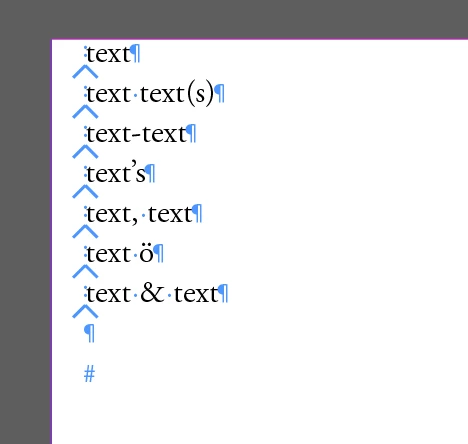


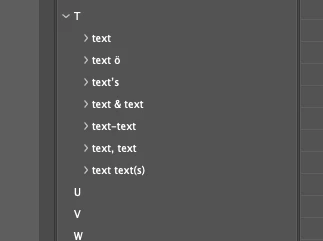
Like you can see don't translate all index entries:
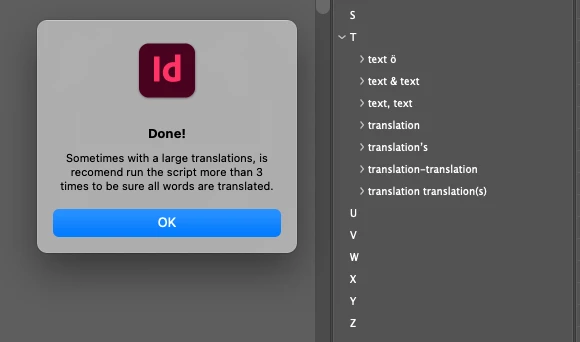
 

Thanks so much in advance!


This topic has been closed for replies.
Correct answer Manan Joshi

The issue was that as soon as you were renaming the topic it was being sorted and hence its index in the collection was changed. So we were getting into a condition where we were missing entries in the loop as an already translated topic moved down in the collection after translation. Try the following modification of the method, here I am working on the state of the topic collection before the translation, so changes in the index(as described above) does not affect the outcome.

function renameTopics(myIndex)
{
	var j;
	var tp = myIndex.topics.everyItem().getElements()
	for (var idx = 0; idx < tp.length; idx++) {
		if( myTest(tp[idx]) ) {
			renameTopics(tp[idx]); 
		}
       
	   j=translateIt(tp[idx].name+"", myTerms);
	   if(j != null)
	   {
		   tp[idx].name = j;
	   }
   } //for    
}

-Manan


1 reply

Manan JoshiCommunity ExpertCorrect answer
Community Expert
November 7, 2020

The issue was that as soon as you were renaming the topic it was being sorted and hence its index in the collection was changed. So we were getting into a condition where we were missing entries in the loop as an already translated topic moved down in the collection after translation. Try the following modification of the method, here I am working on the state of the topic collection before the translation, so changes in the index(as described above) does not affect the outcome.

function renameTopics(myIndex)
{
	var j;
	var tp = myIndex.topics.everyItem().getElements()
	for (var idx = 0; idx < tp.length; idx++) {
		if( myTest(tp[idx]) ) {
			renameTopics(tp[idx]); 
		}
       
	   j=translateIt(tp[idx].name+"", myTerms);
	   if(j != null)
	   {
		   tp[idx].name = j;
	   }
   } //for    
}

-Manan


-Manan
manuelb27477138
Inspiring
November 7, 2020

Amazing!

I test in a large books close to 2000 entries, and works pretty nice.


Manan, you're very kind.

Thank you.