



Tricky question: Define "Variable Page Number" to insert in the text
I appologize if this has already received plenty of coverage but I'm trying to do something which would seem trivial but is not working for me? You see, I'm updating my classroom notes in a multi-page InDesignm document. On page 12, I have a small section dedicated to "Bézier Curves". On page 35, I would like to insert a "Reference" to this "Bézier Curves" section such that the ideal text would read as the following:
> See Page 12
But I am trying to avoid "hard-coding" the number 12 in the text because, some day, I will likely add or delete pages BEFORE page 35 and then, the reference to the Bézier section will be meaningless. You see what I'm trying to do?
The best I was able to do what to "Define" a new Text variable based on "Chapter Number" (suggested by ChatGPT) by navigating to Page 12, accessing the Numbering & section options in the Page menu, check the "Start chapter numbering" option and type "12" as shown in the following screen capture:
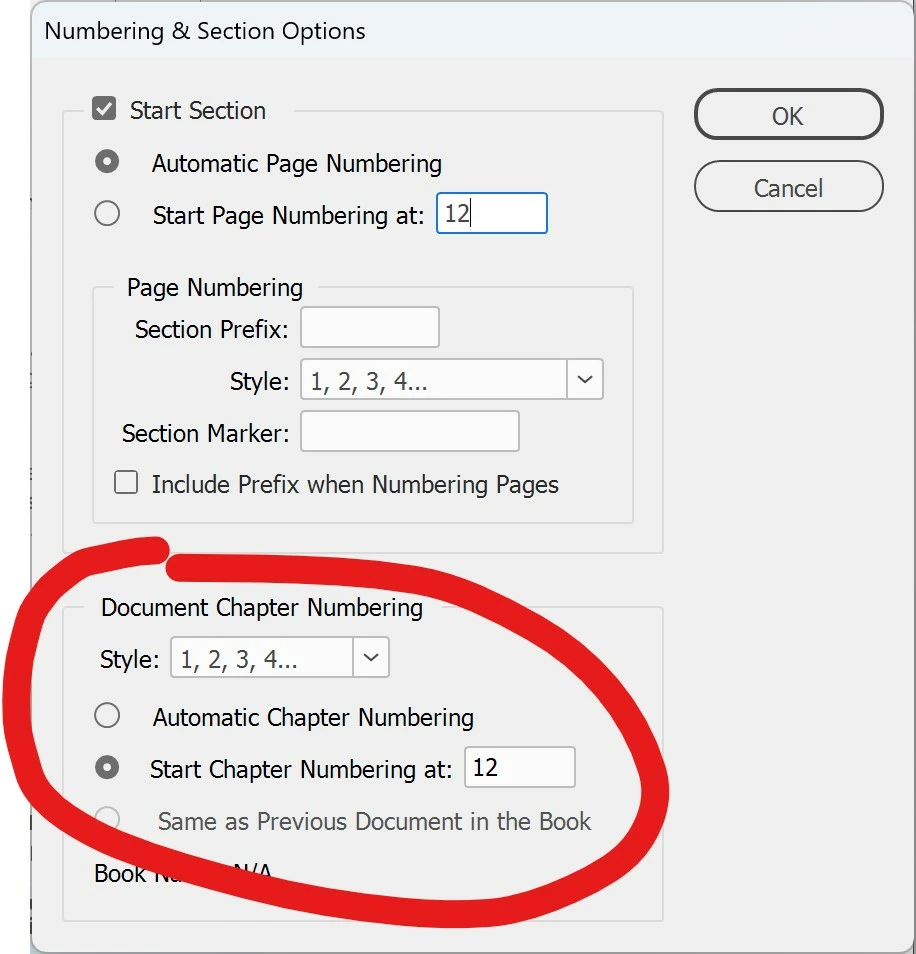
Then, in the text on page 35, I can place the cursor after the word "Page" and then, using a right click, activate the Insert variable > Chapter number option and up comes the magic number 12 as soon as I release the mouse.
But that's a "hack", I find? Is there a "proper" way to do this?
 AdChoices