Dim FigCapElm As InDesign.XMLElement = figureElement.XMLElements(2)
Dim splitFigCap() As String = FigCapElm.Contents.ToString.Split(vbTab)
Dim FigName As String = ""
If splitFigCap.Length > 1 Then
If splitFigCap(0).ToString.ToLower.Contains("figure") Then
FigName = splitFigCap(0).Replace(vbCr, "").Replace("&", "").Trim
FigName = Regex.Replace(FigName, Chr(9), "")
FigName = Regex.Replace(FigName, ChrW(9), "")
FigName = FigName.Replace(vbTab, "")
FigName = FigName.Replace(Chr(9), "")
FigName = Regex.Replace(FigName, "\t", "")
FigName = FigName.Replace("\u0009", "")
FigName = Regex.Replace(FigName, "\^I", "")
FigName = Regex.Replace(FigName, "^", "")
FigName = FigName.Replace(" "c, "")
FigName = Regex.Replace(FigName, "\s+", "")
End If
End If
in the attached image figureElement.XMLElements(2) is (Figure 6.1 Schematic of an oxy-fuel combustion process. Oxygen is produced ). I have to read the Fignumber and matches the text within the frame or not. it is in (A simple block diagram representing the main components of oxy-combustion can be observed in Figure 6.1.). When I manually remove the ^I in find it finds the text. But i have to do this via code.
Hope u clear my issue. Kindly do the needful.
@Aysha27550661f9sm
From this:
Dim FigCapElm As InDesign.XMLElement = figureElement.XMLElements(2)
I can see that you have a reference to the whole XML and figureElement is just a reference to some "branch", right?
As per your screenshot - (Figure 6.1 Schematic of an oxy-fuel combustion process. Oxygen is produced ) - is an XMLElement - that is build from TWO sub XMLElements:

If you go to your text, put cursor before the "Figure" word, then keep pressing right arrow and pressing space:
>,space,>,space,>,space,>...
you will see that those XML markers start separatting - right now, you have at least TWO XML markers on top of each other:
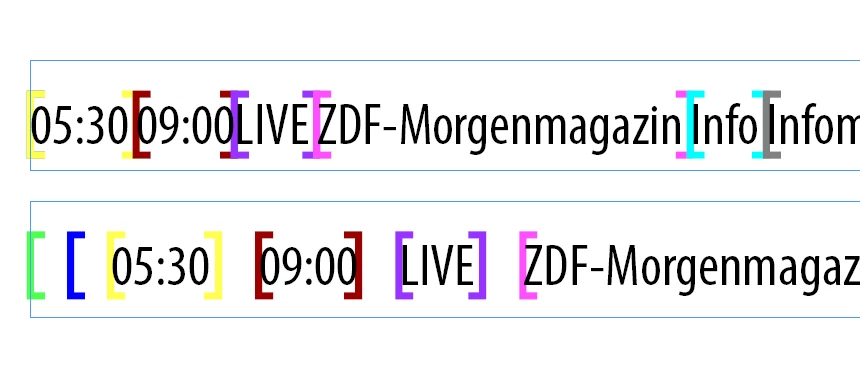
So, instead of trying to split "dirty" text contents of the figureElement - just get a reference to its 1st Child - the same way as you are getting FigCapElm - 2nd element of the figureElement - I don't code in VB.net so just guessing:
Dim RealFigureElement As String = FigCapElm.XMLElements(1).Contents.ToString



 AdChoices