Participant
July 5, 2021
Answered

Type 1 Font -- How do I tell which fonts are Type 1??

  • July 5, 2021
  • 3 replies
  • 16587 views

Hi,


How can I tell if a font on my Mac -- or in my InDesign document is Type 1 font?

Can you advise what type fonts I need to use?


For classroom lessons, I use special fonts such as "Rad" (skateboarders form letter for words) and Toolbox (tools form letters for words).  Are these Type 1 fonts?  My students enjoy these speciality fonts - - I hope they continue into the future.


Thanks,

JoAnn
This topic has been closed for replies.
Correct answer Barb Binder

Hi @JoAnn H:


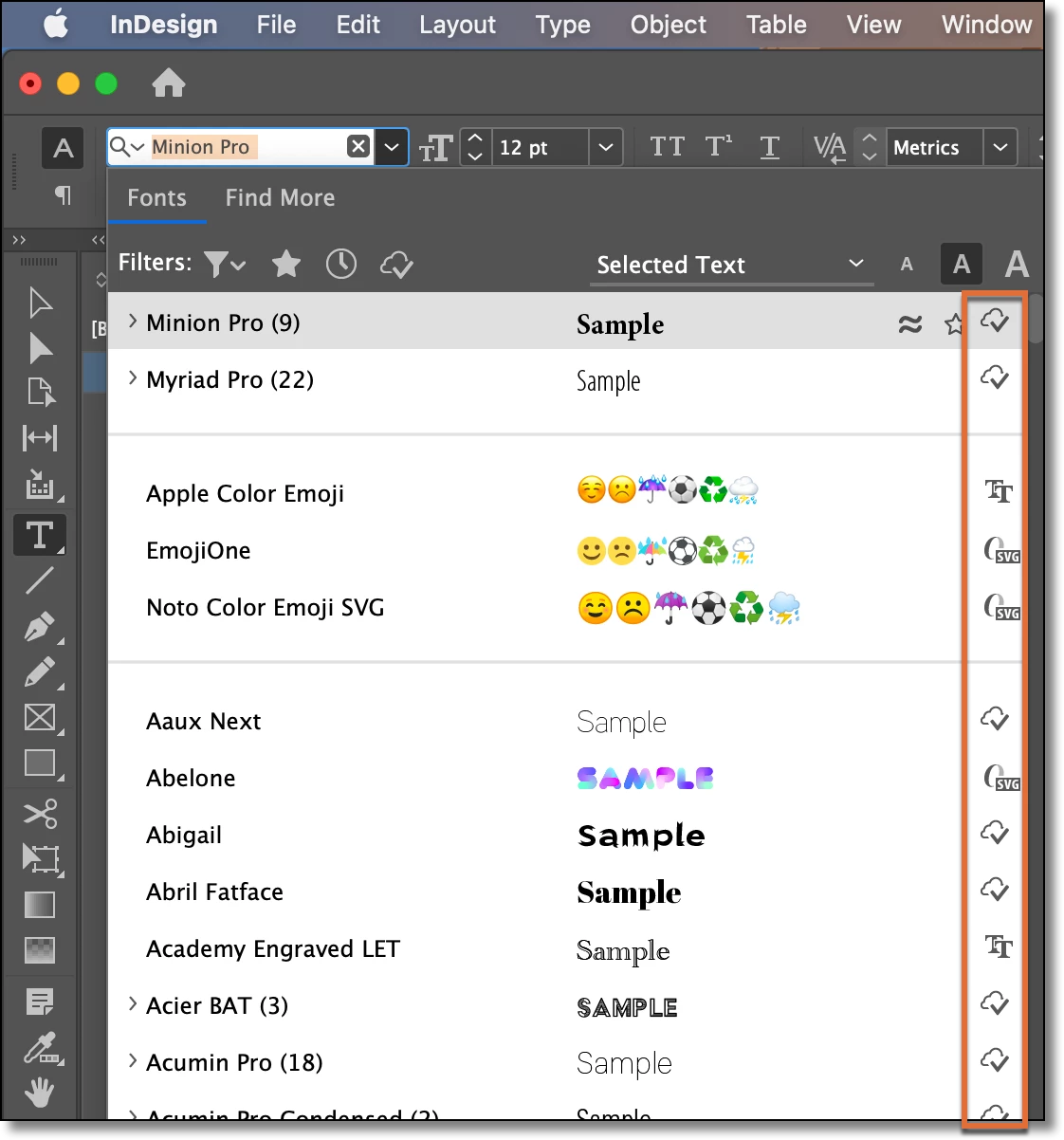
You can see the type of fonts you have installed by examining the right column in the fonts list. All of the Adobe fonts that come with your CC subscription (cloud icon or O) are OpenType fonts. TT designates TrueType. You will see a T1 by the Type 1 fonts. I don't have any installed at this point so I can't show you one in my list. Specialty fonts come in all varieties. For classroom lessons they can use whatever they like. For professional print jobs I'd encourage the use of OpenType fonts. 


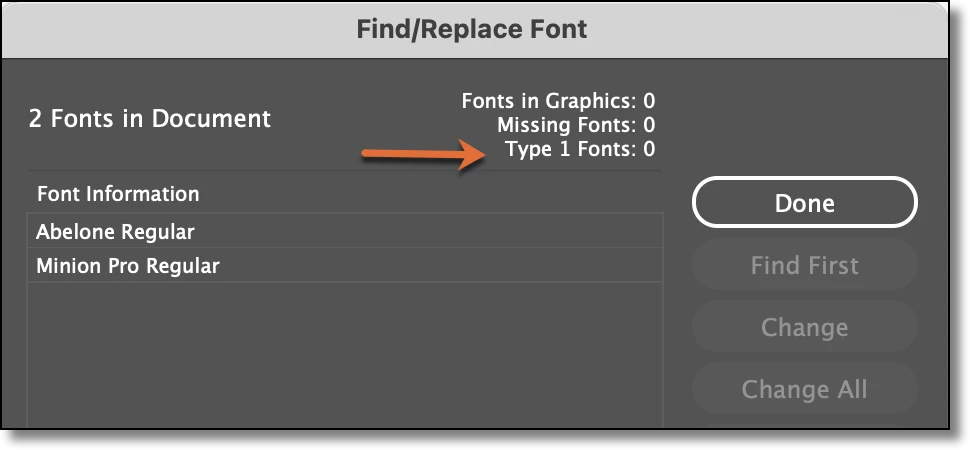
You can check an existing document for Type 1 fonts by opening Type > Find/Replace Fonts. 

~Barb

3 replies

Community Expert
February 4, 2022

Hi together,

the update to InDesign 17.1.0.50 should fix the issue with false warnings of used Type-1-font styles.

I only tested with a small amount of documents that would have triggered false warnings when used with 17.0; as far as I can see and test for now, the issue of false warnings is gone.


Regards,
Uwe Laubender

( ACP )

Barb Binder
Community Expert
Barb BinderCommunity ExpertCorrect answer
Community Expert
July 5, 2021

Hi @JoAnn H:


You can see the type of fonts you have installed by examining the right column in the fonts list. All of the Adobe fonts that come with your CC subscription (cloud icon or O) are OpenType fonts. TT designates TrueType. You will see a T1 by the Type 1 fonts. I don't have any installed at this point so I can't show you one in my list. Specialty fonts come in all varieties. For classroom lessons they can use whatever they like. For professional print jobs I'd encourage the use of OpenType fonts. 


You can check an existing document for Type 1 fonts by opening Type > Find/Replace Fonts. 

~Barb

~Barb at Rocky Mountain Training
Jumpenjax
Community Expert
Community Expert
July 5, 2021

I totally agree with Barb. Her suggestions are the best solution.

Lee- Graphic Designer, Print Specialist, Photographer
Brad @ Roaring Mouse
Community Expert
Community Expert
July 5, 2021

Did you install these yourself? In which case, the file extension will likely be the first clue.

TrueType : (extension .ttf or .ttc) or OpenType (extension .otf). Either of these are just fine for use

Type 1 fonts were originally two-part files on the Mac which have been been slowly disappearing since OS X came out, and as you are probably finding out, support for them is ending soon.


Without knowing the file extension, to check what you have:

1) At a System level, if you are not using a font manager, go to Font Book, select the font you want in the list, and look at info (Command-I), The "Kind" will be a few items down in the list.


2) You can also just check in InDesign. If you are using the font in a document, go to the menu Type > Find Font, and a list of all the fonts in the document will show. Current InDesign versions will alert you right away that a font is a Type 1 (see attached : note the "a" with an alert sign beside it). Regardless, if you select the font in the list, in the Info section below (Click "More Info" if it isn't currently visible), the font Type is usually the 4th line. If it just says "Type 1", there ya go!

Note: Opentype fonts may say either "Opentype Type 1" or "Opentype TrueType" depending on its internal format... the former is not the same as a "Type 1".


Participant
May 6, 2022

Thank you for this explanation. I am getting an error that says my document has 43 type 1 fonts in it. We use only two fonts in our magazine. So gulp! When using your above method, it says "Open Type Type1" and has an extension of .otf. I am assuming these are fine, but why am I getting this scary error? Thanks!

BobLevine
Community Expert
Community Expert
May 6, 2022
Have you updated InDesign to 17.2.1?