
Legend
April 7, 2023
Question

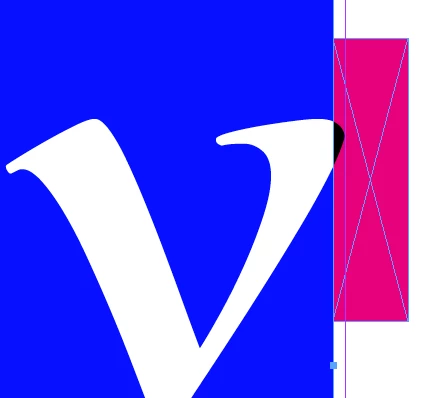
Type popping out of text frame

  • April 7, 2023
  • 4 replies
  • 9861 views

#InDesign #typography Some times type pops out of the text frame, what is this called? Is there a way to detect or automatically fix it. Does it matter?


I have looked at the app.selection[0].lines[0].endHorizontalOffset, which seems to be clipped to the text frame.


It was suggested that I look at the optical settings, but these did not change the appearance.


If I export the frame the type is clipped.


Is this a bug?


*I have a motive this question, I have a plugin that can detect this effect. But, I would prefer a script.
 

This topic has been closed for replies.

4 replies

Inspiring
August 9, 2024

I can tell you that whether this is a bug or not, it's a MAJOR PAIN. Recently, Amazon KPD has apparently made their gutter restrictions more stringent, or updated their software to catch little things like this, and it has totally ruined my carefully planned layout. It's a 500+ page book with graphics and illustrations, very tedious with everything having a very specific place. And the font is serifed and some of the serifs go into the gutter no matter what I do, and KDP then flags it when I upload my manuscript.


I don't care if some people want it like this, there should be an option to absolutely make it NOT like this if other people want that. Just make an absolute option to keep all characters inside the margins no matter what.


  • Changing the Margins is not an option, because it throws my entire layout off, causing everything to jump down, creating more pages, which will essentially force me to redo the entire layout.
  • Changing fonts is not an option for the same reasons.
  • Changing the Optical is not an option, because it might fix the serifs, but it forces the quotes to dangle instead, and then there's no way to fix that.


This file was perfectly laid out using the requirements I was given, and it took a week to get it done. Now, I have to redo the whole thing because of one little software quirk. I don't know whether KDP is being too sensitive or not, but Adobe InDesign should definitely have a fix for this.

—Michael
Inspiring
August 9, 2024

I should add that I've used this particular font very frequently. All my novels were uploaded to KDP using it, and the prior edition of this book that I'm working on now was done in this font, so something clearly changed at KDP.

—Michael
James Gifford—NitroPress
Legend
August 9, 2024

Things change perpetually at KDP.  Sometimes they even announce them. Other times, it just becomes part of the arcana of AI, bots, offshore support staff in ESL locations, and checklist/playbooks handed down from Jeff.

m1b
Community Expert
Community Expert
April 10, 2023

Hi @Pickory, I've put together a hacky script that shows (using blue rectangles) where each line of text protrudes from the selected text frame. I know this is probably not much use to you (because it doesn't fix anything), but because I've just written a very similar to a script I may as well share it. As I said, it's a quick hack—it literally duplicates the text frame and outlines it—so if you can use the SDK, then that would be much preferable.

- Mark


/*
 * Reveal protruding lines of text frame.
 * Known limitation: because it duplicates the text frame,
 * this will sometimes cause a reflow if a paragraph using
 * a multi-line composer spans multiple text frames.
 * @author m1b
 * @discussion https://community.adobe.com/t5/indesign-discussions/type-popping-out-of-text-frame/m-p/13711048
 */
function main() {

    var doc = app.activeDocument,
        textFrame = doc.selection[0];

    if (
        textFrame == undefined
        || !textFrame.isValid
        || textFrame.constructor.name !== 'TextFrame'
    ) {
        alert('Please select a text frame and try again.');
        return;
    }

    var results = getProtrudingCharacterBounds(textFrame, layer);

    if (!results) return;

    // put the rectangles on this layer
    var layerName = 'Protruding';
    var layer = doc.layers.itemByName(layerName)
    if (!layer.isValid)
        layer = doc.layers.add({ name: layerName, printable: false });
    doc.activeLayer = layer;

    for (var i = 0; i < results.length; i++) {

        // draw a rectangle just for showing the results
        var rect = textFrame.parentPage.rectangles.add({
            geometricBounds: results[i],
            fillColor: doc.swatches[4],
        });
        rect.transparencySettings.blendingSettings.opacity = 30;

    }

    alert('Found ' + results.length + ' protruding glyphs.');

};

app.doScript(main, ScriptLanguage.JAVASCRIPT, undefined, UndoModes.ENTIRE_SCRIPT, 'Mark Protruding Text');


/**
 * Returns bounds of the protruding
 * parts of lines of text frame.
 * @param {TextFrame} tf - an Indesign TextFrame.
 * @returns {Array<Array>} - array of [T, L, B, R] arrays.
 */
function getProtrudingCharacterBounds(tf) {

    app.scriptPreferences.measurementUnit = MeasurementUnits.POINTS;

    // get the outermost textframe
    while (tf.parent.constructor.name == 'Character')
        tf = tf.parent.parentTextFrames[0];

    var bounds = tf.geometricBounds;

    // duplicate text frame
    var dup = tf.duplicate();
    outlines = dup.createOutlines();

    // add outlines of anchored text frames
    while (outlines[outlines.length - 1].textFrames.length > 0)
        outlines.push(outlines[outlines.length - 1].textFrames[0].createOutlines()[0]);

    // find the protruding outlines
    var found = [];

    outlinesLoop:
    for (var i = 0; i < outlines.length; i++) {

        var polygons;
        if (outlines[i].constructor.name == 'Polygon')
            // we get a Polygon if there is only one character in text frame
            polygons = [outlines[i]];
        else if (outlines[i].hasOwnProperty('polygons'))
            // a Group with polygons
            polygons = outlines[i].polygons;
        else
            continue;

        for (var j = 0; j < polygons.length; j++) {
            var r = getProtrudingRect(bounds, polygons[j].visibleBounds, 3);
            if (r)
                found = found.concat(r);
        }

    }

    // delete all the outlines
    for (var i = outlines.length - 1; i >= 0; i--)
        outlines[i].remove();

    if (dup.isValid)
        // sometimes the duplicate is left behind
        // eg. when there is a table in the text frame
        dup.remove();

    if (found)
        return found;

};


/**
 * Returns the protruding part of a rectangle.
 * @param {Array<Number>} r1 - [T,L,B,R].
 * @param {Array<Number>} r2 - [T,L,B,R].
 * @param {Number} [offset] - the amount to expand resulting rectangle (default: 0).
 * @returns {Array<Number>} [T,L,B,R].
 */
function getProtrudingRect(r1, r2, offset) {

    offset = offset || 0;

    var results = [];

    var top1 = r1[0], top2 = r2[0],
        left1 = r1[1], left2 = r2[1],
        bottom1 = r1[2], bottom2 = r2[2],
        right1 = r1[3], right2 = r2[3];

    if (
        bottom1 <= top2 || top1 >= bottom2 || right1 <= left2 || left1 >= right2
        || (left2 >= left1 && right2 <= right1 && top2 >= top1 && bottom2 <= bottom1)
    ) {
        // No overlap between the rectangles, or second
        // rectangle is completely within the first.
        return;
    }

    // handle cases where protrudes from both sides
    if (top1 > top2 && bottom1 < bottom2) {
        results = results.concat(getProtrudingRect([top1, left1, bottom2, right1], r2, offset));
        results = results.concat(getProtrudingRect([top2, left1, bottom1, right1], r2, offset));
        return results;
    }

    if (left1 > left2 && right1 < right2) {
        results = results.concat(getProtrudingRect([top1, left1, bottom1, right2], r2, offset));
        results = results.concat(getProtrudingRect([top1, left2, bottom1, right1], r2, offset));
        return results;
    }

    // Define the outside rectangle.
    var outside = [top2, left2, bottom2, right2];

    // Check for overlap on each side and adjust the outside rectangle accordingly.
    if (left1 > left2) {
        outside[1] = left2;
        outside[3] = left1;
    }
    if (right1 < right2) {
        outside[1] = right1;
        outside[3] = right2;
    }
    if (top1 > top2) {
        outside[0] = top2;
        outside[2] = top1;
    }
    if (bottom1 < bottom2) {
        outside[0] = bottom1;
        outside[2] = bottom2;
    }

    // expand by offset (just for better
    // visibility of tiny protrusions)
    outside[0] -= offset;
    outside[1] -= offset;
    outside[2] += offset;
    outside[3] += offset;

    return [outside];

};


Edit 2023-04-11: now puts indicators on a new, non-printing layer, to keep them separate from artwork. @Eugene Tyson

PickoryAuthor
Legend
April 10, 2023

Mark, that is very clever.  Excellent work.


Good to see a pure scripting solution. 


P.


Community Expert
April 10, 2023

Yes it's good. 
Would like it to duplicate the frame to a new layer and put all the markers on that new layer.

It would be simple layer deletion to remove all the other pieces around it.

James Gifford—NitroPress
Legend
April 7, 2023

Rob's answer goes into plenty of detail, but let me add this: it doesn't usually matter that edges and points of type extend past text frame edges. Frames are invisible and can be put anywhere needed within a layout. No end user is ever going to see or know that type is outside the layout frames like this.


The type control Optical/Metrics and others can help align fonts that have glyphs that stray outside neat character boxes, if that's the issue. But such alignment is usually invisible at readable type sizes, and micro-adjusting large, display or art type is just a given.


Community Expert
April 8, 2023

I notice and have to notice.

There's plenty of industries were there is a strict text free zones - even 1 pixel outside the text area is detected using software. This is a non-starter and has to be fixed for everything and everywhere. 


Text free is text free. There are no half measures

I use the text inset like Rob has illustrated. 

But when the font goes from regular to italic it can push outside the frames again.

Other characters - non-latin - can go outside the areas without any warning.


It's quite disappointing, a text frame is a frame - and you'd expect it to be contained within a frame - but it doesn't. 


These pokey bits are frustrating.

PickoryAuthor
Legend
April 8, 2023
Rob Day, James Gifford, 
Thank you for the explainations and workarounds. I was hoping to find a script to detect and fix the pop outs.
 
Eugene Tyson, 
Currently I am only looking at text frames, are there any other page items that should be included?
 
P.
rob day
Community Expert
Community Expert
April 7, 2023

Hi @Pickory , The Story panel’s Optical Margin Alignment affects the amount of overhang, but even with it off there could be some:


The text fame can have an Inset Spacing of any amount set in textFramePreferences:


PNG Export: