



Roger Breton
Legend
October 22, 2022
Question

Unable to change Gradient tab stop in "Grayscale"

  • October 22, 2022
  • 2 replies
  • 582 views

I want to throw a grayscale radial gradient on my page.

I assign a "Gradient" fill to a rectangle.

I head over to the Gradient panel.

But I am unable to change the Gradient tab stop?

It goes from White to Black.

I want to "screen" Black down to, say, 70%, but it isn't possible?

Or am I missing something?

The only way I can change the "Black" is by change from the "named color" [Black] to "CMYK" Black (0c 0m 0y 100k). Here's a screen grab :
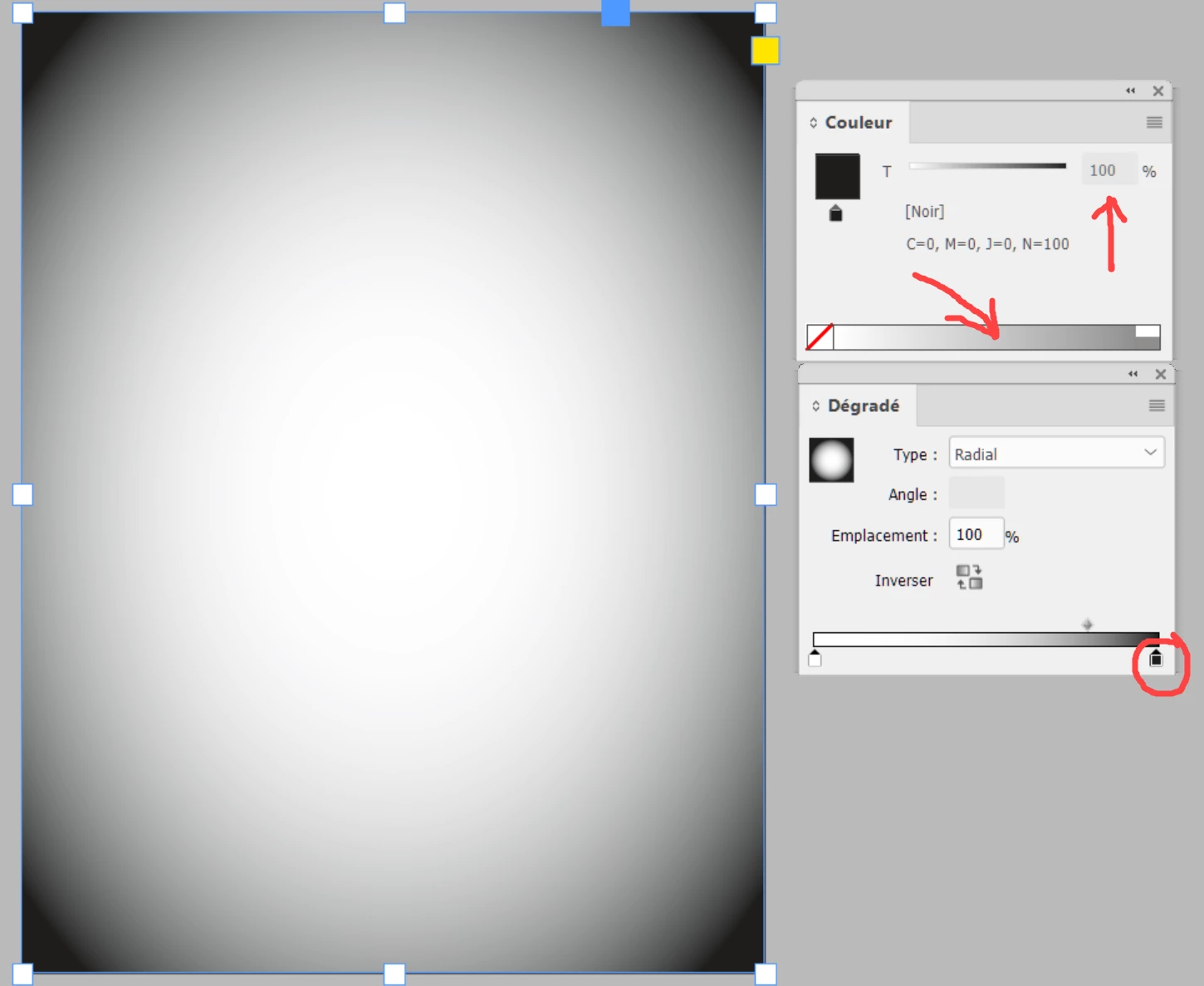
 I think I know why... The more I experiment with changing the tab stop color, the more the reasons of this "limitation" are growing on me : could it have to do with the color "[Black]" in the Swatches palette being a "locked" color? For some reason, it can't be screened on Gradient tab stops BUT it can be screened on ANY other kinds of objects? Maybe that's just the way it is...

This topic has been closed for replies.

2 replies

rob day
Community Expert
Community Expert
October 22, 2022

Hi @Roger Breton , InDesign doesn’t have a Grayscale space, so you have to use the Black CMYK channel. When you create your New Gradient Swatch, you should have the option to use Swatches or  CMYK colors for the stops:


Then selecting and editing the fill’s stops using the Gradient panel:


Roger Breton
Legend
October 22, 2022

Wow! Thank you Rob! The time you took to document your solution makes all the difference! You're right, unlike Illustrastor, InDesign does not have a "Grayscale" space BUT it still accepts placed grayscale images. So it "knows" how to deal with grayscale elements but I understand how there is no need for "grayscale space" options in fills or gradients 🙂

Roger Breton
Legend
October 22, 2022

Also, I can’t remember when they were introduced, maybe after you had the conversation, but the better approach is to use a matching Black Ink profile for grayscale editing in Photoshop:


https://community.adobe.com/t5/indesign-discussions/exporting-rgb-cmyk-and-grayscale-to-print-pdf/m-p/10990825#M179498


Rob, your points are all well taken. 

You wrote: If there was a Grayscale Space added you could have a 65% Gray fill and a 0|0|0|65 CMYK fill displaying differently.

You are absolutely correct assuming the Gray ICC profile would not be related to tyhe CMYK ICC profile. 

I agree. 


Steve Werner
Community Expert
Community Expert
October 22, 2022

If I'm understanding you, why don't you create your own Black swatch color:


Then you can drag the slider and/or add new color stops in your gradient:


Roger Breton
Legend
October 22, 2022

Right. Why not, Steve? But that still does not explain the "limitation" of the user being unable to screen [Black] on gradient tab stops? I suppose it may have something to "DeviceN" in which the engineers don't want to get involved with? I'm sure there's a good reason for this but it is far from intuitive for the average poor soul... 
Thank you for your kind reply 🙂

rob day
Community Expert
Community Expert
October 22, 2022

Also, if the Gradient Swatch Stops are setup using Swatches, you can change the Stop Color from a Swatch to CMYK in the Gradient panel via the Color panel’s flyout: