


Inspiring
July 7, 2020
Answered

Unable to delete table border lines InDesign

  • July 7, 2020
  • 6 replies
  • 20024 views

Hello, 

I'm trying to delete the side and bottom table border lines in InDesign (I do want to keept the top table border line). I changed the table border weight to zero and none. When I did that, the right table border line disapearred but the other lines are still there. Help please! Thanks in advance. 

Nadya
    This topic has been closed for replies.
    Correct answer Barb Binder

    Hi Nadya:


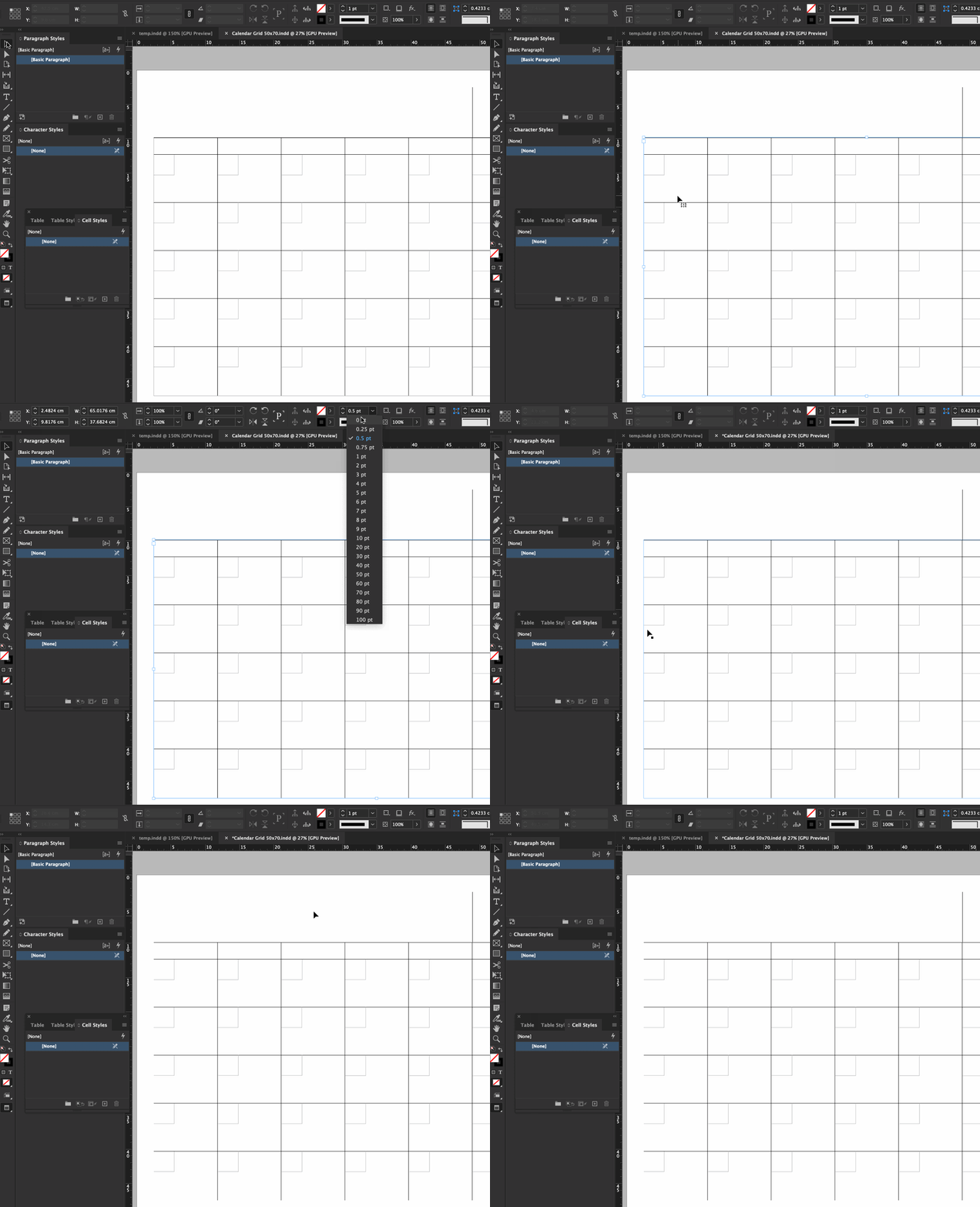
    I see the problem! You successfully disabled the rules on the left and bottom of the table (and doubtlessly learned a lot in the process) prior to sharing the file.


    What we couldn't see is that the table is inside a text frame that is the exact same size, and the text frame had a stroke around the outside. So, select the frame and set the stroke value to 0.


    ~Barb


    6 replies

    New Participant
    May 24, 2021

    Just to add - In my senario the cell options had already been turned off. I had to turn them on first, then change the border weight to O and then turn off again.


    Hope this helps anyone

    Barb Binder
    Community Expert
    July 8, 2020

    Nadya, we are always happy to help.


    ~Barb 

    ~Barb at Rocky Mountain Training
    Barb Binder
    Barb BinderCorrect answer
    Community Expert
    July 8, 2020

    Hi Nadya:


    I see the problem! You successfully disabled the rules on the left and bottom of the table (and doubtlessly learned a lot in the process) prior to sharing the file.


    What we couldn't see is that the table is inside a text frame that is the exact same size, and the text frame had a stroke around the outside. So, select the frame and set the stroke value to 0.


    ~Barb


    ~Barb at Rocky Mountain Training
    JNKAJ7Author
    Inspiring
    July 8, 2020

    Ahhhh...yes, that makes sense! AND yes...I did learn a lot today from this post. Good detective work Barb. Thanks again! 

    JNKAJ7Author
    Inspiring
    July 8, 2020

    My goodness, it sure was an easy fix once you figured out the issue!


    Barb Binder
    Community Expert
    July 8, 2020

    You can just save the file (or use Save as and delete the other pages) and then post the file on dropbox (or other file sharing service). Post the link in your reply here (public) or message me privately by clicking my name/avatar and then clicking on message.


    ~Barb 

    ~Barb at Rocky Mountain Training
    Barb Binder
    Community Expert
    July 8, 2020

    To delete the lines in the red ellipses, select the table, gray out all of the lines except the ones in the red ellipses and then choose 0 pt. 


    In my animation, I turn them on so that I can turn them off. If you are truly stuck you can share the page of the file with the table so that we can look at it to see if something else is going on.


    ~Barb


    ~Barb at Rocky Mountain Training
    JNKAJ7Author
    Inspiring
    July 8, 2020

    Yes, I keep choosing 0 point. I have turned them on, I can change the stroke to anything and tried changing the colour and I'm able to do that, but when I put it on 0 point, they don't disapear like the one on the right did. 


    How do I share the file? I tried to choose the InDesign working document and it said I needed to change the format. Do I upload a PDF? 


    Barb Binder
    Community Expert
    July 8, 2020

    This is tricky to figure out the first time. You need to use the proxy (which represents the table) in the Control panel. Select the table with the Type tool: gray out the lines you want to leave alone, leave the lines blue that you want to change. Then, make the change. 


    ~Barb


    ~Barb at Rocky Mountain Training
    JNKAJ7Author
    Inspiring
    July 8, 2020

    Thanks for your reply Barb! I'm on InDesign version 15.1.1 on a MacBook Catalina. I don't see the proxy in the control panel. I see the other table options (dimensions, cell insets, etc). How do I make the proxy visible? 

    JNKAJ7Author
    Inspiring
    July 8, 2020

    The lines in the proxy that are blue are the lines that will change in the selected cells. You can change things like the stroke width, stroke color or stroke style. The field to the left of the proxy that reads 0 pt is the stroke width (thickness of the lines). The line that sticks up is unchanged because the center line in the proxy is not selected (blue).


    Thanks! Yes, I want that line to stick up. I want to delete the border lines on the left, bottom and right. I was able to delete the right border line by selecting 0 and no stroke but that's the only line that deleted. I can't delete the left border line and the bottom line of the calendar grid.