pamb85064850
Inspiring
December 1, 2020
Answered

Unable to edit text box

  • December 1, 2020
  • 6 replies
  • 6316 views

Hello,

This issue is driving me nuts! I'm sure there's an easy fix, but I can't figure it out.

On certain .indd files, I'm unable to edit any text box. This happens with more than enough files that I can't imagine these files are all corrupt, but not ALL files. 

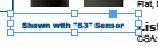
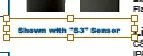
When I single click on the text box, I see the normal blue frame with handles (2nd image below). When I double click to edit, the frame turns brown (1st image below) and I'm unable to edit anything. I've tried unlocking all objects (Object/Unlock all Objects), but it's grayed out. There are no other layers on top of these text boxes and they all share a Master Page (which does not include the text boxes I'm trying to edit). 
Any suggestions are greatly appreciated!

Correct answer SJRiegel

That text is not set in InDesign - it was made in other program (Maybe Photoshop or Illustrator)
With the box selected, look at your Links Panel - You can use the Edit icon there to open the correct program to edit the text.

6 replies

New Participant
April 1, 2025

I had the same issue. My fix was as follows:

  1. Click the text box that you want to edit
  2. In the "Quick Actions" panel, selected "Unlink File"


Dave Creamer of IDEAS
Braniac
April 1, 2025
quote

I had the same issue. My fix was as follows:

  1. Click the text box that you want to edit
  2. In the "Quick Actions" panel, selected "Unlink File"

By @JUSTIN3227086018a4


Different issue. You can't unlink a pasted graphic, which was the OP's problem. 


David Creamer: Community Expert (ACI and ACE 1995-2023)
Braniac
December 2, 2020

Hi @pamb85064850:


Thank you for sharing the file. 


The captions do not actually appear in the links panel—so you will not be able to edit them the way @SJRiegel suggested. She was assuming the normal workflow—I was too—but on closer examination, all of the captions are pasted graphics. We typically want to use File > Place to add text or graphics to InDesign for a variety of reasons. One is that if these images of text had been placed, then you could have linked to the source file for editing. It would be an awkward workflow, but it would work. Instead, these images were pasted as graphics from somewhere else, eliminating any way to edit them. 


Someone at corporate set up the files, packaged them & sent them to me to edit for our brand. Oddly, we share files almost daily and I've never run into this issue before.

That "someone at corporate" took the wrong approach to creating the captions—they should be standard editable text—and now you are dealing with the aftermath. If you can reach out to that someone and gently discuss this, perhaps you can help them understand how to handle these captions, moving forward. In the meantime, yes, you or someone, will need to retype the captions if you want to be able to edit them. And set up a caption paragraph style while you/they are at it.


~Barb 

Braniac
December 2, 2020

Hi @pamb85064850:


Save the file under a new name. Remove the extra pages from the copy. Package the remaining page and put the file on dropbox.


Post a link here (public) or message me (private) by clicking my name/avatar to load my profile page, and then click the Message button.


~Barb 

pamb85064850
Inspiring
December 2, 2020

@Barb Binder Thank you.


Please find the link here. 


Thanks again for your help!

Braniac
December 2, 2020

Hi @pamb85064850:


That was another question I had last night. Where was the blue link or the cloud icon (if pulled out of a library)? Potentially the badges can be hidden (View > Extras > Hide Link Badge) or the files can be embedded (through the Links panel menu).


Are you willing to share a page (or partial page) from that file so that we can look at it? Then we can be more precise on how to move forward. I do think you want to change the workflow so that you are working with editable text.


~Barb

pamb85064850
Inspiring
December 2, 2020

@Barb Binder Thank you for your tenacity.

I'm happy to share a page with you. How do I do that, please?

Thank you!

Braniac
December 2, 2020

@SJRiegel is correct—but I want to point out that it is an odd situation.


It looks like you have an inline image inside of a text frame. Normally, we have text in a text frame, and clicking once on the text will allow one to begin to edit. When you double click, you are selecting an image—the amber color is used to define the image boundary.


How are you adding the pictures of the text to your document? Are you placing them? Dragging from the library? Or did someone else set up the files?


~Barb 

pamb85064850
Inspiring
December 2, 2020

@SJRiegel and @Barb Binder : Thank you for the information. 
I don't see a link to this particular "box" in my links panel. I see all other links there (all images), but not this one. 
Someone at corporate set up the files, packaged them & sent them to me to edit for our brand. Oddly, we share files almost daily and I've never run into this issue before. 
It looks like every text box in this document is formatted the same way (something other than text). Because I don't see a  link, I think my only option is to start from scratch regarding the text boxes?

Thanks again for the quick responses!

SJRiegelCorrect answer
Braniac
December 1, 2020

That text is not set in InDesign - it was made in other program (Maybe Photoshop or Illustrator)
With the box selected, look at your Links Panel - You can use the Edit icon there to open the correct program to edit the text.