


Ken Nielsen
Legend
January 4, 2023
Answered

Unable to place an object as while placing an object it go to a menu called links in InDesign

  • January 4, 2023
  • 1 reply
  • 678 views

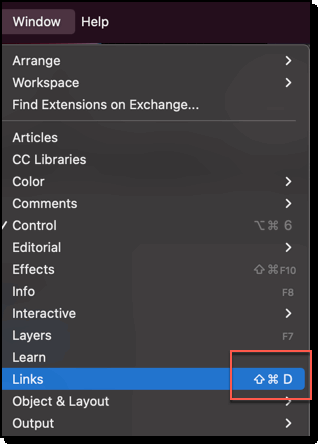
For years I've been able to place an image in a document using command-D. Now, without warning, command-D brings the object into a menu called 'links' and I cannot place it in the document?

Any help to how I can bring InDesign back into it's customary behavior would be greatly appreciated as I've had to stop my project now until I get this resolved.

TIA,

Ken


<Title renamed by moderator>
This topic has been closed for replies.
Correct answer Ken Nielsen

The shortcut to open the Links panel is Cmd+Sh+D, vs the shortcut for Place which as previously mentioned is Cmd+D. Is the Shift key stuck on your keyboard? If not, consider trashing preferences.


~Barb


I shut the system down and restarted. That alone made InDesign 'wake up' and function properly. So I won't need to trash preferences but wanted to thank you and everyone here for responding with help. These computers need a 'kick' once in a while...

1 reply

Ken Nielsen
Legend
January 4, 2023

Okay, discovered, Control D is the place command. This is what happens when you get old. Couldn't find how to delete this question so I'll mark this as correct answer.


BobLevine
Community Expert
Community Expert
January 4, 2023

It is ctrl + d on Windows and cmd + d on a Mac. But those are defaults and can be changed to anything you want them to be.

Ken Nielsen
Ken NielsenAuthorCorrect answer
Legend
January 4, 2023

The shortcut to open the Links panel is Cmd+Sh+D, vs the shortcut for Place which as previously mentioned is Cmd+D. Is the Shift key stuck on your keyboard? If not, consider trashing preferences.


~Barb


I shut the system down and restarted. That alone made InDesign 'wake up' and function properly. So I won't need to trash preferences but wanted to thank you and everyone here for responding with help. These computers need a 'kick' once in a while...