


New Participant
December 8, 2017
Answered

Unable to reach dropdown menus in InDesign

  • December 8, 2017
  • 3 replies
  • 10394 views

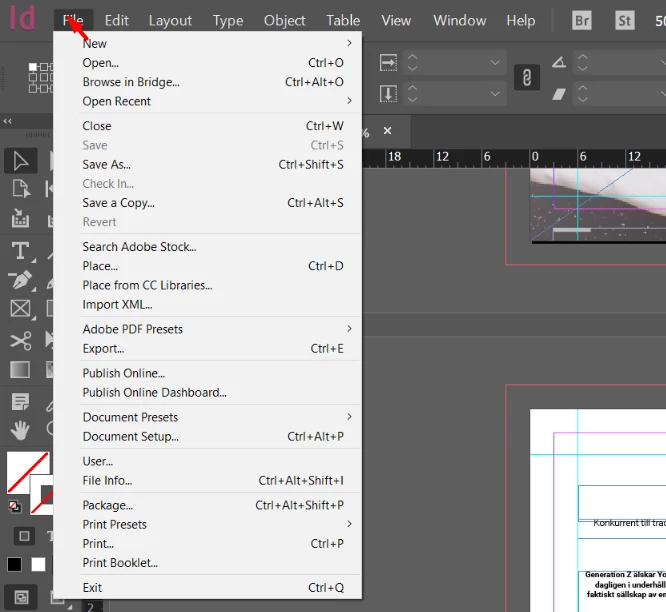
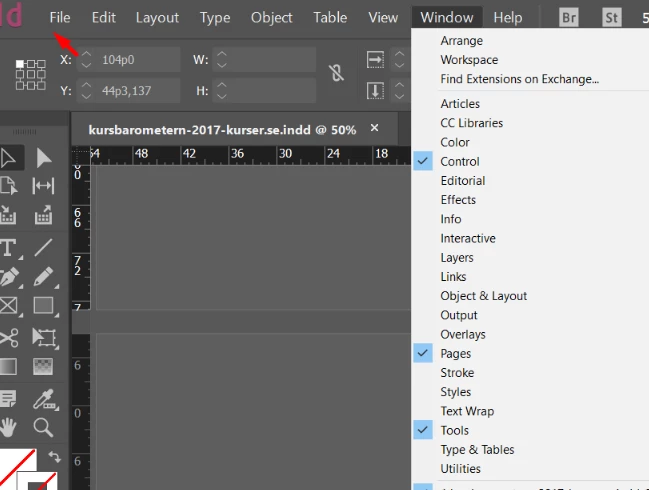
I am unable to reach my first three dropdown menus in InDesign. For example, when I click on "File" the drop down menu shows, but as soon as I move the cursor it opens another menu. Has anyone else experienced this problem? I thought it had something to do with my computer but tech department at my work told med to bug report it to Adobe.

This is when I click to open the menu, with the cursor still at the menu bar
This is how it looks when I move the cursor down a bit and another menu opens
So, does anyone know why this happens? Any solutions? Is this something I need to bug report?

Best,

Julia

Correct answer VP1MSL

All of the GUI drop-down and contextual menus were not staying open and no items were selectable. MacBook 2015, osx 12.5, InDesign 17.3. Solution for me: in PREFERENCES > USER INTERFACE SCALING, deselect SCALE CURSOR PROPORTIONATELY.

3 replies

VP1MSL
VP1MSLCorrect answer
New Participant
August 4, 2022

All of the GUI drop-down and contextual menus were not staying open and no items were selectable. MacBook 2015, osx 12.5, InDesign 17.3. Solution for me: in PREFERENCES > USER INTERFACE SCALING, deselect SCALE CURSOR PROPORTIONATELY.

New Participant
September 30, 2023

I could kiss you! This worked for me. Thanks so much!

amaarora
Community Manager
Community Manager
December 11, 2017

Hi,

You would most likely need to clean BOTH cache and preferences.Troubleshooting 101: Replace, or "trash" your InDesign preferences

-Aman

hammer0909
Community Expert
Community Expert
December 11, 2017

Are you by any chance running InDesign on Windows using Parallels or another virtualization program? I had this issue because Windows had display scaling enabled and it was messing up my screen in a similar way. To fix it, I did one of the following below.

Windows 10

Select Display > Change the size of text, apps, and other items, and then adjust the slider for each monitor.

Earlier Windows systems

Right-click the application, select Properties, select the Compatibility tab, and then select the Disable display scaling on high DPI settings check box.

Derek Cross
Community Expert
Community Expert
December 11, 2017

Which version of InDesign and OS?

It might be worth resetting your InDesign Preferences:

Close InDesign. Then hold down Ctrl + Alt + Shift (Windows) or Cmd + Ctrl + Opt + Shift (Mac), and relaunch InDesign. Respond in the affirmative to the dialog asking if you really want to replace the preferences.

New Participant
July 24, 2022

Thank you, thanks you. Deleting preferences worked.

New Participant
January 27, 2024

I'm going to try it.

I can't use any of the tools, and I can't access any drop down menus. I click, amdnothing happens.