
jmlevy
Community Expert
Community Expert
May 18, 2020
Answered

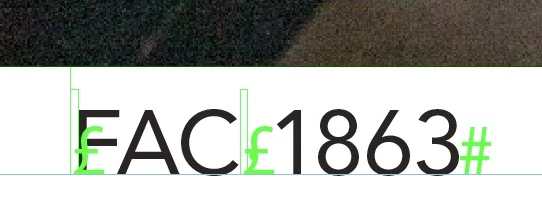
Unknown hidden character
  • May 18, 2020
  • 3 replies
  • 2078 views

Hi, I have a memory lapse: I cannot remember what is this hidden character (the £ sign)…

This topic has been closed for replies.
Correct answer jmlevy

There do seem to be some corresponding anchored objects in your capture. Are they supposed to be there?:
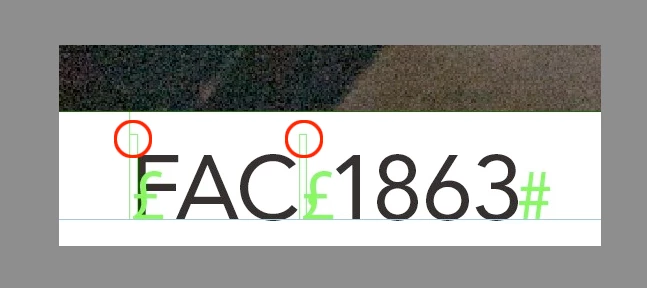


No, this is not anchored objects but empty text variables. I think I understand what happens: this £ sign is displayed when the text variable is empty and disappears when it is not. There is a problem with the script that does not pick up any more the metadata. I will contact the author. Edit: problem solved by resetting preferences.

Thanks everybody!

3 replies

Bill Silbert
Community Expert
Community Expert
May 18, 2020

That character does not show up in the list of hidden characters found here: https://helpx.adobe.com/indesign/using/editing-text.html. So I think that JM's and/or Uwe's assessments that it is from a third party or a result of some corruption is most likely correct.

jmlevy
Community Expert
jmlevyCommunity ExpertAuthor
Community Expert
May 18, 2020

Thanks Bill,

I did not even think to have a look at the help on line. Shame on me! Thanks everybody for all your answers.

rob day
Community Expert
Community Expert
May 18, 2020

I wonder if it’s an anchor, which normally is the Yen currency symbol? Could the anchor invisible change to the pound currency symbol depending on the installed language?

Community Expert
May 18, 2020

Hi jmlevy,

never seen that in one of my InDesign documents.

Could be something a 3rd-party plug-in injected.


Regards,
Uwe Laubender

( ACP )

jmlevy
Community Expert
jmlevyCommunity ExpertAuthor
Community Expert
May 18, 2020

Hi Uwe, no third party plugin.

But I think that there is someting wrong on the user machine, I will tell him to rebuild preferences. I have asked some of my experts friends and they too cannot recognize this character.

rob day
Community Expert
Community Expert
May 18, 2020

You might be able to get via a script—select the character and run this:


var p=app.activeDocument.selection[0].properties.contents;  
alert("Selection:" + p.toString()) 


jmlevy
Community Expert
jmlevyCommunity ExpertAuthor
Community Expert
May 18, 2020

Hi Rob,

the poblem is that the screen capture has been sent to me by one of our users and that I cannot reproduce the same behaviour.