
Participating Frequently
November 4, 2023
Pregunta

Use GREP to create a new line and header style after the last occurance of a words only once

  • November 4, 2023
  • 3 respuestas
  • 1255 visualizaciones

Hi 

I wonder if someone can help I have a list of skills. And because of the short comings of the data collection method I had to put them into one column in a datamerge. 

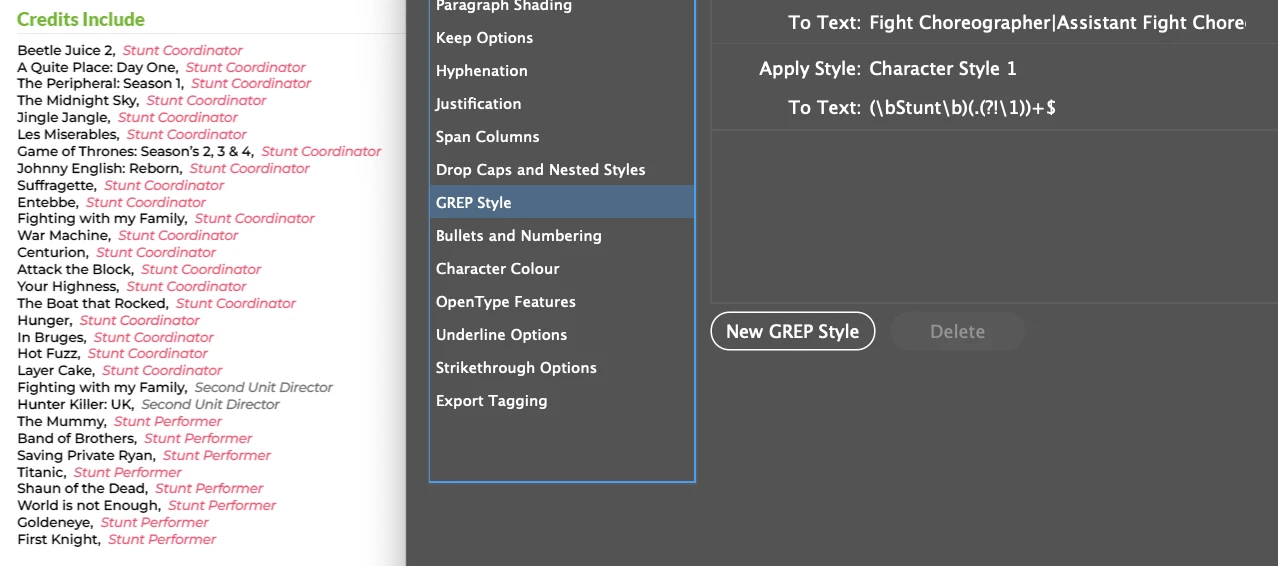
I'm trying to use GREP to find just the last occurance of a skill (only once) "Stunt Coordinator" or "Second Unit Director" or "Stunt Performer" or "Doubled For" to then add a return and give it a header title skill. Like in the photo attached. In the photo I'm testing it on just one word but I'm not having any luck. Can someone help please.

Thank you
Este tema ha sido cerrado para respuestas.

3 respuestas

Community Expert
November 5, 2023

@British Stunt Register 


James -- It's still not very clear what the before and after states are. You said 'The Before for a performer' -- where is that performer? What to do with them? And 'For a Performer I'd like and for lack of a screenshot I'm just using text . . .' isn't very clear either.


As Mark requested earlier, please provide literal examples of the before and after states.


Though I don't understand what exactly you're after, it looks not simply like (re-)formatting, which can be handled by search-and-replace, but a proper transformation, for which you'll need a script.


P.

Participating Frequently
November 5, 2023

Thank you sorry about that, here is what Im' looking to achieve: 

Like what @m1b stated I'm trying to search for roles:

1. Search for certain words in a given story or document, eg, the grep

Role: (Stunt Double|Second Unit Director|Second Unit Director & Stunt Coordinator|Actor|Character)

 2. Pick the last one in the story and add a new paragraph after its paragraph and apply the green sub-heading/rule below paragraph style.

3. The text of the new paragraph style is dependent on the text found in the grep, but not the same, eg "Stunt Double" —> "Doubled For".


Here is the raw data:
I can search and replace the "Production Name:" and the "Doubled For/Character Name:" like previous comments suggested, thank you.

Production Name: The Crown S6, Role: Additional Stunt Coordinator, Doubled For/Character Name:
Production Name: The Larkins S2, Role: Additional Stunt Coordinator, Doubled For/Character Name:
Production Name: Kidnapped, Role: Additional Stunt Coordinator, Doubled For/Character Name:
Production Name: Meg2: The Trench, Role: Stunt Performer, Doubled For/Character Name:
Production Name: Andor S2, Role: Stunt Performer, Doubled For/Character Name:
Production Name: Heads of State, Role: Stunt Performer, Doubled For/Character Name:
Production Name: Wicked, Role: Stunt Performer, Doubled For/Character Name:
Production Name: Blitz, Role: Stunt Performer, Doubled For/Character Name:
Production Name: Red Eye, Role: Stunt Double, Doubled For/Character Name: Lesley Sharp
Production Name: Murder They Hope, Role: Stunt Double, Doubled For/Character Name: Annette Badland
Production Name: Apartment 7A, Role: Stunt Double, Doubled For/Character Name: Tina Gray
Production Name: Dinner with the Parents, Role: Stunt Double, Doubled For/Character Name: Carol Kane
Production Name: Doc Martin, Role: Stunt Double, Doubled For/Character Name: Beth Goddard
Production Name: Challenge, Role: Character, Doubled For/Character Name: Stunt Neighbour
Production Name: A Thousand Blows, Role: Character, Doubled For/Character Name: Head Cook
Production Name: Boat Story, Role: Stunt Double, Doubled For/Character Name: Joanna Scanlan
Production Name: Titanic, Role: Character, Doubled For/Character Name: Drowned Woman Floating
Production Name: Braveheart, Role: Stunt Performer, Doubled For/Character Name:
Production Name: My House in Umbria, Role: Stunt Double, Doubled For/Character Name: Maggie Smith
Production Name: Shaun of the Dead, Role: Character, Doubled For/Character Name: Fainting woman
Production Name: Eastern Promises, Role: Stunt Double, Doubled For/Character Name: Naomi Watts
Production Name: Hyde Park on Hudson, Role: Stunt Double, Doubled For/Character Name: Laura Linney
Production Name: 44 Inch Chest, Role: Stunt Double, Doubled For/Character Name: Joanne Whalley
Production Name: Harry Potter 4 - 8, Role: Stunt Double, Doubled For/Character Name: Helena Bonham Carter
Production Name: Red 2, Role: Stunt Double, Doubled For/Character Name: Helen Mirren
Production Name: White Girl, Role: Stunt Coordinator, Doubled For/Character Name:
Production Name: Skyfall, Role: Stunt Performer, Doubled For/Character Name:
Production Name: Fast & Furious 6, Role: Stunt Double, Doubled For/Character Name: Michelle Rodriguez
Production Name: Mary Poppins Returns, Role: Stunt Double, Doubled For/Character Name: Julie Walters
Production Name: Rocketman, Role: Character, Doubled For/Character Name: Old Pub Woman

Thank you

Robert at ID-Tasker
Legend
November 5, 2023

@British Stunt Register 


So you want to get your screenshot from the raw text at the end of your message? 


GREP will never to that - as you need to rebuild the whole text = custom script. 


... 


If you've access to Excel or something similar - you could do this semi-automatically - convert ","  and ":" to tabs, copy to Excel, sort by 4th column...

But still more processing needed = custom script. 


Robert at ID-Tasker
Legend
November 5, 2023

If you work on a PC - is it one-time job or do you have to do it more often? 


Participating Frequently
November 5, 2023

I'm on a Mac and it is a one time job. Although I will have to do it again once these proofs are checked.

m1b
Community Expert
Community Expert
November 4, 2023

Hi @British Stunt Register, can you show a screenshot of what it should look like afterwards?

- Mark

Participating Frequently
November 4, 2023

It would search for Stunt Double then create a header and have the name of the show and then the actor name


Colin Flashman
Community Expert
Community Expert
November 4, 2023

GREP styles won't add or remove characters - they will only apply formatting to selections.

I agree that GREP searches would be appropriate. But you would need more than one.

I'd suggest a few GREP tools that will help:

first is this script that allows you to chain many GREP searches: https://creativepro.com/chaingrep-grep-script/

then there is this script from Peter Kahrel that expands GREP capabilities, such as highlighting matches throughout the document to see if the GREP is finding too little or too much: https://creativepro.com/files/kahrel/indesign/grep_editor.html

If the answer wasn't in my post, perhaps it might be on my blog at colecandoo!