



dublove
Legend
January 3, 2025
Answered

Use scripts, How to find out tables that it doesn't span 2 pages (or 2 columns) .

  • January 3, 2025
  • 4 replies
  • 3243 views

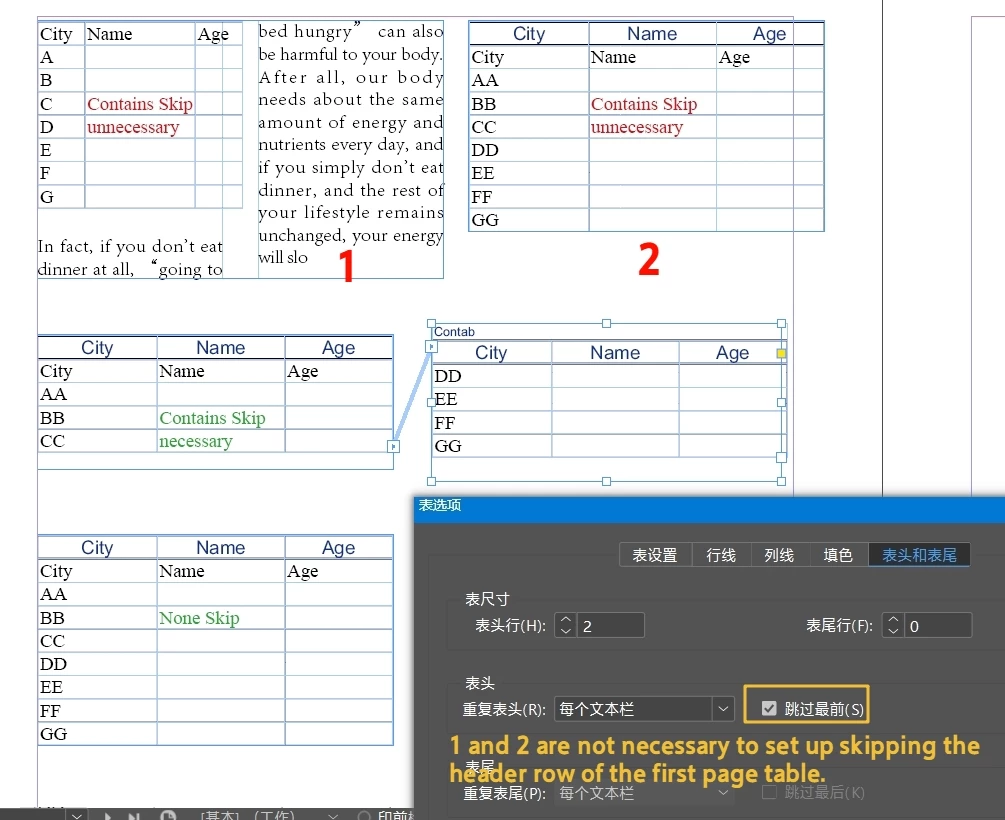
If a table uses "Skip Header Row on Page 1" feature,

but the table only takes up 1 page (or 1 column), It will lead to duplication in the table of contents.
Waiting for an official fix for this bug may be too long.
Is there a script to find these tables and then unskip the page 1 header rows?

Initially it may have been correctly needed.

They didn't take up 2 pages (2 columns) later because the layout moved.
But you don't know which ones made the setting
 

Correct answer FRIdNGE

Place The Cursor Inside A Table Cell?

Targets all tables in the entire document, not selecting a particular table. It is traversing all tables.


// Loop through all tables in the active document
var myTables = app.activeDocument.stories.everyItem().tables.everyItem().getElements();
var T = myTables.length,  t;
for ( t = 0; t < T; t++ ) {
    var myTable = myTables[t];
    if ( myTable.storyOffset.textColumns[0] != myTable.storyOffset.paragraphs[0].insertionPoints[-1].textColumns[0] ) {
        myTable.select();
        alert( "Do Something! ... What? No idea!!!" )
    }
}


(^/)

4 replies

Robert at ID-Tasker
Legend
January 6, 2025

@dublove


Let's reset everything - because, I think, we went into a rabbit hole - are you doing your documents for print or for ePUB / accessibility - or both?


Because, I'm pretty sure there is / are much easier way(s) to solve your "problems" - and you're "trying too hard" to accomplish everything at once. 


dublove
dubloveAuthor
Legend
January 7, 2025
quote

Because, I'm pretty sure there is / are much easier way(s) to solve your "problems" - and you're "trying too hard" to accomplish everything at once. 

By @Robert at ID-Tasker

I also think you're way better off. Well hope you can share.

I've been waiting for you 10,000 years.


It is usually used for printing.
Interactive output is only used for proofreading. It can be disregarded.


Robert at ID-Tasker
Legend
January 7, 2025

@dublove


If you need to prepare your document(s) mainly for print - then do it "the easy way" - ignore all the automatic table header options and rows and add your own when needed.


I would create two "template" table headers - somewhere on the pasteboard on the 1st spread - set label for easier finding. One for 1st header and another for "continue". 


Then, when you need to add those headers - do what I've suggested earlier - remove those custom rows and add new ones. 


And the script would be much simpler - it would go row-by-row - check if parent TextFrame or TextColumn is different than for the row before - meaning that the current row is first in the TextFrame / TextColumn - and add blank row(s) and copy&paste from the templates. 


Community Expert
January 4, 2025

This isn't a bug, it's just how InDesign works.


What you're asking for is actually a new feature, and you can request new features through the InDesign Help menu, which will take you to the official site for feature suggestions.


Unfortunately, tables in InDesign are quite limited, so you'll often need to find workarounds to achieve what you want.


I’m not able to help with the scripting side, but like all software, InDesign has its limitations, and we all have to work within them.


It’s hard to fully understand what you’re trying to accomplish with these tables, but it sounds like a lot of what you’re doing would benefit from automation.


To be honest, there haven’t been many updates to how tables work in InDesign since the feature was introduced.


Your options are to either work within the current limitations and do a lot of manual adjustments, or collaborate with someone (whether paid or unpaidis between you) to create a script or plugin that meets your needs.


I also feel that a language barrier may be affecting clarity here, as the description of what you need isn’t entirely clear or detailed enough to fully understand.


dublove
dubloveAuthor
Legend
January 4, 2025

hello everyone

Excuse me.
All else aside.
I'm most interested in knowing:
how to determine that a table is not spanning pages.
A table does not span two columns?

There should be no problem communicating this.

extremely grateful.

dublove
dubloveAuthor
Legend
January 4, 2025

Alright - maybe something like this

Before running the script on a large or important document, test it on a smaller sample file to ensure it works as expected. Save a backup of your document as a precaution.


This is just and idea, maybe it does what you want and maybe not, but hopefully it can be refined or used as foundation going forward.


// Loop through all tables in the active document
var tables = app.activeDocument.stories.everyItem().tables.everyItem().getElements();
for (var i = 0; i < tables.length; i++) {
    var table = tables[i];

    try {
        // Get the first and last rows of the table
        var firstRow = table.rows[0];
        var lastRow = table.rows[table.rows.length - 1];

        // Get the parent text frames of the first and last rows
        var firstRowFrame = firstRow.cells[0].texts[0].parentTextFrames[0];
        var lastRowFrame = lastRow.cells[0].texts[0].parentTextFrames[0];

        // Check if the table spans multiple frames
        if (firstRowFrame === lastRowFrame) {
            // The table does NOT span multiple pages or columns
            table.skipFirstHeader = false; // Disable "Skip Header Row on Page 1"
            $.writeln("Table adjusted: " + table.id); // Log adjusted table IDs
        }
    } catch (e) {
        $.writeln("Error processing table ID " + table.id + ": " + e.message);
    }
}

alert("Script completed. Tables that didn't span pages/columns have been adjusted.");


Hi Eugene Tyson.

This is changed to firstRowFrame ! = lastRowFrame

That's exactly what I want.

Though I didn't get why it was just the opposite of what I thought it was.
but, Everything Ok, except that it doesn't work properly when the form is not finished (overflow), this can be ignored.

Can you export the pages where the problem tables are located, I will check these tables.

Robert at ID-Tasker
Legend
January 3, 2025

@dublove


To check if table spans multiple TextFrames / Pages - you need to check Parent Text Frame / Parent Page of the Text object of the cells. 


For the Text Columns - you would've to check Horizontal Offset of the 1st Character / InsertionPoint. 


Checking all cells isn't necessary - just cells in the first column would be enough.


dublove
dubloveAuthor
Legend
January 3, 2025

You're pointing too shallowly.
I can't find my way.

FRIdNGE
Inspiring
January 3, 2025

Absolutely not clear! …


(^/) The Jedi

dublove
dubloveAuthor
Legend
January 3, 2025

Look at my InDesign file.
When a table is set up with the Skip Page 1 Header feature, but the table does not span two pages (or two columns).
Problems will occur.
So to find these tables

FRIdNGE
Inspiring
January 3, 2025

What problems? Show us what you want to get (dupplicating the tables on the right page and correcting them to get the right result you want).


(^/)