


Participant
January 28, 2017
Answered

Using paragraph number without parenthesis in references

  • January 28, 2017
  • 3 replies
  • 1771 views

Hey,

I would like to create a reference to a numbered paragraph inside my text. The problem I have is that the paragraphs are numbered like so (1), (2), (3), ... and the parenthesis are shown in references. I just want to use only the number without the parentheses inside my text. How can I do that? I mean is that even possible? :S

Some notes for you:

  • The number format is: (^#)^t
  • The reference format is <paraNum />
  • In short: I want <paraNum /> to be replaced with ^#  and not (^#) which is currently the case

Some Example:

(1) Lorem ipsum bla blablabla ...

... some text ...

Let's reference paragraph (1) <-- I want the reference without parenthesis.

Many thanks to you folks!
    This topic has been closed for replies.
    Correct answer Obi-wan Kenobi

    Hi Mesdames!

    No need a script! Think simple!

    As we see, Cakasim uses the "cross-reference" feature and plays it correctly!

    His apparent problem, extracting the auto-numbering of a para "(1) blablabla…", is that it gives him: "(1)"

    … So, what does he forget ? …

    I let you some time to think about this question!

    …………

    Well! … enough time without not giving the way to fix it! …

    Cross-references are managed by ID as text!

    So, a simple grep style is necessary to make the parentheses "invisible" (or a F/R to remove them but you'll destroy the link!)

    I let you again some time to think about this point!

    …………

    Well! … enough time again without not giving the way to fix this last point:

    I supposed all "(number)" make reference to cross-references!

    If not, Cakasim could insert a "marker" in his CR format to fix a CR-target problem!

    (^/) 

    3 replies

    jane-e
    Community Expert
    Community Expert
    January 28, 2017

    If I understand you, this may work.

    1. Auto numbered paragraphs

    (1) blah blah blah

    2. Insert a text anchor. Name it "1". I put mine at the beginning of the paragraph.

    3. Create a cross-ref to the text anchor named "1"

    4. For the format, start with "Text Anchor Name". Click the Pencil to edit the format. Click the + to create a copy and rename it to preserve the original. Remove the quotation marks.

    5. Repeat

    How many of these do you have?

    Maybe someone can write a script in the InDesign Scripts forum to automate it if this method works.

    Obi-wan Kenobi
    Obi-wan KenobiCorrect answer
    Legend
    January 28, 2017

    Hi Mesdames!

    No need a script! Think simple!

    As we see, Cakasim uses the "cross-reference" feature and plays it correctly!

    His apparent problem, extracting the auto-numbering of a para "(1) blablabla…", is that it gives him: "(1)"

    … So, what does he forget ? …

    I let you some time to think about this question!

    …………

    Well! … enough time without not giving the way to fix it! …

    Cross-references are managed by ID as text!

    So, a simple grep style is necessary to make the parentheses "invisible" (or a F/R to remove them but you'll destroy the link!)

    I let you again some time to think about this point!

    …………

    Well! … enough time again without not giving the way to fix this last point:

    I supposed all "(number)" make reference to cross-references!

    If not, Cakasim could insert a "marker" in his CR format to fix a CR-target problem!

    (^/) 

    Barb Binder
    Community Expert
    Community Expert
    January 28, 2017

    My logic was backwards! I was going after the auto-number and not the X-refs.

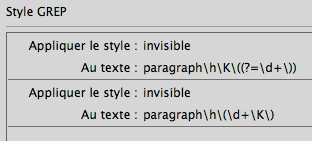
    Ok, Obi-wan, your GREP is perfect in targeting the parentheses. I set the Character style to pink so that I could see that:

    For Cakasim​'s copy and pasting pleasure:

    paragraph\h\K\((?=\d+\))

    and

    paragraph\h\(\d+\K\)

    And Cakasim​, if you are unfamiliar with GREP styles:

    • Create a character style (mine is called Invisible, but temporarily set to pink)
    • Create a paragraph style (mine is Sample)
    • Add the GREP styles shown above to assign the character styles

    Now, forgive me, Obi-wan Kenobi but here's my stupid question. Now that we found the parentheses, how do we make them invisible and close up the space? Just making them white will leave the space on both sides of the number.

    ~Barb at Rocky Mountain Training
    jane-e
    Community Expert
    Community Expert
    January 28, 2017

    Just take out the parenthesis!

    This format yields number period tab

    1.

    2.

    3.

    If you don't want the period, it would be:

    Select some text and turn on Preview as you experiment. Does this work?

    jane-e
    Community Expert
    Community Expert
    January 28, 2017

    Oh, I didn't catch that it's a cross reference. Mine was for numbered paragraphs.

    Barb Binder
    Community Expert
    Community Expert
    January 28, 2017

    As a FrameMaker user, it seems like there should be an easy answer. In Fm we have two building blocks—paranumonly and paranum—but that second building block doesn't seem to exist in InDesign. Odder still, the InDesign documentation makes it seem like <paraNum/> should remove punctuation, but I'm getting the same results as you are.

    I played with removing the parens from the auto number (that works of course) but I can't figure out any way of adding them back in that isn't picked up by <paraNum/>.

    This is the point when I would consider redesigning the doc and removing the parens from the numbers. However, there are a number of creative folks in the forum who make magic happen. Let's stay tuned and see what others come up with.

    ~Barb at Rocky Mountain Training