

dublove
Legend
June 24, 2024
Frage

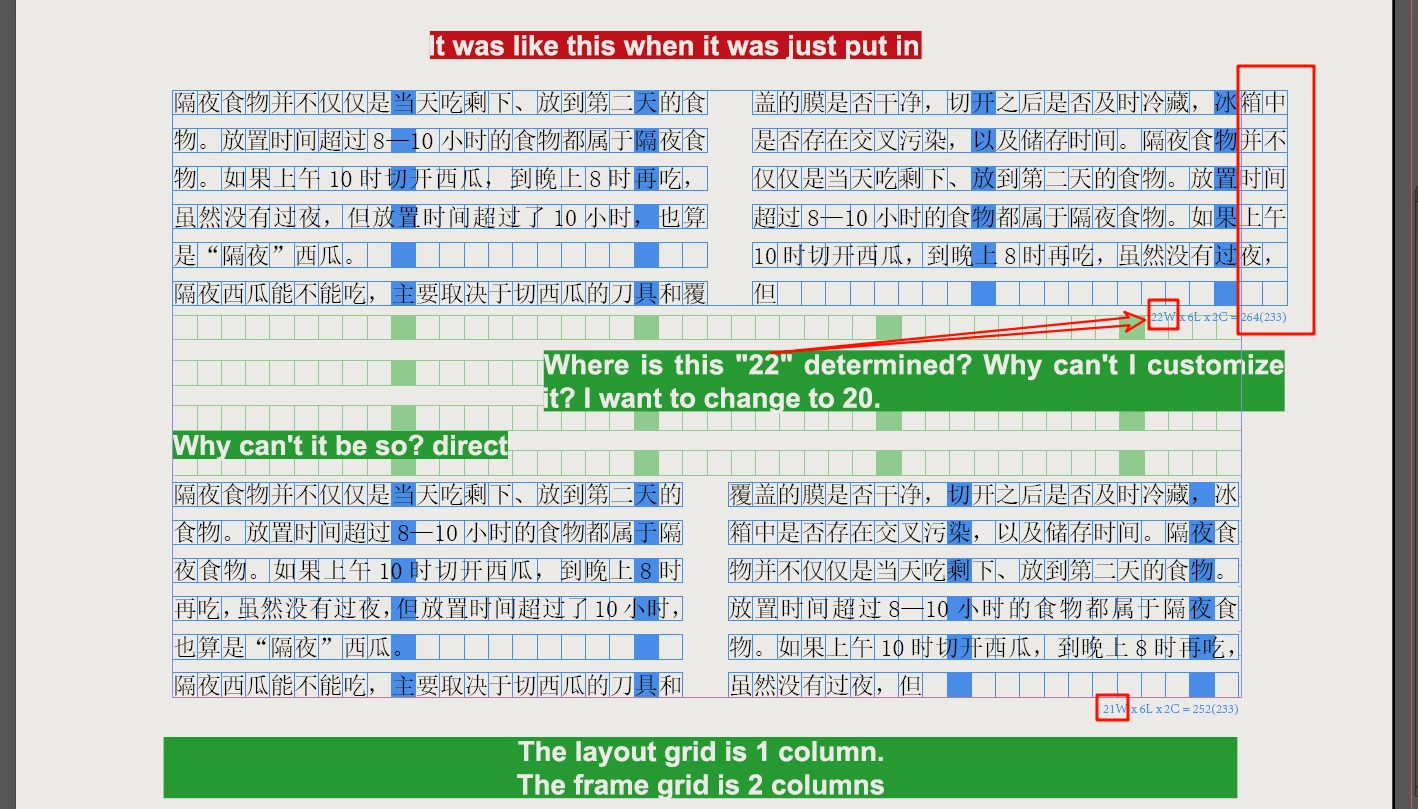
Using the layout grid typesetting,How to accurately control the width of the 2 -column frame grad?

  • June 24, 2024
  • 2 Antworten
  • 197 Ansichten

When I use the layout grid to typeset it, why can't I control the width of the frame of the frame grid? It is always 1-2 words wider than the type area?

Can't it be directly suitable for the type area when it is imported?


The layout grid is 1 column. The frame grid is 2 columns
Dieses Thema wurde für Antworten geschlossen.

2 Antworten

Peter Spier
Community Expert
Community Expert
June 24, 2024

Layout grids don't seem to be available in my US English version, so I'm guessing they are a CJK feature. I don't see anything in the help files that says you can specify the number of cells in the grid, but I do notice in your file that the total number of cells in the tow columns is the same as the number of cells in the original one-column frame, so I expect that's where the "22" is coming from. I'm afraid I have no clue how you would change this for a two column frame, but I bet if you insted used two one column frames in that part of the layout your problem would disappear.


dublove
dubloveAutor
Legend
June 25, 2024

Perhaps he only allows drag to adapt to width.
If you click, the text box will always be wider

Mike Witherell
Community Expert
Community Expert
June 24, 2024

Those green box patterns originate on the Parent page. They could be edited there, but interestingly, I could not select them on the Parent page. I wonder if your document is corrupt?

Mike Witherell