


Participant
February 5, 2022
Answered

Weird ligature issue in foreign script

  • February 5, 2022
  • 3 replies
  • 1248 views

So I'm writing a text and I use text in 'phags-pa, an old Asian script. There is a native font on my mac that can handle it (Noto Sans Phagspa), and I've also downloaded some other fonts from Babelstone. I'm using Babelstone, and I'm using GREP styles and some scripting to put the text where it needs to be. Suddenly I notice that InDesign is not doing any ligatures, or maybe it's contextual alternatives. Characters all sho in the "isolated" version, not connected as they're supposed to be. I look at the same texxt in the same font in Textedit on my mac, and it displays fine. Weird.


I switch to the Noto font, and it seems to display fine. Not optimal, since I preferred the Babelstone script, but maybe it's a compatibility issue, I thought. It's a TTF font, after all. But then, the ligatures/contextual alternatives disappear from the Noto font, too. They used to work (and I have a screenshot to prove it), but now they don't.


I have tried uninstalling and reinstalling the font, I have tried restarting the computer, reinstalling InDesign, and working with a fresh document (not the one I was working with, but just a new one) … and there is no way to get the text to display correctly. What's maddening is that other programs on my computer handle it just fine; it's just InDesign that's having issues with it.


So I'm writing a text and I use text in 'phags-pa, an old Asian script. There is a native font on my mac that can handle it (Noto Sans Phagspa), and I've also downloaded some other fonts from Babelstone. I'm using Babelstone, and I'm using GREP styles and some scripting to put the text where it needs to be. Suddenly I notice that InDesign is not doing any ligatures, or maybe it's contextual alternatives. Characters all sho in the "isolated" version, not connected as they're supposed to be. I look at the same texxt in the same font in Textedit on my mac, and it displays fine. Weird.


I switch to the Noto font, and it seems to display fine. Not optimal, since I preferred the Babelstone script, but maybe it's a compatibility issue, I thought. It's a TTF font, which people tell me are no good. But then, the ligatures/contextual alternatives disappear from the Noto font, too. They used to work (and I have a screenshot to prove it), but now they don't.


I have tried uninstalling and reinstalling the font, I have tried restarting the computer, reinstalling InDesign, and working with a fresh document (not the one I was working with, but just a new one) … and there is no way to get the text to display correctly. What's maddening is that other programs on my computer handle it just fine; it's just InDesign that's having issues with it. Ligatures are turned on, contextual variants are turned on, and there is no tracking.


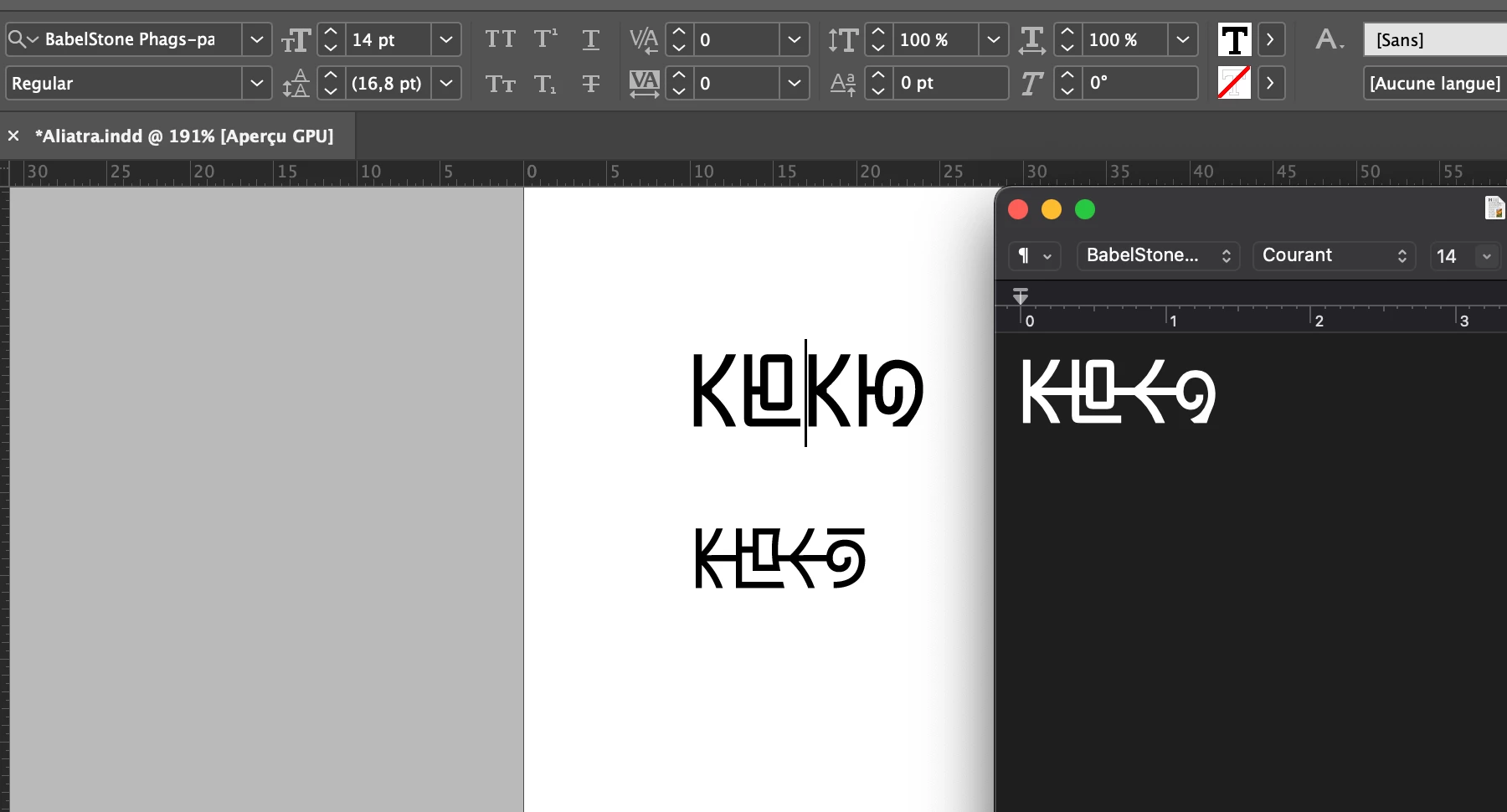
Below is a screenshot from when it was working with Noto. Top left is Babelstone, not working. Below that is the working Noto. White on black is OSX Textedit, using Babelstone, working.


Help?

This topic has been closed for replies.
Correct answer Joel Cherney

Oooh! It's been a long time since someone brought a script I've never typeset into this forum; pardon me for being a little excited.


Have you tried turning the World-Ready Composer on? Or off, if it's already on?  When you're testing such things, I would suggest making a paragraph style for each font, and to turn on the World-Ready Composer in each paragraph style.  It's kind of a long shot, but it's one of the few generic things to try that you haven't already mentioned. If that doesn't work, can you post an INDD with your non-functional sample? The only live-text 'Phags-pa bits I've found on the Internet are all laid out vertically, and I am unsure how much difference that would make when trying to figure out your issue on my own install of InDesign. (Speaking of which... isn't it a vertical script? Your horizontal layout is intentional, right?)


3 replies

Community Expert
February 11, 2022

"I think you misunderstood how the text needs to be set. When writing 'phags-pa, the characters are already rotated to go in line with the text."


Ah! Of course I missed that, because it's my first time I have contact with 'phags-pa.

So what is the issue now? You need lines of text that are rotated? And run from right to left in a text frame?

So the solution would be to simply rotate the text frame?


Sorry. I missed you second paragraph.


Regards,
Uwe Laubender

( ACP )

Community Expert
February 9, 2022

Hi Aichmorhabdo,

tested your sample text with Babel Stone Phags-pa Book with the Adobe Japanese Paragraph Composer plus character rotation to value 90 applied by an ExtendScript (JavaScript) script I once wrote for a different purpose. As a final step I rotated the text frame and defined a new paragraph style out of the selected text:


Script code is below, select all the text and run the script:


( function()
{

	var result = prompt("SCRIPT | Rotate each selected character to value:", "0.0" , "");
	
	if(result === null){return};
	var resultAfter = result.replace(/,/gi,".");
	var n = parseFloat(resultAfter);
	if(isNaN(n)){alert("SCRIPT | Rotate selected characters | Value Rejected: "+"\""+ resultAfter +"\""); return};

	// Define rotation angle in CCW values:
	var rotationAngle = n ;

	// Define Japanese Paragraph Composer: 
	var composer = "$ID/HL Composer J";
	// Or define the Japanese Single-line Composer:
	// var composer = "$ID/HL Single J";

	// Check, if a document is open:
	if(app.documents.length == 0){return};

	// Check, if selection is text:
	if(app.selection.length != 1){return};
	if(!app.selection[0].hasOwnProperty("baselineShift")){return};

	// Define selection:
	var selection = app.selection[0];

	// Apply definitions to the selection:
	selection.properties =
	{
		// To each character or insertion point:
		characterRotation : rotationAngle ,
		 // To each selected paragraph:
		composer : composer
	};

	app.selection[0].parent.recompose();
	}()
);


Note: Both Adobe Japanese Paragraph Composers are available with all versions of InDesign CS6 and above and do support character rotation ( not only to 90° ) by scripting. Or use the CJK version of InDesign for this. Here an article how to get the CJK InDesign with an English interface:


Adobe InDesign Tips: Japanese/CJK Functionality + English UI—Redux
By Dr Ken Lunde, Nov 5, 2019
https://ken-lunde.medium.com/adobe-indesign-tips-japanese-cjk-functionality-english-ui-redux-539528e295c6


Regards,
Uwe Laubender

( ACP )


Participant
February 10, 2022

Hi, Uwe. Nice code! If I install Japanese InDesign I think I'll keep the interface, to practice my Japanese. 😄 Anyway, I think you misunderstood how the text needs to be set. When writing 'phags-pa, the characters are already rotated to go in line with the text. If I take a text box and rotate it 90 degrees, the result is already correct for a single line. Your example has the characters rotated the wrong way.


My problem is that if I just rotate my paragraph 90 degrees, the text will go top-to-bottom, right-to-left. 'Phags-pa is supposed to be set top-to-bottom, left-to-right. Exceedingly few scripts are set like this, and they're mostly extinct, so it's not surprising that InDesign can't handle it out of the box. Since I won't have to set a lot of 'phags-pa paragraphs (mostly individual words and phrases), I think I'll just do my example paragraph manually, or maybe do a script to rearrange the lines.


Thanks anyway, though!

Joel Cherney
Community Expert
Joel CherneyCommunity ExpertCorrect answer
Community Expert
February 6, 2022

Oooh! It's been a long time since someone brought a script I've never typeset into this forum; pardon me for being a little excited.


Have you tried turning the World-Ready Composer on? Or off, if it's already on?  When you're testing such things, I would suggest making a paragraph style for each font, and to turn on the World-Ready Composer in each paragraph style.  It's kind of a long shot, but it's one of the few generic things to try that you haven't already mentioned. If that doesn't work, can you post an INDD with your non-functional sample? The only live-text 'Phags-pa bits I've found on the Internet are all laid out vertically, and I am unsure how much difference that would make when trying to figure out your issue on my own install of InDesign. (Speaking of which... isn't it a vertical script? Your horizontal layout is intentional, right?)


Joel Cherney
Community Expert
Community Expert
February 6, 2022

Well, I didn't wait! I didn't try to force my Wikipedia-sourced sample of 'phags-pa into vertical layout, but it does seem like the WRC needs to be on in order for the ligatures to render properly:


Participant
February 7, 2022

That's it! Thank you, I would have never found that myself. Solved my problem straight up. And yes, 'phags-pa is a vertical script. That screenshot was just as an example. I use it sometimes inline in the text, in which case I keep it horizontal to not screw up the text flow, but when I set it by itself I do it vertically. I guess I might as well ask what the proper way of oing that is, since I've been doing it by rotating the text box 90 degrees. Problem is 'phags-pa is vertical and left-to-right. Not sure if InDesign can handle that? So far I haven't needed to set multiple lines of it, though.


Anyway, thak you again, you really made a frustrated guy happy.