


Known Participant
September 22, 2021
Question

Weird patches of color appear randomly

  • September 22, 2021
  • 2 replies
  • 2576 views

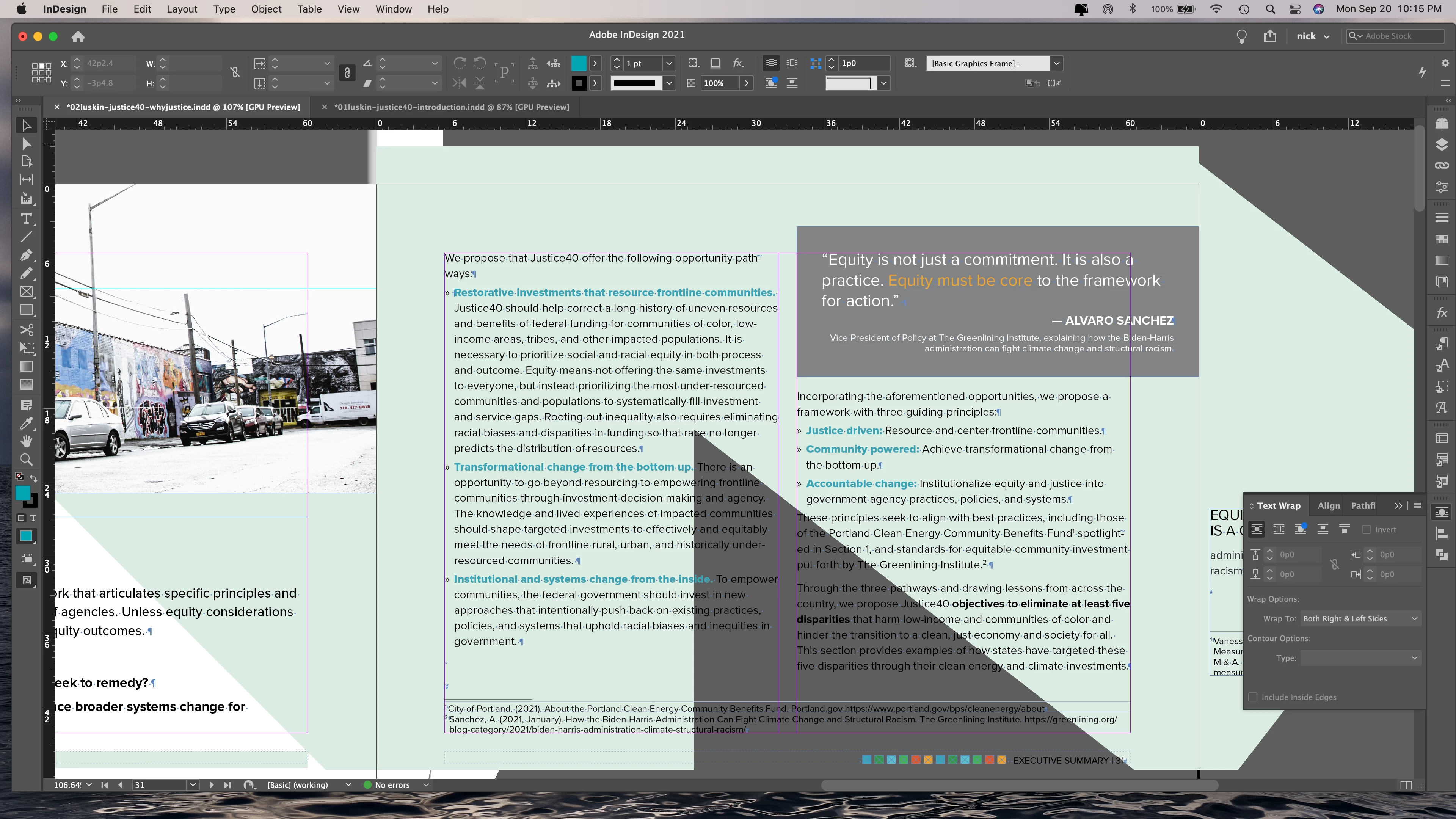
This issue started with Catalina and has persisted with Big Sur: There are occasions when I resize my window or save or navigate and all of a sudden patches of color appear in my InDesign document: bands or geometric shapes (see attached; the gray triangle and green background, not pullquote block, are what I'm talking about). Typically the colors are ones I'm using in my document, so that's not random. I usually close the document and/or restart the program. I've also restarted and trashed prefs (aaargh) and/or reinstalled on occasion. But it keeps happening. And last night I was working on a document and all of sudden I'm getting text scored through and yellow highlighting (indicating H&J errors — except that feature wasn't highlighted in Composition>Preferences). Anyone know what this might be about? I have a feeling it's a CPU or redraw issue, perhaps a setting is off, but I've not had this before on my 2017 MacBook Pro, which has adequate memory and disc space. I can also say that ID also launches more slowly, with spinning wheeel, on a regular basis, since Catalina. I've deactivated as many fonts as I can (except for those crappy Noto fonts, which one can't deactivate; thanks Apple). 
2 replies

Participant
November 8, 2022

Have you been able to resolve this issue? I'm having the same trouble and can't seem to get to the bottom of it. 

jmlevy
Community Expert
Community Expert
November 8, 2022

Did you try the suggestion given by S_Gans? It should work.

I suggest in ID, do Indesign>Preferences>GPU Performance, and try turning OFF the checkbox.

Known Participant
November 8, 2022

Thanks. I didn't turn it off because the interface says things are compatible, but I haven't noticed this lately. so I'm keeping my fingers crossed that InDesign 2023 will cooperate with iOS Ventura and so far that seems the case. EXCEPT for when one clicks on the font drop menu arrow in the control panel: You get the spinning ball of death for a while, and then it calms down. This seems to be a Creative Suite "feature." Now if only we could get rid of all those NOTO fonts!

S_Gans
Community Expert
Community Expert
September 22, 2021

Hi. It seems each MacOS update is treating the GPU differently, as well as changes in the Adobe requirements for each app. I HAVE to believe that your 2017 MBP has a GPU that would suit this, but it may be worth checking. I suggest in ID, do Indesign>Preferences>GPU Performance, and try turning OFF the checkbox. Then restart and test things again. If things work, then there's a bug with the software with your GPU, and I'd suggest searching https://indesign.uservoice.com/forums/601180-adobe-indesign-bugs to see if the issue is already reported, and upvote that one, or create a new bug report there.

For more information on the GPU for ID, please see: https://helpx.adobe.com/indesign/using/gpu_performance.html

Adobe Community Expert / Adobe Certified Instructor
tonyinthecitytoo
Participating Frequently
March 4, 2024

Good to know it's not just a curse I have to deal with alone. The random patches of color appearing over my layouts has persisted for probably 6 years now. It has spanned 2 machines (A 5K iMac and now an M1 MacBook Pro), multiple macOS updates, and multiple InDesign updates. Here's a screenshot (underneath that red-orange is a full page layout with text and graphics). 

Known Participant
March 4, 2024

Thanks for checking in. This had gone away for me but is now back on my new MacBook Pro M3 Max. I think InDesign is very buggy. It's also -- and this is minor -- the only Adobe program that doesn't minimize into its icon when I double click the top bar.