


Inspiring
July 21, 2022
Answered

What am I doing wrong here? (margins)

  • July 21, 2022
  • 3 replies
  • 397 views

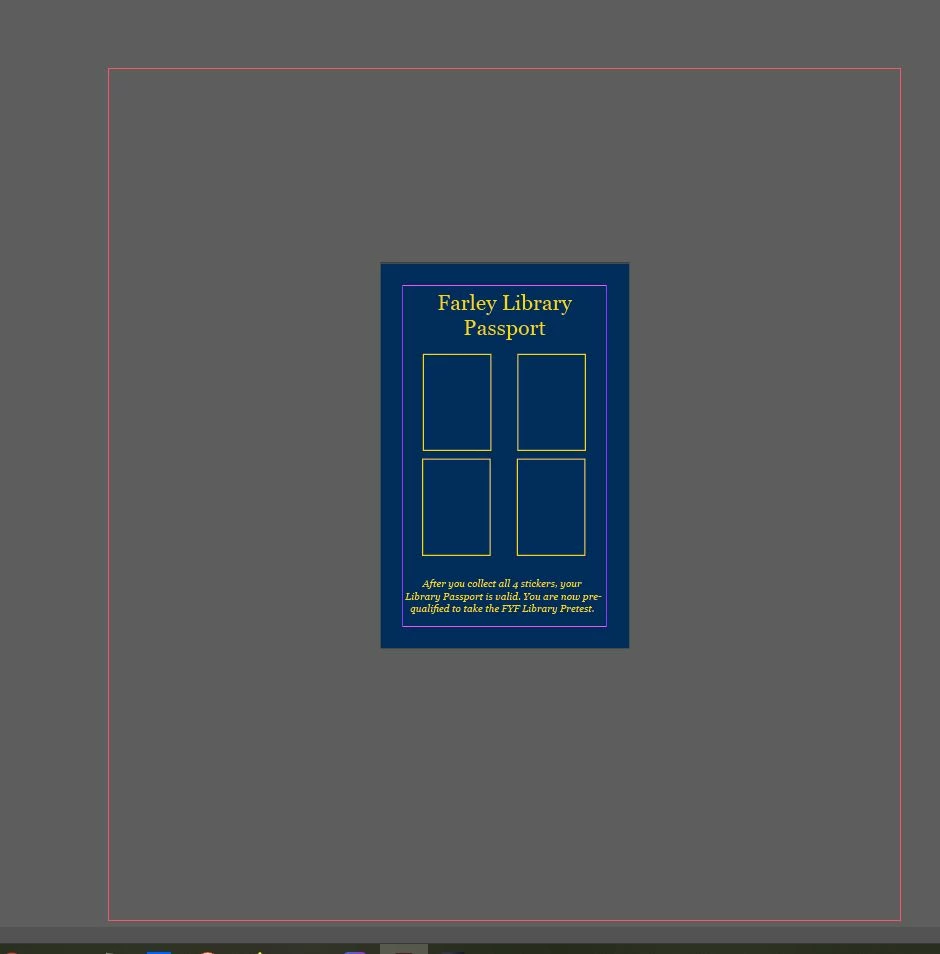
I'm not sure what I'm doing wrong here. I created a half-letter-size document (5.5" x 8.5") with a half-inch margin on all four sides. I got a red margin far away from the actual document (see photo). When I printed the document, the "passport" showed up on the lower right-hand side of the printed document.

I'm a little rusty in InDesign. Used to use it on a daily basis but not anymore.

Thank you!
 

This topic has been closed for replies.
Correct answer hammer0909

That red line is your bleed guide. Any chance you entered a big number for your bleed value? Check it by choosing File > Document Setup.

3 replies

Legend
July 21, 2022

Go back and check your bleed settings: from your screen shot, it looks like the bleed is set to 5 inches instead of 0.5 inches.

Inspiring
July 21, 2022

I think I figured it out. It's a bleed line, which I have now removed. It's printing fine!


hammer0909
Community Expert
hammer0909Community ExpertCorrect answer
Community Expert
July 21, 2022

That red line is your bleed guide. Any chance you entered a big number for your bleed value? Check it by choosing File > Document Setup.