Exit
  • Global community
    • Language:
      • Deutsch
      • English
      • Español
      • Français
      • Português
  • 日本語コミュニティ
  • 한국 커뮤니티
0

What is the script for page selection when exporting pdf?

Guide ,
Jun 17, 2025 Jun 17, 2025

I would like to add an export range to the script for exporting pdfs.
There are a lot of scripts on the internet for exporting pdf's, and it seems that they can only call templates, and do not set the export page.
Is there similar information can be recommended to me?


0669.png

TOPICS
Bug , Feature request , How to , Scripting
1.0K
Translate
Report
Community guidelines
Be kind and respectful, give credit to the original source of content, and search for duplicates before posting. Learn more
community guidelines

correct answers 1 Correct answer

Community Expert , Jun 18, 2025 Jun 18, 2025

This next one looks like you wrote it.
It feels more complete, but it seems like the script isn't responding


Try this:


makeDialog();
//the preset and page range
var pp, pr;
function makeDialog(){
    var theDialog = app.dialogs.add({name:"Choose a Preset", canCancel:true});
    with(theDialog.dialogColumns.add()){
        staticTexts.add({staticLabel:"Export Preset:"});
        staticTexts.add({staticLabel:"Page Range:"});
    }
    with(theDialog.dialogColumns.add()){
        pp = dropdowns.
...
Translate
Community Expert ,
Jun 17, 2025 Jun 17, 2025
Translate
Report
Community guidelines
Be kind and respectful, give credit to the original source of content, and search for duplicates before posting. Learn more
community guidelines
Guide ,
Jun 17, 2025 Jun 17, 2025

Having looked for too many references, it feels a bit complicated.

https://github.com/MoebiusSt/exportPageRangesToPDF.jsx/blob/main/exportPageRangesToPDFs_v206.jsx

Also read this one above, also super complicated ......

The fire is too bad. It's dizzying to watch.


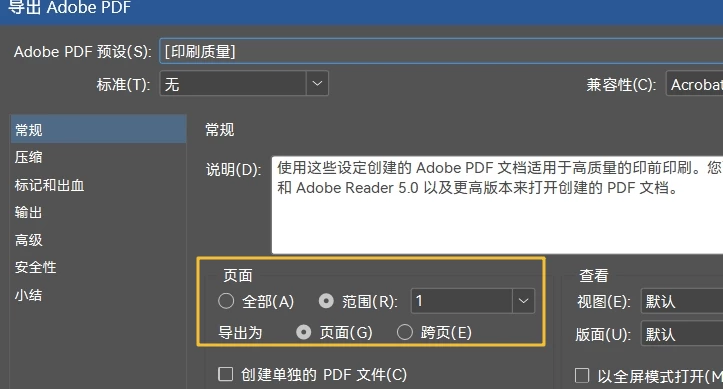
I just want to receive these four things from the dialog box and add them to the code below:

All pages:
Page range:

Single or cross page


pageRange = PageRange.ALL_PAGES;
pageRange = PageRange.SELECTED_ITEMS;
exportAsSinglePages=0
or
exportAsSinglePages=1

dublove_0-1750182763998.jpeg

Now it can't set a page number.

/*
原址
https://community.adobe.com/t5/indesign-discussions/can-today-s-date-be-automatically-added-before-the-file-name-when-export-pdf/m-p/15134450
*/
var myDocument = app.activeDocument;


//获取桌面路径
//var desktopPath = "~/Desktop/pdf/";
var desktopPath = Folder.desktop;


var myFileName = myDocument.name.replace(/\.indd$/, ''); // Remove the .indd extension
var myDate = new Date();
var myYear = myDate.getFullYear();
var myMonth = ("0" + (myDate.getMonth() + 1)).slice(-2); // Add leading zero
var myDay = ("0" + myDate.getDate()).slice(-2); // Add leading zero
var myFormattedDate = myYear + "-" + myMonth + "-" + myDay;


var myPDFFile = new File(desktopPath + "/" + "pdf" + "/" + myFormattedDate + "-" + myFileName + ".pdf");
//var myPDFFile = new File(myDocument.filePath + "/" + myFormattedDate + "-" + myFileName + ".pdf");

// Create a dialog for selecting the PDF export preset
var myDialog = new Window('dialog', 'Select PDF Export Preset');
myDialog.orientation = 'column';
myDialog.alignChildren = 'left';

var myDropdown = myDialog.add('dropdownlist', undefined, app.pdfExportPresets.everyItem().name);
myDropdown.selection = 0;

var myButtonGroup = myDialog.add('group');
myButtonGroup.orientation = 'row';


myButtonGroup.add('button', undefined, 'OK', { name: 'ok' });
myButtonGroup.add('button', undefined, 'Cancel', { name: 'cancel' });

try {
    if (myDialog.show() == 1) {
        var myPDFExportPreset = app.pdfExportPresets.item(myDropdown.selection.text);
        myDocument.exportFile(ExportFormat.PDF_TYPE, myPDFFile, false, myPDFExportPreset);
    } else {
        alert('Export canceled');
    }
}
catch (e) { alert("PDF文件已打开……") }
Translate
Report
Community guidelines
Be kind and respectful, give credit to the original source of content, and search for duplicates before posting. Learn more
community guidelines
Community Expert ,
Jun 17, 2025 Jun 17, 2025

This is the same with a simple preset dialog


makeDialog();
var pp;   
function makeDialog(){
    var theDialog = app.dialogs.add({name:"Choose a Preset", canCancel:true});
    with(theDialog.dialogColumns.add()){
        pp = dropdowns.add({stringList:app.pdfExportPresets.everyItem().name, selectedIndex:3, minWidth:80});
    }
    if(theDialog.show() == true){
        pp = app.pdfExportPresets.item(pp.selectedIndex);
        main();
        theDialog.destroy();
	}
}

function main(){
    var doc = app.activeDocument;
    //make sure the doc has been saved
    if (!doc.saved) {
        alert("Please Save")
        return
    } 
    //path for the PDF
    var fp = doc.filePath + "/" +  doc.name.replace(/\.[^\.]+$/, '') + ".pdf"
    
    //a temporary preset based on PDF/X-4
    var pre = makePDFPreset("Temp", app.pdfExportPresets.itemByName(pp.name));
    //set adjusted properties, setting pagerange and cropmarks here edit as needed
    pre.properties={pageRange:"1", cropMarks:true}
    //export PDF, file path, show dialog, preset
    doc.exportFile(ExportFormat.pdfType, File(fp), false, pre);
    //remove the temp preset
    pre.remove()
} 

function makePDFPreset(n, bo){
    var ps  = app.pdfExportPresets.itemByName(n);
    if (ps.isValid) {
        return ps;
    } else {
        ps = app.pdfExportPresets.add({name:n});
        ps.properties = bo.properties;
        return ps;
    }
}

Translate
Report
Community guidelines
Be kind and respectful, give credit to the original source of content, and search for duplicates before posting. Learn more
community guidelines
Guide ,
Jun 17, 2025 Jun 17, 2025

Hi @rob day 

Thank you very much.

My intention is to add "Export Page Range Settings"  to the existing panel.

Add page setups while calling existing presets.

The following code may be used.

pageRange = PageRange.ALL_PAGES;
pageRange = PageRange.SELECTED_ITEMS;
exportAsSinglePages=0
or
exportAsSinglePages=1


88.png

The top side works, the bottom side of the code seems to have an error.

Translate
Report
Community guidelines
Be kind and respectful, give credit to the original source of content, and search for duplicates before posting. Learn more
community guidelines
Community Expert ,
Jun 17, 2025 Jun 17, 2025

This exports a PDF to the same folder as the InDesign file using PDF/X-4 as the base preset:


//run the main function
main()

function main(){
    var doc = app.activeDocument;
    //make sure the doc has been saved
    if (!doc.saved) {
        alert("Please Save")
        return
    } 
    //path for the PDF
    var fp = doc.filePath + "/" +  doc.name.replace(/\.[^\.]+$/, '') + ".pdf"
    
    //a temporary preset based on PDF/X-4
    var pre = makePDFPreset("Temp", app.pdfExportPresets.itemByName("[PDF/X-4:2008]"));
    //set adjusted properties
    pre.properties={pageRange:"1", cropMarks:true}
    //export PDF, file path, show dialog, preset
    doc.exportFile(ExportFormat.pdfType, File(fp), false, pre);
    //remove the temp preset
    pre.remove()
} 

function makePDFPreset(n, bo){
    var ps  = app.pdfExportPresets.itemByName(n);
    if (ps.isValid) {
        return ps;
    } else {
        ps = app.pdfExportPresets.add({name:n});
        ps.properties = bo.properties;
        return ps;
    }
}
Translate
Report
Community guidelines
Be kind and respectful, give credit to the original source of content, and search for duplicates before posting. Learn more
community guidelines
Guide ,
Jun 17, 2025 Jun 17, 2025

Find this.

//DESCRIPTION:Export page ranges with single PDF Export Dialog
// Modified on 02-Mar-2025

pglist = prompt('Page list', '');
path = app.activeDocument.fullName.path;
//pglist = pglist.split(/,\s*/);

// Ask the user to manually configure the export settings once
var pdfFile = new File(path + '/temp_export.pdf');
app.activeDocument.exportFile(ExportFormat.PDF_TYPE, pdfFile, true); // Opens dialog once
pdfFile.remove(); // Delete temporary file

// Apply the same settings to the rest
for (i = 0; i < pglist.length; i++) {
    app.pdfExportPreferences.pageRange = pglist[i];
    var finalPdfFile = new File(path + '/pages_' + pglist[i] + '.pdf');
    app.activeDocument.exportFile(ExportFormat.PDF_TYPE, finalPdfFile, false); // Uses the same settings


@rob day 

This next one looks like you wrote it.
It feels more complete, but it seems like the script isn't responding

makeDialog();
var pp, pglist;

function makeDialog(){
    var theDialog = app.dialogs.add({name:"Choose a Preset", canCancel:true});
    with(theDialog.dialogColumns.add()){
        staticTexts.add({staticLabel:"Export Preset:"});
        staticTexts.add({staticLabel:"Page Range:"});
        
    }
    with(theDialog.dialogColumns.add()){
        pp = dropdowns.add({stringList:app.pdfExportPresets.everyItem().name, selectedIndex:3, minWidth:80});
        pglist = textEditboxes.add({editContents:"", minWidth:350});
    }
    if(theDialog.show() == true){
        pp = app.pdfExportPresets.item(pp.selectedIndex);
        pglist = pglist.editContents.split(',');
        var path = app.activeDocument.fullName.path;
        for (i=0; i<pglist.length; i++){
            app.pdfExportPreferences.pageRange = pglist[i];
            app.activeDocument.exportFile(ExportFormat.PDF_TYPE, File(path+'/pages_'+pglist[i]+'.pdf'), false, pp);
        }
        theDialog.destroy();
	}
}


Translate
Report
Community guidelines
Be kind and respectful, give credit to the original source of content, and search for duplicates before posting. Learn more
community guidelines
Community Expert ,
Jun 18, 2025 Jun 18, 2025

This next one looks like you wrote it.
It feels more complete, but it seems like the script isn't responding


Try this:


makeDialog();
//the preset and page range
var pp, pr;
function makeDialog(){
    var theDialog = app.dialogs.add({name:"Choose a Preset", canCancel:true});
    with(theDialog.dialogColumns.add()){
        staticTexts.add({staticLabel:"Export Preset:"});
        staticTexts.add({staticLabel:"Page Range:"});
    }
    with(theDialog.dialogColumns.add()){
        pp = dropdowns.add({stringList:app.pdfExportPresets.everyItem().name, selectedIndex:3});
        pr = textEditboxes.add({editContents:""});
    }
    if(theDialog.show() == true){
        //dialog results preset and page range
        pp = app.pdfExportPresets.item(pp.selectedIndex);
        pr = pr.editContents.split(',');
        main();
        theDialog.destroy();
	}
}

function main(){
    var doc = app.activeDocument;
    //make sure the doc has been saved
    if (!doc.saved) {
        alert("Please Save")
        return
    } 
    //path for the PDF export
    var fp = doc.filePath + "/" +  doc.name.replace(/\.[^\.]+$/, '') + ".pdf"
    //the selected preset to use
    var pre  = app.pdfExportPresets.itemByName(pp.name);
    //the page range (needs to be a string)
    app.pdfExportPreferences.pageRange = pr.toString()
    //export PDF, file path, show dialog, preset
    doc.exportFile(ExportFormat.pdfType, File(fp), false, pre);
} 

Translate
Report
Community guidelines
Be kind and respectful, give credit to the original source of content, and search for duplicates before posting. Learn more
community guidelines
Guide ,
Jun 18, 2025 Jun 18, 2025

Hi rob day.

This is very nice to learn and use.
Thank you very much.

Translate
Report
Community guidelines
Be kind and respectful, give credit to the original source of content, and search for duplicates before posting. Learn more
community guidelines
Guide ,
Aug 01, 2025 Aug 01, 2025

Hi rob day.

Can I set it to "cross-page" or "single page" here?


I couldn't find it here.
https://www.indesignjs.de/extendscriptAPI/indesign-latest/#PDFExportPreference.html

It doesn't seem to be pdfPageLayout.

00222.png

Translate
Report
Community guidelines
Be kind and respectful, give credit to the original source of content, and search for duplicates before posting. Learn more
community guidelines
Community Expert ,
Aug 01, 2025 Aug 01, 2025

Set exportReaderSpreads to true

Translate
Report
Community guidelines
Be kind and respectful, give credit to the original source of content, and search for duplicates before posting. Learn more
community guidelines
Guide ,
Aug 01, 2025 Aug 01, 2025

Is that so? I can't get it.
Another example, I also don't understand how to get the value of selectedButton.

creFolder(exPDFname);
makeDialog();
//the preset and page range
var pdfPre, getpRange;

//var desktopPath = "~/Desktop/pdf/";
var singlePage, spreadPage;
function makeDialog() {
    var theDialog = app.dialogs.add({ name: "PDF  ", canCancel: true, minHeight: 600, minWidth: 400, });
    with (theDialog.dialogColumns.add()) {
        staticTexts.add({ staticLabel: "预设:" });
        staticTexts.add({ staticLabel: "范围:" });
    }
    with (theDialog.dialogColumns.add()) {
        pdfPre = dropdowns.add({ stringList: app.pdfExportPresets.everyItem().name, selectedIndex: 18, minWidth: 80 });
        getpRange = textEditboxes.add({ editContents: "" });
    }

    with (theDialog.dialogColumns.add()) {

        var myRangeButtons = radiobuttonGroups.add();
        with (myRangeButtons) {
            singlePage = radiobuttonControls.add({ staticLabel: "singlePage", checkedState: true, value: false });
            spreadPage = radiobuttonControls.add({ staticLabel: "spreadPage", value: true });
        }
    }
    if (theDialog.show() == true) {
        //对话框结果预设值和页面范围 dialog results preset and page range
        pdfPre = app.pdfExportPresets.item(pdfPre.selectedIndex);
        var myRange = myRangeButtons.selectedButton
        getpRange = getpRange.editContents.split(',');
        theDialog.destroy();
    }
}

function main() {
    var myDocument = app.activeDocument;
 myDocumentmake  sure the myDocument has been saved
    if (!myDocument.saved) {
        alert("Please Save")
        return
    }

    var desktopPath = Folder.desktop;
    var myFileName = myDocument.name.replace(/\.indd$/, ''); // Remove the .indd extension
    var myDate = new Date();
    var myYear = myDate.getFullYear();
    var myMonth = ("0" + (myDate.getMonth() + 1)).slice(-1); // Add leading zero
    var myDay = ("0" + myDate.getDate()).slice(-2); // Add leading zero
    var myPDFFile = new File(desktopPath + "/" + exPDFname + "/" + myFormattedDate + "-" + myFileName + ".pdf");
    myDir = new File(desktopPath + "/" + exPDFname + "/");
    //the selected preset to use
    var preSle = app.pdfExportPresets.itemByName(pdfPre.name);
    app.pdfExportPreferences.pageRange = getpRange.toString()
    app.pdfExportPreferences.exportReaderSpreads = myRange;
    myDocument.exportFile(ExportFormat.PDF_TYPE, false, preSle);
    //the page range (needs to be a string)
}

try {
    main();
    showDialog("已创建于" + myDir, 1000);
}
catch (e) {
    // Call the function
    showDialog("★★你取消 或  PDF已打开★★", 900);
    exit();
}


Translate
Report
Community guidelines
Be kind and respectful, give credit to the original source of content, and search for duplicates before posting. Learn more
community guidelines
Community Expert ,
Aug 02, 2025 Aug 02, 2025

Your code throws errors—what's theDialog


Screen Shot 8.png

Translate
Report
Community guidelines
Be kind and respectful, give credit to the original source of content, and search for duplicates before posting. Learn more
community guidelines
Guide ,
Aug 02, 2025 Aug 02, 2025

Hi rob day.

I have updated the code.


Because it involves calling other local libraries, it is sometimes inconvenient to upload all the code.
You need to create a new "PDF" folder on your desktop.

Translate
Report
Community guidelines
Be kind and respectful, give credit to the original source of content, and search for duplicates before posting. Learn more
community guidelines
Guide ,
Aug 02, 2025 Aug 02, 2025

Hi @rob day 

lease take a look at how the values of singlePage = radiobuttonControls and spreadPage = radiobuttonControls.add are represented.
Thank you.

Translate
Report
Community guidelines
Be kind and respectful, give credit to the original source of content, and search for duplicates before posting. Learn more
community guidelines
Community Expert ,
Aug 03, 2025 Aug 03, 2025

You are no getting the results from the radio buttons


function main() {
    $.writeln(pdfPre)
    //[object PDFExportPreset]
    $.writeln(getpRange)
    //A string could be text
    $.writeln(singlePage)
    //[object RadiobuttonControl] not the result
    $.writeln(spreadPage)
    //[object RadiobuttonControl] not the result
}
Translate
Report
Community guidelines
Be kind and respectful, give credit to the original source of content, and search for duplicates before posting. Learn more
community guidelines
Guide ,
Aug 03, 2025 Aug 03, 2025

Hi rob day

This sentence is clearly wrong.

spreadPage = radiobuttonControls.add({ staticLabel: “spreadPage”, value: true });


Because I didn't know how to write it, I just made it up.

Translate
Report
Community guidelines
Be kind and respectful, give credit to the original source of content, and search for duplicates before posting. Learn more
community guidelines
Guide ,
Aug 03, 2025 Aug 03, 2025

Is this correct?
app.pdfExportPreferences.exportReaderSpreads = true;
If so, I'm close to success.

Translate
Report
Community guidelines
Be kind and respectful, give credit to the original source of content, and search for duplicates before posting. Learn more
community guidelines
Guide ,
Aug 03, 2025 Aug 03, 2025
LATEST
Translate
Report
Community guidelines
Be kind and respectful, give credit to the original source of content, and search for duplicates before posting. Learn more
community guidelines
Guide ,
Jun 18, 2025 Jun 18, 2025
Sadly, time waits for no one.
Couldn't get the dialog to work.
But this one is available and will have to do.
app.pdfExportPreferences.pageRange = PageRange.allPages;

Why not ALL_PAGES?

……

It's weird though.
If the last time you used “File >> Export”.
For example:
you only exported page 2, then the first time you line the script, it also only exports page 2.
Immediately after that, you run the script again and it exports all the pages.

What the hell is this?
Did the 1st time not clear the cache from the previous time?

Translate
Report
Community guidelines
Be kind and respectful, give credit to the original source of content, and search for duplicates before posting. Learn more
community guidelines