



dublove
Legend
July 29, 2025
Answered

What's wrong with this dialog box? I can't get the value.

  • July 29, 2025
  • 4 replies
  • 641 views

Prompt: getCn ,GetCsp is undefined

The dialog box has been bothering me.

Can this mm be entered like this? How can I make the value in this dialog box be mm?


Thank you very much.

var getCn, getCsp;

makeDialog();
alert("columns:" + getCn)
alert("spacing:" + getCsp)
function makeDialog() {
    var theDialog = app.dialogs.add({ name: "Column number and spacing settings", canCancel: true, minHeight: 600, minWidth: 400, });
    with (theDialog.dialogColumns.add()) {
        staticTexts.add({ staticLabel: "number of columns:" });
        staticTexts.add({ staticLabel: "spacing:" });
    }
    with (theDialog.dialogColumns.add()) {
        var getCn = textEditboxes.add({ editContents: "4" });
        var getCsp = textEditboxes.add({ editContents: "6mm" });
    }

    if (theDialog.show() == true) {
        //dialog results preset and page range
        getCn = getCn.editContents.split(',');
        getCsp = getCsp.editContents.split(',');
        theDialog.destroy();
    }
}
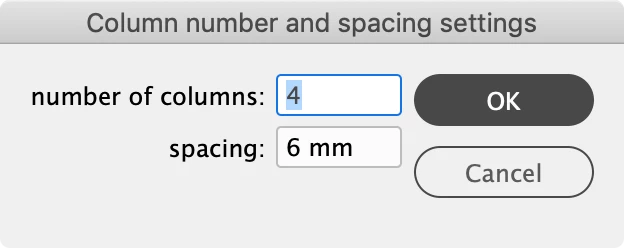
 

Correct answer rob day

Thank you very much.

I just found it somewhere else.

var mm = 2.83465;
I just found it somewhere else.
getCsp = measurementEditboxes.add({ editValue: (6 * mm), editUnits: MeasurementUnits.millimeters });
}
    if (theDialog.show() == true) {
        getCn = getCn.editContents;
        getCsp = getCsp.editValue;
    }


Keep in mind the measurementEditbox box expects editValue to be set as Points—the points are converted to the EditUnits or left as Points if no editUnit is provided.


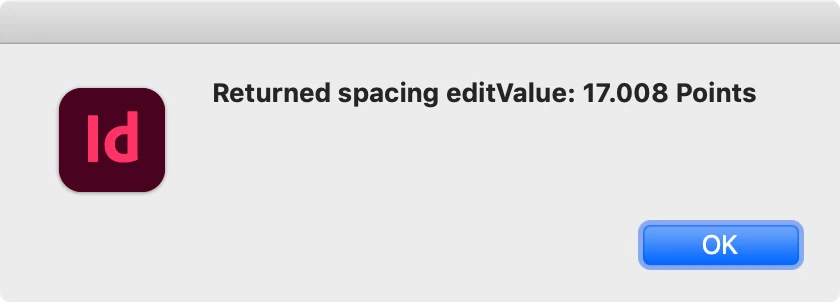
So here the editValue is set to 17.008 but displays as 6mm in the dialog and returns Points no matter what value is entered:


var getCn, getCsp;
makeDialog();
function makeDialog() {
    var theDialog = app.dialogs.add({ name: "Column number and spacing settings", canCancel: true, minHeight: 600, minWidth: 400, });
    with (theDialog.dialogColumns.add()) {
        staticTexts.add({ staticLabel: "number of columns:" });
        staticTexts.add({ staticLabel: "spacing:" });
    }
    with (theDialog.dialogColumns.add()) {
        getCn = integerEditboxes.add({editValue:4});
        getCsp = measurementEditboxes.add({ editValue: 17.008  , editUnits: MeasurementUnits.MILLIMETERS });
    }

    if (theDialog.show() == true) {
        getCn = getCn.editContents;
        getCsp = getCsp.editValue;
        //run a function that uses the global results
        main()
        theDialog.destroy();
    }
}


function main(){
    alert("Returned spacing editValue: " + getCsp + " Points");
}


4 replies

rob day
Community Expert
Community Expert
July 30, 2025

Also, here are the properties available with the InDesign ExtentScript DialogColumn class:


https://www.indesignjs.de/extendscriptAPI/indesign-latest/#DialogColumn.html


An alternative way to make dialogs is with the ScriptUI classes—for simple dialogs I think the InDesign dialog class is easier to learn .

dublove
dubloveAuthor
Legend
August 1, 2025

Hi rob day.
It seems that after spacing, a number needs to be entered, with the default unit being mm.
The requirement is that mm cannot appear in the input box.

Modifying it this way doesn't seem right either.


Okay, you need to set the scale to mm before entering. Are the numbers you enter in mm?
I think I saw that somewhere.


var csp = getCsp;
This causes some strange errors.

But if I change it directly to
var csp = 6;

Everything works fine.


 getCsp = integerEditboxes.add({ editValue: 6 });
        //getCsp = measurementEditboxes.add({ editContents: “6”, editUnits: MeasurementUnits.MILLIMETERS });

rob day
Community Expert
Community Expert
August 1, 2025

Then use realEditBoxes.


Just be aware that you will have to consider what the ruler units are set to—6 could be inches, points, milimeters etc—you would need to set the expected ruler units at the beginnig of the script. With a measurementEditbox the user can set it in the dialog to anything—the current ruler units are not considered. Note that measurementEditbox always converts the unit used to points.


getCsp = realEditboxes.add({editValue:6});
rob day
Community Expert
Community Expert
July 30, 2025

Hi @dublove , Also, your alert() isn’t returning anything because the variables have not been defined yet. And your column field wants to be an integer, so use integerEditboxes. Call a function on the line before destroy():


var getCn, getCsp;

makeDialog();
function makeDialog() {
    var theDialog = app.dialogs.add({ name: "Column number and spacing settings", canCancel: true, minHeight: 600, minWidth: 400, });
    with (theDialog.dialogColumns.add()) {
        staticTexts.add({ staticLabel: "number of columns:" });
        staticTexts.add({ staticLabel: "spacing:" });
    }
    with (theDialog.dialogColumns.add()) {
        getCn = integerEditboxes.add({editValue:4});
        getCsp = measurementEditboxes.add({ editContents: "6" , editUnits: MeasurementUnits.MILLIMETERS});
    }

    if (theDialog.show() == true) {
        getCn = getCn.editContents;
        getCsp = getCsp.editContents;
        //run a function that uses the global results
        main()
        theDialog.destroy();
    }
}


function main(){
    alert("columns: " + getCn + "      spacing: " + getCsp);
}


dublove
dubloveAuthor
Legend
July 31, 2025

Hi Kasyan Servetsky 

Hi rob day 


Thank you both very much.
I just jumped out of another “hole.”
Are the “holes” we step into our own doing?
What a painful day. I suffered all day because of my own “hole.”

Kasyan Servetsky
Legend
July 30, 2025

Prompt: getCn ,GetCsp is undefined

First, you define these variables in the 1st line as globals.

Then inside the makeDialog function, you redefine them as locals -- note var before them -- so they exist only in the function's scope. Finally, you use them (globals) in alerts, but global variables remain untouched -- undefined.

dublove
dubloveAuthor
Legend
July 30, 2025

Hi Kasyan Servetsky.

I couldn't figure it out even after looking at it for a long time.
I'm too careless... I think I can still be saved.
Thank you very much.

Kasyan Servetsky
Legend
July 30, 2025

How about using measurementEditboxes instead of textEditBoxes?

var getCn, getCsp;

makeDialog();
alert("columns: " + getCn);
alert("spacing: " + getCsp);

function makeDialog() {
    var theDialog = app.dialogs.add({ name: "Column number and spacing settings", canCancel: true, minHeight: 600, minWidth: 400, });
    with (theDialog.dialogColumns.add()) {
        staticTexts.add({ staticLabel: "number of columns:" });
        staticTexts.add({ staticLabel: "spacing:" });
    }
    with (theDialog.dialogColumns.add()) {
       getCn = measurementEditboxes.add({ editContents: "4", editUnits: MeasurementUnits.MILLIMETERS});
       getCsp = measurementEditboxes.add({ editContents: "6" , editUnits: MeasurementUnits.MILLIMETERS});
    }

    if (theDialog.show() == true) {
        getCn = getCn.editContents;
        getCsp = getCsp.editContents;
        theDialog.destroy();
    }
}


dublove
dubloveAuthor
Legend
July 30, 2025

@rob day 

Please take a look at this for me, thank you.