


Participant
June 19, 2024
Answered

When printing a PDF my text outlines dissapear

  • June 19, 2024
  • 2 replies
  • 702 views

I´m trying to print a PDF Document with several names on them. They´re all identical, grey gradient with a black outline. Now in my PDF everything shows up how it´s supposed to be, but as soon as i print it, the outline of all but one of the names dissapear.

I can´t convert the text to paths because the outline is not centered and it looks weird after converting it.

I also tried embedding the font and flattening the transparencies, so maybe someone as an idea on why it is still happening or what else I could try?
This topic has been closed for replies.
Correct answer Laubender

Hi @Finest-Folia ,

thank you for your sample InDesign document.

I exported to PDF (Print) with the standard settings PDF/X-4 and PDF/X-1a and found no issues with the outlines on the text. I have to say that the applied font was not installed on my machine.  Tested with InDesign 2024 version 19.4.0.63 on macOS.


So the issue could be with your print driver.

To resolve this you could try to print as bitmap from the PDF when opened in Acrobat.

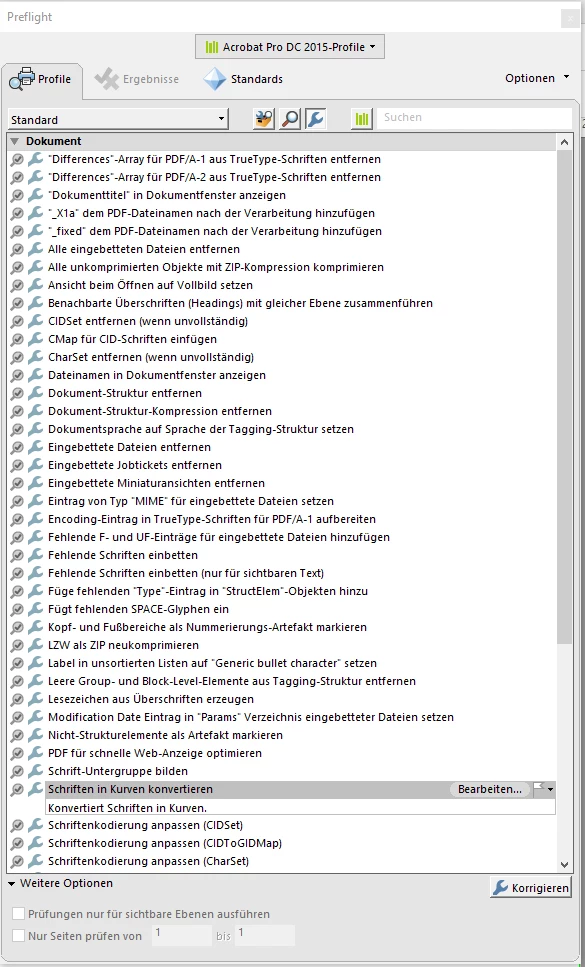
Or you could outline all text in the exported PDF with Acrobat Pro's Preflight function.

And print the result.


From my German Acrobat Pro where I assume that you are using the German version.

Druckproduktion > Preflight > Einzelprofile > Dokument > Schriften in Kurven konvertieren


Regards,
Uwe Laubender
( Adobe Community Expert )

2 replies

LaubenderCommunity ExpertCorrect answer
Community Expert
June 19, 2024

Hi @Finest-Folia ,

thank you for your sample InDesign document.

I exported to PDF (Print) with the standard settings PDF/X-4 and PDF/X-1a and found no issues with the outlines on the text. I have to say that the applied font was not installed on my machine.  Tested with InDesign 2024 version 19.4.0.63 on macOS.


So the issue could be with your print driver.

To resolve this you could try to print as bitmap from the PDF when opened in Acrobat.

Or you could outline all text in the exported PDF with Acrobat Pro's Preflight function.

And print the result.


From my German Acrobat Pro where I assume that you are using the German version.

Druckproduktion > Preflight > Einzelprofile > Dokument > Schriften in Kurven konvertieren


Regards,
Uwe Laubender
( Adobe Community Expert )

Participant
June 19, 2024

It actually worked, actually both of those ideas!

I was worried about the printer not recognising my spot colour, but everything shows the way it´s supposed to. Thank you very much!

Community Expert
June 19, 2024

Hi @Finest-Folia ,

to understand the issue could you show a screenshot of your InDesign layout with frame edges showing?

Or better, could you attach the InDesign document to your answer?

( Use the forum's editor for this. )


Thanks,
Uwe Laubender
( Adobe Community Expert )

Participant
June 19, 2024

Yeah sure, I attached the InDesign file!