


Known Participant
October 23, 2020
Answered

Which CMYK value to use from Pantone conversion?

  • October 23, 2020
  • 7 replies
  • 20663 views

Hi everyone,


I'm hoping somebody might be able to help me out with a Pantone color match question. I'm trying to find the best CMYK match for some brand colors (I'd used an online conversion previously and have since realized what a mistake that was), but I'm confused about what I've discovered.


For example, take PMS 2398 C:


On the Pantone website, the best CMYK match is 97 31 11 59, and the hex is #00BAB3.
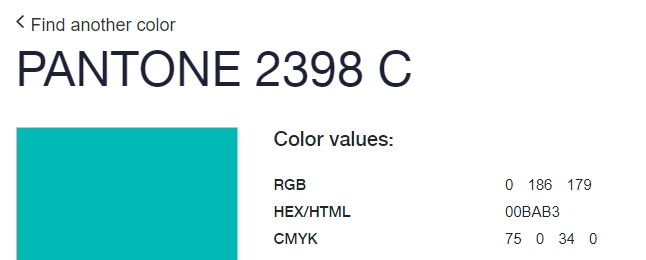


And when I search for it in the Pantone Connect extension, I get the same results.
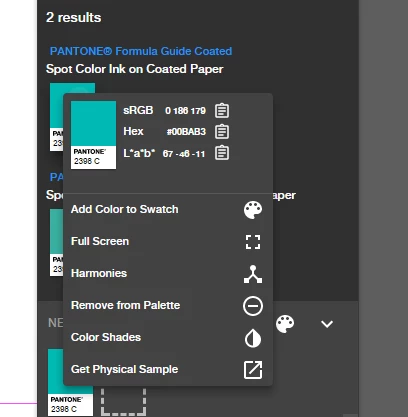


However, when I drag the Pantone Connect swatch over to my CC library, it changes the Hex/RGB values slightly (from #00BAB3 to #00B8B4). Also, when I enter the recommended CMYK values (75,0,34,0), Adobe tells me the hex value should be #00b9b7.


I also tried converting the PMS value to CMYK and RGB following this guide, which gave me CMYK 80,0,37,0 and Hex #00B6B2. 


I'm guessing I shouldn't follow the linked guide, or pay attention to Adobe conversions, and just enter the Pantone #CMYK and RGB values directly, but I wanted to check. Why does Adobe alter the values so much when converting them? And why did it even alter them slightly when all I did was drag it over from the Pantone Connect extension to my CC library? I'm just trying to find what will be the most accurate CMYK match for professional printing.


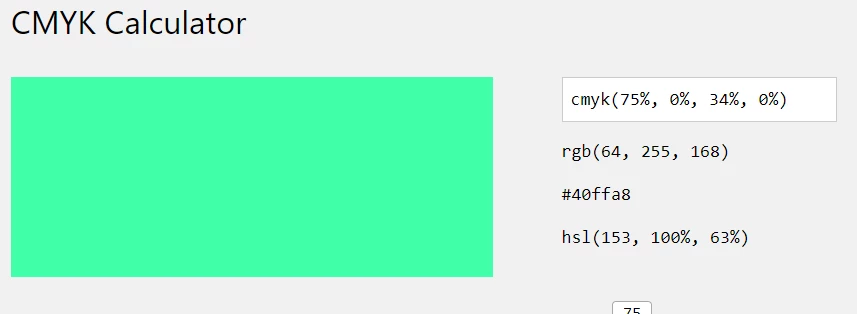
Oh, and to further confuse things, I know I should ignore online sites, but when I enter the CMYK value online, it looks altogether different and is matched to ANOTHER entirely different HEX code. Why?! 
 

This topic has been closed for replies.
Correct answer rob day

Also, it looks like there is a bad bug in the latest Pantone Connect extension. The PANTONE Color Bridge libraries should be defined as process CMYK values—Pantone’s suggested process CMYK value that will simulate the solid ink color.


Pantone introduced the Bridge libraries with CS6 in order to clarify the difference between spot and process colors.


If you choose a Bridge color in the extension, the suggested CMYK value is listed on the swatch, but if you add it to the InDesign Swatches panel you’ll get a Lab swatch (which defeats the purpose of the Bridge libraries). To get the suggested CMYK value, you would need to manually make the swatch as CMYK, or select the Bridge color directly from the ID Swatches pane—Swatches>New Color>Color Mode>PANTONE Bridge


7 replies

casual_Flower98C6
Participating Frequently
April 14, 2021
rob day
Community Expert
rob dayCommunity ExpertCorrect answer
Community Expert
October 26, 2020

Also, it looks like there is a bad bug in the latest Pantone Connect extension. The PANTONE Color Bridge libraries should be defined as process CMYK values—Pantone’s suggested process CMYK value that will simulate the solid ink color.


Pantone introduced the Bridge libraries with CS6 in order to clarify the difference between spot and process colors.


If you choose a Bridge color in the extension, the suggested CMYK value is listed on the swatch, but if you add it to the InDesign Swatches panel you’ll get a Lab swatch (which defeats the purpose of the Bridge libraries). To get the suggested CMYK value, you would need to manually make the swatch as CMYK, or select the Bridge color directly from the ID Swatches pane—Swatches>New Color>Color Mode>PANTONE Bridge


kgbfAuthor
Known Participant
October 30, 2020

Thanks so much, @rob day! This helps a ton.

Community Expert
October 24, 2020

<snip>


Had a much longer post - with wonderful images and setup solution for this - but the forum cut the images out and cut my post short. 


I will revisit with a better post shortly.


kgbfAuthor
Known Participant
October 26, 2020

@Eugene Tyson I look forward to reading it soon!

Legend
October 24, 2020

There is no standard conversion to CMYK. None at all. Pantone stopped giving one years ago for this reason. But the need of their customers for this myth to be true meant that they put back the conversions, even though they are nonsense. Rather than digging deeper and finding even more numbers, I'd recommend studying colour management until you can see why it's nonsense. And stop putting uncalibrated CMYK, RGB and hex in branding guides, it is dangerous to your brand! 

rob day
Community Expert
Community Expert
October 24, 2020

 Pantone stopped giving one years ago for this reason.


The PANTONE + Color Bridge libraries are defined as process CMYK simulations, and the PANTONE + Solid libraries are defined as Lab Spots, which would be instrument read from printed solid ink swatches.


The libraries that ship with CC haven’t been updated since CS6, now you have to use the Pantone Color Manager app in order to export updated .acb libraries.


Mike Witherell
Community Expert
Community Expert
October 24, 2020

So, in addition to the heady stuff Rob just illuminated, here are 2 questions for you:

1. How have you set up your color management method from Photoshop and on down to InDesign, Illustrator, and Acrobat PDF?

2. What color mode is your InDesign document? CMYK or RGB (check Edit > Transparency Blendspace > )

and maybe a third question:

3. Are you intending to turn on the Proof Colors switch (View menu) in order to get InDesign to pretend to look like the output colorspace

All 2 or 3 of these color situations can trigger a translation of that color value you want.

Mike Witherell
kgbfAuthor
Known Participant
October 26, 2020

Thanks Mike! To answer your questions, I have my color settings synchronized across apps to North America General Purpose 2, with RGB at sRGB IEC1966-2.1 and CMYK at US Web Coated (SWOP) v2. RGB is set to preserve embedded profiles, and CMYK is set to "preserve numbers (ignore linked profiles)". At the time I posted this question, I had the color mode in CMYK, but I'll need to have some documents in RGB color mode as well.


I guess I'm still just a little confused as to what process to follow for something like a brand standards document. I need to be able to give CMYK and RGB values to a range of folks with different design knowledge.

Legend
October 26, 2020

I'm looking for a solution, and am a beginner, @Test Screen Name. If you have an alternative method I could follow, that would be helpful. Otherwise, I am still lost and only further confused by your comments. 


The point we are trying to make is that converting a standard colour to RGB or to CMYK will give results that will not give consistent colour, because RGB "numbers" and CMYK "numbers" are not the same for everyone. That means if you put them in a branding guide you will produce an inconstent branding, and the brand will suffer. So don't. You HAVE a standard colour, PMS 2398 C. That is what belongs in the branding guide.


You MIGHT also add a web colour, made by convering to sRGB (specifically sRGB, not just some random RGB). This is needed because web design is based on RGB (also known as hex colours, but the same thing), and sRGB is the web standard. 


On no account include any conversion to CMYK. People who need to work in CMYK need the requisite knowledge to work with Lab simulations and convert to their target device, and if they can't do that, they should not be allowed near CMYK work.

rob day
Community Expert
Community Expert
October 23, 2020

The Pantone Coated solid ink colors are defined as Lab, so the Lab value listed in the Pantone Connect Extension is the actual color you will get when you add the color to your Swatches panel.


The sRGB and Hex values listed in Connect would be Pantone’s suggested conversion from Lab into sRGB, but there are a number of color preference settings that would affect the conversion if you make it with a CC app— Pantone doesn’t let you know how they make their conversions. 


Changing the document’s assigned RGB profile, or the Conversion Options in Color Settings (Intent, or Engine) would affect the RBG or RGB Hex conversion numbers you get in the Color Picker. If I open your color in InDesign’s Color Picker,  the Lab values exactly match the Connect Lab values. The RGB, Hex, and CMYK values are color managed conversions from Lab color based on the document’s assigned color settings:


If I open Color Settings and change the Intent and Engine, it affects the RGB conversion numbers:


If I change the document’s assigned CMYK profile, the Picker’s CMYK conversion is affected by the changed output profile assignment. Hex values are an RGB notation, so a CMYK value has to be converted back to RGB in order to get a hex equivalent.


Web conversion charts are basically worthless because HTML code has no color management capabilities.


Here’s the 2398C Lab conversion to Euroscale Coated CMYK


Community Expert
October 23, 2020

None of the automatic conversions or pre-set matches are perfect. Some are reasonalby close, and some are pretty far off. I have had better luck using the Solid Color fan guide and the CMYK fan guide, and doing my own comparison until I found the match that looked the closest to me.