
Exit
  • Global community
    • Language:
      • Deutsch
      • English
      • Español
      • Français
      • Português
  • 日本語コミュニティ
  • 한국 커뮤니티
0

White Lines on Preview Mode

New Here ,
Apr 10, 2018 Apr 10, 2018

I know an attempt to address this issue has been discussed in previous threads dating back a few years, but those solutions are not working for me and I'm not sure if they're directed at the new Cloud version of Adobe.

When in preview mode, there are a lot of white lines through my files. They shift around when I scroll, zoom in, out, etc. When I toggle from Overprint Preview to no Overprint Preview, they disappear until I scroll, zoom out, etc. The same happens when I hide or show the ruler.

I use the Cloud version of InDesign and this started happening about 2 months ago. Obviously this must not be a global issue because I'd be seeing much more about this. Is this specific to me? My computer? Or the product in general? I appreciate any help this forum can provide.


3.6K
Translate
Report
Community guidelines
Be kind and respectful, give credit to the original source of content, and search for duplicates before posting. Learn more
community guidelines

correct answers 1 Correct answer

Community Expert , Apr 10, 2018 Apr 10, 2018

It sounds like you might be referring to a well known bug with GPU Performance. Try turning it off in InDesign preferences.

Translate
Community Expert ,
Apr 10, 2018 Apr 10, 2018

It sounds like you might be referring to a well known bug with GPU Performance. Try turning it off in InDesign preferences.

Translate
Report
Community guidelines
Be kind and respectful, give credit to the original source of content, and search for duplicates before posting. Learn more
community guidelines
New Here ,
Apr 10, 2018 Apr 10, 2018

Thanks for this suggestion. I gave this a try but it didn't seem to do the trick.

Translate
Report
Community guidelines
Be kind and respectful, give credit to the original source of content, and search for duplicates before posting. Learn more
community guidelines
Community Expert ,
Apr 10, 2018 Apr 10, 2018

I really don't know what issue you're referring to. If Bill's guess is not it, please post screenshots.

Translate
Report
Community guidelines
Be kind and respectful, give credit to the original source of content, and search for duplicates before posting. Learn more
community guidelines
Community Expert ,
Apr 10, 2018 Apr 10, 2018

please post a snap shot of the problem!

Ch

Translate
Report
Community guidelines
Be kind and respectful, give credit to the original source of content, and search for duplicates before posting. Learn more
community guidelines
New Here ,
Apr 10, 2018 Apr 10, 2018

Here is a screen shot. You can see there are white lines (although the one at the very top of the image is black).
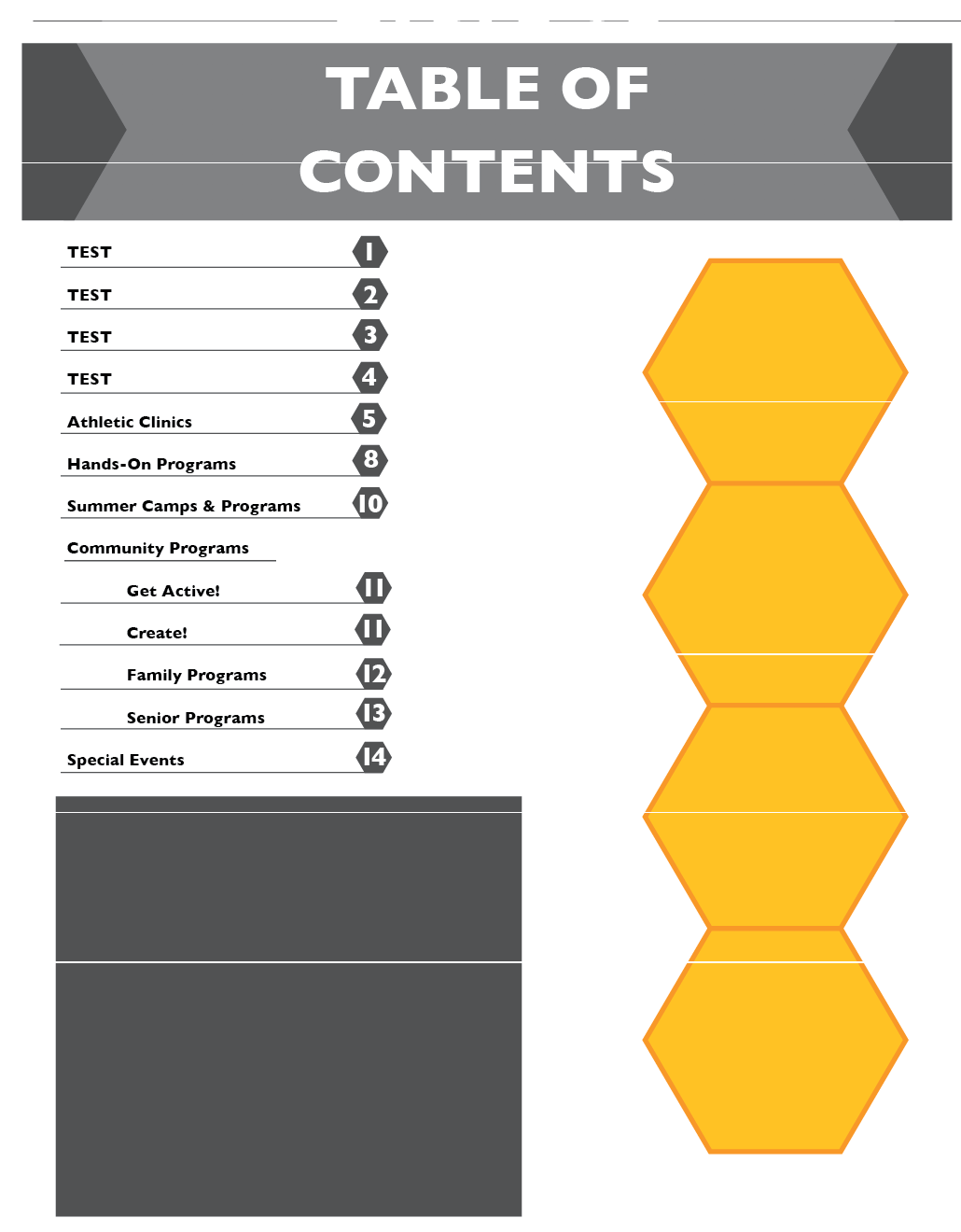
2018-04-10_2011.png

Translate
Report
Community guidelines
Be kind and respectful, give credit to the original source of content, and search for duplicates before posting. Learn more
community guidelines
New Here ,
Apr 10, 2018 Apr 10, 2018

This is another screen shot that shows the issue a little better:

2018-04-10_2058.png

Translate
Report
Community guidelines
Be kind and respectful, give credit to the original source of content, and search for duplicates before posting. Learn more
community guidelines
Community Expert ,
Apr 10, 2018 Apr 10, 2018

Did you test it on other files it could be a screen issue and not InDesign. Try to open other files also in other application.

Chana

Translate
Report
Community guidelines
Be kind and respectful, give credit to the original source of content, and search for duplicates before posting. Learn more
community guidelines
Community Expert ,
Apr 10, 2018 Apr 10, 2018

What version of InDesign? What operating system?

Translate
Report
Community guidelines
Be kind and respectful, give credit to the original source of content, and search for duplicates before posting. Learn more
community guidelines
New Here ,
Apr 12, 2018 Apr 12, 2018

I'm using Creative Cloud on a mac. It's just on inDesign, not other applications.

Translate
Report
Community guidelines
Be kind and respectful, give credit to the original source of content, and search for duplicates before posting. Learn more
community guidelines
New Here ,
May 08, 2018 May 08, 2018

I'm following-up on this thread as this issue seems to be getting worse. I'm noticing it in Adobe Illustrator and Indesign - the Cloud version. I'm not sure what to do at this point. Here's another screen shot of a file. The white text should be white - the blue lines should not be on it and they change position if I toggle between preview and overprint preview. Sometimes the file has white lines through it, and sometimes there are gray boxes depending on the mode I'm in. Any help would be greatly appreciated!

graphic-example.png

Translate
Report
Community guidelines
Be kind and respectful, give credit to the original source of content, and search for duplicates before posting. Learn more
community guidelines
Community Expert ,
May 08, 2018 May 08, 2018

Bill gave the best answer way back when in post 1.

Translate
Report
Community guidelines
Be kind and respectful, give credit to the original source of content, and search for duplicates before posting. Learn more
community guidelines
Explorer ,
Jul 30, 2019 Jul 30, 2019

I have the same issue. Toggling rulers on seems to solve it.

Translate
Report
Community guidelines
Be kind and respectful, give credit to the original source of content, and search for duplicates before posting. Learn more
community guidelines
Community Expert ,
Jul 30, 2019 Jul 30, 2019

herb4  schreef

I have the same issue. Toggling rulers on seems to solve it.

What that does is simply redrawing the screen, you can also zoom in, out etc to forcec a screen redraw. The problem  here is the GPU rendering that is bad in InDesign, stll.

Translate
Report
Community guidelines
Be kind and respectful, give credit to the original source of content, and search for duplicates before posting. Learn more
community guidelines
Contributor ,
May 24, 2024 May 24, 2024
LATEST

it is still there, and I still couldn't find what is related to... also I have no GPU settings in Preferences

sometimes it shows on, sometimes not... the line is still on the same place no matter what page zoom is used

Translate
Report
Community guidelines
Be kind and respectful, give credit to the original source of content, and search for duplicates before posting. Learn more
community guidelines