

Participant
June 3, 2017
Answered

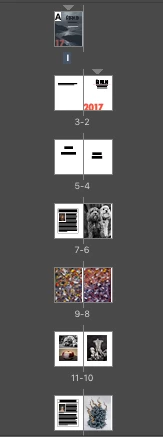
Why are my pages numbering from right to left. How do I fix it

  • June 3, 2017
  • 5 replies
  • 6840 views

Why is this happening? How do I fix it? Help please!
    Correct answer amaarora

    Hi,

    That is simply because you are not using an English version but an Arabic (Or middle eastern) version of InDesign.

    All you now need to do is to change the binding of your document from the document options. Something like this...

    1. Original document
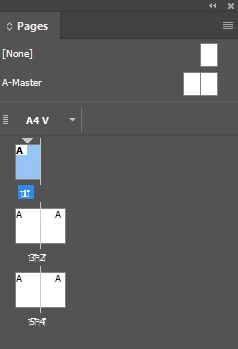
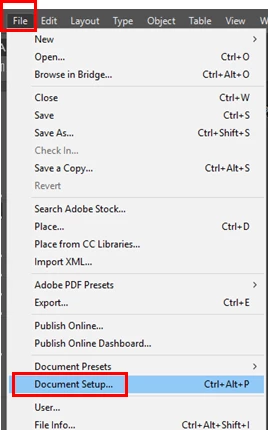
    2. Go to Document Setup
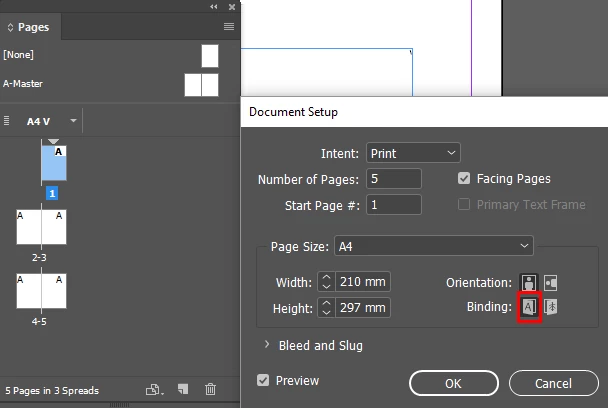
    3. Change the binding to Left to Right
    Let me know if this is your case

    -Aman

    5 replies

    Community Expert
    July 14, 2020

    Hi Alexandra,

    one could also execute a little ExtendScript (JavaScript) code to change the binding of the active document:


    app.documents[0].documentPreferences.pageBinding =
    PageBindingOptions.LEFT_TO_RIGHT ;
    
    /*
    
    Available values for pageBinding:
    
    PageBindingOptions.LEFT_TO_RIGHT
    PageBindingOptions.DEFAULT_VALUE
    PageBindingOptions.RIGHT_TO_LEFT
    
    */


    Also check if value PageBindingOptions.DEFAULT_VALUE is already doing the trick.

    How to save code as script file, install the script file and run the script with InDesign's Scripts panel see:

    https://www.indiscripts.com/pages/help#hd0sb2


    Regards,
    Uwe Laubender

    ( ACP )

    Participant
    April 1, 2025

    This script worked wonderfully, thank you so much for helping me 5 years later.

    Community Expert
    April 1, 2025

    Hi @jose_0243 ,

    that's the beauty of InDesign's ExtendScript scripts where 5 or more years later most of the little scripts one can find here in the forum will work without any changes in the latest versions of InDesign.

    FWIW: The biggest changes with ExtendScript and InDesign's representation of features scriptwise were between InDesign CS4 (version 6.0) and InDesign CS5 (version 7.0) about 14 years ago!


    Regards,
    Uwe Laubender
    ( Adobe Community Expert )

    Participant
    July 14, 2020

    Fantastic, thank you! 

    Indeed, I had to switch to the middle eastern version once – and apparently never switched back.

    Barb Binder
    Community Expert
    Community Expert
    June 3, 2017

    Now we understand what happened. Did you try File > Place?

    ~Barb at Rocky Mountain Training
    amaarora
    Community Manager
    amaaroraCommunity ManagerCorrect answer
    Community Manager
    June 3, 2017

    Hi,

    That is simply because you are not using an English version but an Arabic (Or middle eastern) version of InDesign.

    All you now need to do is to change the binding of your document from the document options. Something like this...

    1. Original document

    2. Go to Document Setup

    3. Change the binding to Left to Right

    Let me know if this is your case

    -Aman

    Participant
    June 3, 2017

    I think you are right. This document was created on a computer that was set up for Arabic. However, I do not have the binding option on my document set up menu. Do you know where I can find it?

    amaarora
    Community Manager
    Community Manager
    June 3, 2017

    Hi,

    It can not be done from your English version.

    I recommend you get the binding option changes through the machine from which this document was made.

    Another way (not recommended over your English InDesign and hence try with your own discretion) is Find and install Hebrew or Arabic editions of InDesign CC or Illustrator CC

    -Aman

    Barb Binder
    Community Expert
    Community Expert
    June 3, 2017

    That's interesting. Any idea how this occurred? Is it associated with a language setting? Is this a new installation of InDesign?

    The only thing I can suggest is to create a new document with the same document setup (check that the page numbers look normal), and then use File > Place to place these pages into the new file.

    ~Barb at Rocky Mountain Training
