


Why can't I enable GPU performance on my mac mini M4?
Hi everyone,
I recently purchased a new Mac mini with the M4 chip, but I'm encountering significant lagging issues in InDesign. All other Adobe products seem to be working fine, but InDesign is very "laggy." This is especially noticeable when I zoom in on an image or simply scroll through pages. I often have to click somewhere else to get it to refresh or render properly.
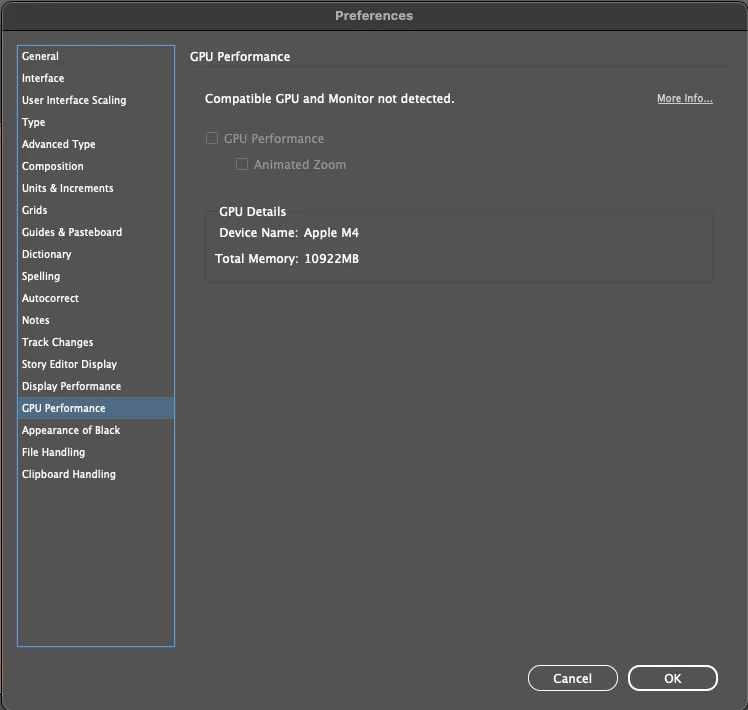
I've read online that I need to enable GPU Performance, but as you can see in the screenshot below, it's unavailable for me.
Could this issue be related to my monitor setup? I'm using a Samsung Odyssey LC24RG50FQI XCI monitor and an XPPen Artist Pro 14 (Gen 2) graphics tablet. Everything is connected with high-quality cables (Samsung via HDMI to HDMI, XPPen via Type-C to Type-C).
I have the latest native version of InDesign installed. I've already tried clearing the cache, reinstalling the program multiple times, and even reinstalling macOS (the latest version,Sequoia 15.5 (24F74)) – all without success. I bought such a powerful computer hoping to work efficiently and quickly, but it's just lagging.
How can I fix this? Any help would be greatly appreciated!
I'm also attaching a YouTube link where I recorded the problem to clearly show it when zooming in on photos https://youtu.be/I9-NDVWzAXU
 AdChoices