


Inspiring
June 4, 2025
Question

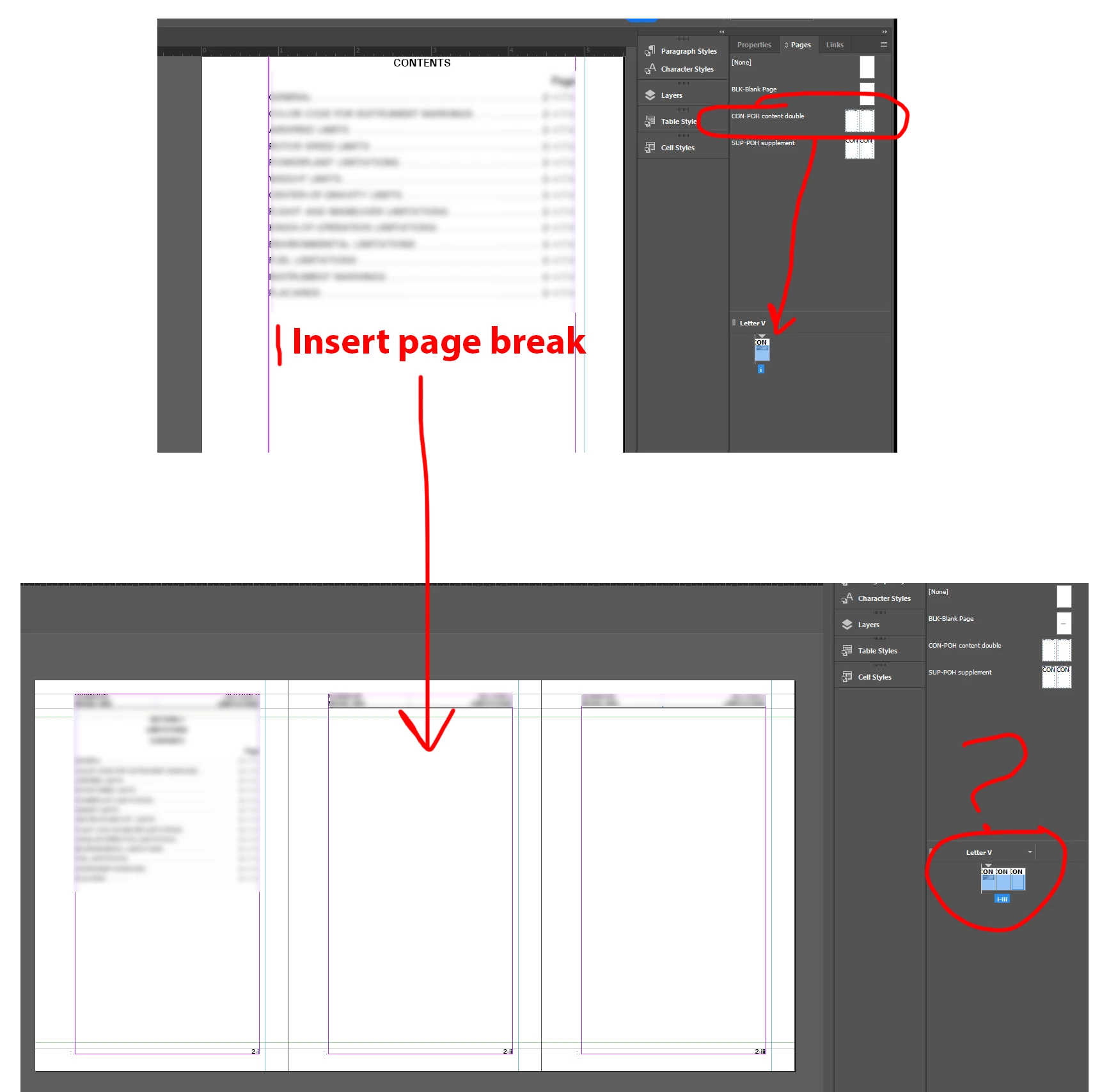
Why does adding a page create a three-page spread?

  • June 4, 2025
  • 6 replies
  • 3091 views

My parent pages are a two-page spread. I have one page, to which the appropriate parent page has been applied. When I insert a page break on that first page, InDesign inexplicably creates a three-page horizontal spread.
 

6 replies

Braniac
June 4, 2025

Hi @Thomas_Calvin:


If you always want the normal right first page then the left/right page flow, keep both on.


This post may be helpful in understanding this very confusing feature: "https://www.rockymountaintraining.com/adobe-indesign-allow-document-pages-or-selected-spread-to-shuffle/


~Barb

Inspiring
June 4, 2025

Thanks Barb, I'll check that out.


The misleading thing here was that turning "shuffle spread" off fixed the endlessly-widening-spread problem by itself, even when "shuffle pages" remained off.

rob day
Braniac
June 4, 2025

Hi @Thomas_Calvin , With your page 1 selected in the Pages panel make sure Allow Document Pages to Shuffle is checked in the Pages panel:


If it is unchecked like this:


And drag the Parent there is the option to conect the new page to the spread (note the connect icon I’m getting when I drag the new page)


With Allow Document Pages to Shuffle is checked I get this:


Inspiring
June 4, 2025

Thanks. In my case, "all pages to shuffle" had been turned off, while "spreads to shuffle" was on. Turning spread-shuffling off restored the normal left/right cadence. After noting that, I did turn page-shuffling back on.

Mike Witherell
Braniac
June 4, 2025

You might export to IDML and reopen the IDML and Save-As to a fresh InDesign document, if you suspect file corruption.

My next question: Why the desire to flow text continuously through threaded text?

Another question: Why not delegate the responsibility to break to the next page with an attribute built into the Paragraph Style? Look in Paragraph Style Options > Keep Options > Start: In Next Frame or On Next Frame?

Mike Witherell
Inspiring
June 4, 2025

Thanks for the suggestions.

My next question: Why the desire to flow text continuously through threaded text?


How else are you supposed to have automatic page addition, and ensure no text is lost?


quote

Another question: Why not delegate the responsibility to break to the next page with an attribute built into the Paragraph Style?


Good question, but we don't have any style that must always appear on a new page.

Inspiring
June 4, 2025

Well, for anyone who finds this, I found the problem:


In this document's Pages options, "Allow selected spread to shuffle" was on. I've never even noticed this option before, let alone activated it. Deactivating it halted the asinine three-page layout. The question is why this setting, which breaks your layout, would be on by default? I won't even ask why it exists.


Also since the last time I checked, "Allow document pages to shuffle" was turned off.

rob day
Braniac
June 4, 2025

In this document's Pages options, "Allow selected spread to shuffle" was on. I've never even noticed this option before


The Allow...Shuffle settings are page not document settings.


When you drag a Parent into the Pages panel pay attention to drag icon—this indicates that I am adding the page to the spread, not starting a new spread.


Inspiring
June 4, 2025

Also pay attention to your Primary Text frames’ threading. If the threading is broken Smart Text Reflow might not work.


Threading should not look like this where the Primary text flow is broken:


Should look like this:


Autoflow text:


Thanks. I'm aware of how the flow should look; that's how I illustrated the broken threading in the three-page spread.


I don't see why the reshuffling option would cause all the text frames in a file to be marked as non-primary all of a sudden. I don't ever apply those options in the Pages panel by using a context menu on child pages.


On the other hand, with the profound selection problems in that panel, there's no telling what gets applied to what, as the user operates in various menus inside and outside of the panel.

Mike Witherell
Braniac
June 4, 2025

I notice the head of your Pages panel labels the pages as Letter V. Maybe for a while it was an alternate layout.

What happens if you click on Pages panel menu button > View Pages > Vertically ?


Also, if you were to turn on Type menu > Show Hidden Characters

Is it possible that you put in two Page Break commands?

Mike Witherell
Inspiring
June 4, 2025

No change. It was set on "alternate layout" for some reason, but evidently that wasn't the problem.


I also changed the blank page to a two-page spread, and this also had no effect.

Mike Witherell
Braniac
June 4, 2025

Hi Thomas,

Could you post a screenshot of your...

File > Document Setup (to see whether Facing Pages is on or off)

and

Pages panel menu button > Flyout menu (to see whether Shuffle is off or on. Both shuffles should be on.)

And why is your blank parent page set to one page when the document is set to two? Or is it?

And under Preferences > Type > is Smart Text Reflow off or on?

Mike Witherell
Inspiring
June 4, 2025

Thanks, Mike. Shuffle is on.


This document hasn't exhibited this behavior before. I created a "new" document by saving the original as something else, then deleting all the pages except the first. So nothing should have changed in the setup. Here's the setup panel.


 "Smart text reflow" is on, set to "End of story."

Our blank pages do not differ from left to right, and historically our docs did not have a continuous flow through the pages. That's what I'm fixing right now.