Inspiring
July 26, 2019
Answered

XML - append child

  • July 26, 2019
  • 1 reply
  • 3037 views

Hi,

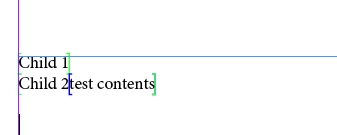
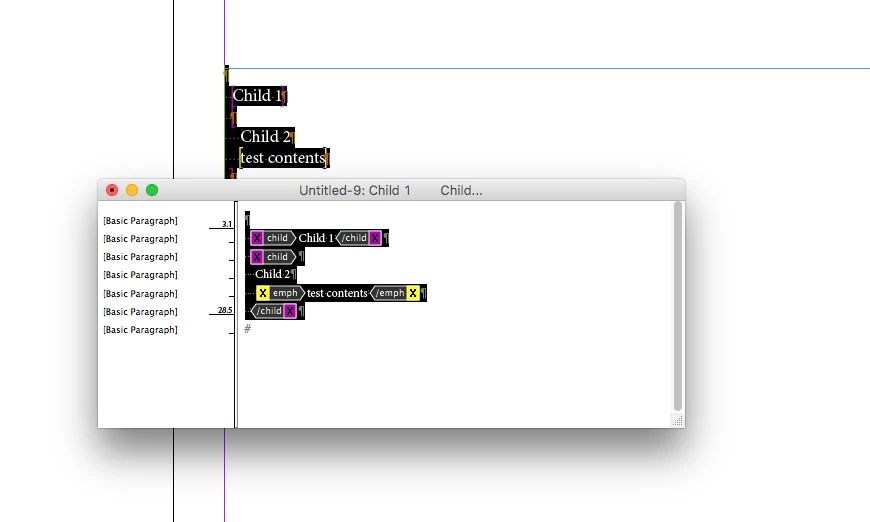
     I am generating new xml from existing xml by reading as xml. Reading elements (specific elements) and appending it into new xml file by using appendChild of xml method. The element which I appending have nested elements so that final xml have the nested elements as new line without space before. But i am appending with space and the elements.  pls. refer the below screenshots.
   

Code:

xmlProcess();

function xmlProcess() {    

      var root = new XML("<root></root>");

      var child = new XML("<child>Child 1</child>");    

      root.appendChild(child);

      var child2 = new XML("<child>Child 2 <emph>test contents</emph></child>");          //

      root.appendChild(child2);

      var file = new File("~/Desktop/test.xml");

      var xml = root.toXMLString();

      file.open("W");

      file.write(xml);

      file.close();


      var doc = app.activeDocument;     

      doc.importXML(file);    

    };


     How to append the element in a single line as it is given in a string..
This topic has been closed for replies.
Correct answer Sunil Yadav

Hi,

     Thank you for your reply... I will check the link which you given...

     Its also gives the same output.


I told you earlier that playing with xml using javascript will get you in little bit trouble with spacing issue :

space getting deleted: this problem has a pattern, that spaces just before a child starts or child ends or a sibling starts or end.

That means near by tag opening and closing spaces you have to look around. you can tackle them with non-breaking space entity.

Here's how you can fight with space deletion near closing or opening tag bracket problems:

xmlProcess(); 

function xmlProcess() {     

    var root = new XML("<root></root>"); 

    var child = new XML("<child>Child 1</child>");     

    root.appendChild(child); 

    var child2 = new XML("<child>Child 2&#160;<emph>test contents</emph></child>");          // 

    root.appendChild(child2); 

    var file = new File("~/Desktop/test.xml"); 

    var xml = root.toXMLString(); 

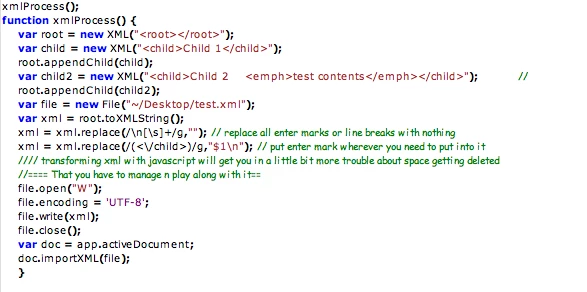
    xml = xml.replace(/\n[\s]+/g,""); // replace all enter marks or line breaks with nothing 

    xml = xml.replace(/(<\/child>)/g,"$1\n"); // put enter mark wherever you need to put into it 

    //// transforming xml with javascript will get you in a little bit more trouble about space getting deleted 

    //==== That you have to manage n play along with it== 

    file.open("W"); 

    file.encoding = 'UTF-8'; 

    file.write(xml); 

    file.close(); 

    var doc = app.activeDocument;      

    doc.importXML(file); 

    }

Best

Sunil

1 reply

Loic.Aigon
Brainiac
July 26, 2019

Hello,

If I am not mistaken, your problem isn't a code one but a indesign one. XML in InDesign is mainly all about a text flow and every indentations made of tabs or spaces will be unless you asked otherwise in teh XML import options be considered as text characters inside InDesign.

So if you want your child two not to be "indented" in the layour, either ask to "Do Not Import Contents Of Whitespace-Only Elements" in the regular import options or set those in the app.xmlImportPreferences…

…Or set prettyIndent to false prior to output your XML String and deal with encoded carriage returns on your own.

FWIW

Loic

Sudha_KAuthor
Inspiring
July 26, 2019

Hi,

     I am inserting the elements (child2) with emph tag as single.  but in generated xml, its in next line.

     please check the xml structure generated in desktop.

Sudha_KAuthor
Inspiring
August 1, 2019

I told you earlier that playing with xml using javascript will get you in little bit trouble with spacing issue :

space getting deleted: this problem has a pattern, that spaces just before a child starts or child ends or a sibling starts or end.

That means near by tag opening and closing spaces you have to look around. you can tackle them with non-breaking space entity.

Here's how you can fight with space deletion near closing or opening tag bracket problems:

xmlProcess(); 

function xmlProcess() {     

    var root = new XML("<root></root>"); 

    var child = new XML("<child>Child 1</child>");     

    root.appendChild(child); 

    var child2 = new XML("<child>Child 2&#160;<emph>test contents</emph></child>");          // 

    root.appendChild(child2); 

    var file = new File("~/Desktop/test.xml"); 

    var xml = root.toXMLString(); 

    xml = xml.replace(/\n[\s]+/g,""); // replace all enter marks or line breaks with nothing 

    xml = xml.replace(/(<\/child>)/g,"$1\n"); // put enter mark wherever you need to put into it 

    //// transforming xml with javascript will get you in a little bit more trouble about space getting deleted 

    //==== That you have to manage n play along with it== 

    file.open("W"); 

    file.encoding = 'UTF-8'; 

    file.write(xml); 

    file.close(); 

    var doc = app.activeDocument;      

    doc.importXML(file); 

    }

Best

Sunil


Hi,

     You have used entity for space to retain the space right.

     When appending child we need to replace the space to entity and need to proceed? Is it right method to proceed with an existing xml file?