Vinícius Amaral
Known Participant
October 24, 2017
Answered

Execute a VBScript inside a JavaScript

  • October 24, 2017
  • 1 reply
  • 15390 views

Hi there

How are you doing?

I´ve found an excellent script from IndiSnip [InDesign® Snippets] | Adobe® InDesign® Scripting Snippets

It´s a VBScript that I would like to use inside a JavaScript.

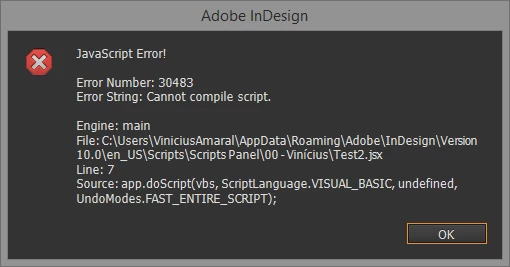
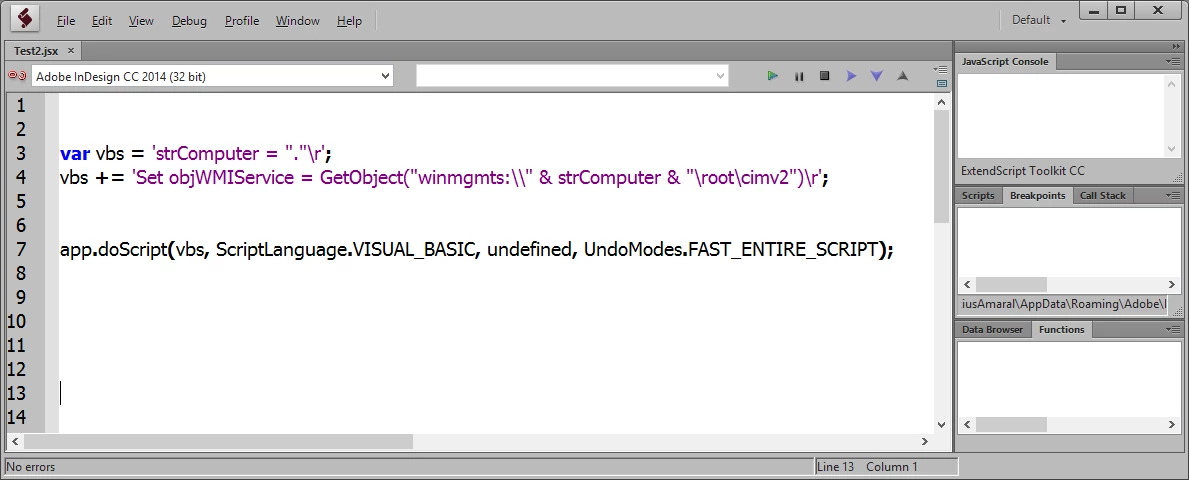
When I use it as a VBS file, everything works good, but I am not successful when I write it in JavaScript using the
app.doScript('My VBSCript line', ScriptLanguage.visualBasic);

I did it in many ways, I could not complete the script in debug mode.

Anyone could help me?

Link of script:

Get network adapter Name/MAC/Speed | IndiSnip [InDesign® Snippets]

Thanks

strComputer = "."

SetobjWMIService = GetObject("winmgmts:\\"& strComputer & "\root\cimv2")

SetIPConfigSet = objWMIService.ExecQuery ("SELECT * FROM Win32_NetworkAdapterConfiguration WHERE IPEnabled = True")

SetobjWMI = GetObject("winmgmts:\\"& strComputer & "\root\WMI")

SetAdaptInfo = objWMI.InstancesOf("MSNdis_LinkSpeed WHERE Active = True",48)

ForEachadaptInfo in AdaptInfo

    AdaptNameLink = AdaptNameLink & adaptInfo.InstanceName & vbNewLine

    AdaptSpeed = AdaptSpeed & adaptInfo.NdisLinkSpeed & vbNewLine

Next

ForEachIPConfig in IPConfigSet

    IfNotIsNull(IPConfig.Description) Then

        AdaptName = AdaptName + IPConfig.Description & vbNewLine

    EndIf

    IfNotIsNull(IPConfig.MACAddress) Then

        MACadd = MACadd + IPConfig.MACAddress & vbNewLine

    EndIf

Next

app.scriptArgs.SetValue "myAdaptNameLink", AdaptNameLink

app.scriptArgs.SetValue "myAdaptSpeed", AdaptSpeed

app.scriptArgs.SetValue "myAdapt", AdaptName

app.scriptArgs.SetValue "myMAC", MACadd
This topic has been closed for replies.
Correct answer Kasyan Servetsky

Kas

When I try to execute the VBS as a string in the JS, it not works.
When I do it separated, it works fine.

I would like to convert it in a binary file, and the file as a VBS, I can´t.

The AppleScript made using the same idea works fine on Mac.


Oh sorry, I forgot to mention: you have to double the backslashes in the vbs string.

This code works:

main();

function main() {

    var vbs = 'strComputer = "."\r';

    vbs += 'Set objWMIService = GetObject("winmgmts:\\\\" & strComputer & "\\root\\cimv2")\r';

    vbs += 'Set IPConfigSet = objWMIService.ExecQuery ("SELECT * FROM Win32_NetworkAdapterConfiguration WHERE IPEnabled = True")\r';

    vbs += 'Set objWMI = GetObject("winmgmts:\\\\" & strComputer & "\\root\\WMI")\r';

    vbs += 'Set AdaptInfo = objWMI.InstancesOf("MSNdis_LinkSpeed WHERE Active = True",48)\r';

    vbs += 'For Each adaptInfo in AdaptInfo\r';

    vbs += 'AdaptNameLink = AdaptNameLink & adaptInfo.InstanceName & vbNewLine\r';

    vbs += 'AdaptSpeed = AdaptSpeed & adaptInfo.NdisLinkSpeed & vbNewLine\r';

    vbs += 'Next\r';

    vbs += 'For Each IPConfig in IPConfigSet\r';

    vbs += 'If Not IsNull(IPConfig.Description) Then\r';

    vbs += 'AdaptName = AdaptName + IPConfig.Description & vbNewLine\r';

    vbs += 'End If\r';

    vbs += 'If Not IsNull(IPConfig.MACAddress) Then\r';

    vbs += 'MACadd = MACadd + IPConfig.MACAddress & vbNewLine\r';

    vbs += 'End If\r';

    vbs += 'Next\r';

    vbs += 'app.scriptArgs.SetValue "myAdaptNameLink", AdaptNameLink\r';

    vbs += 'app.scriptArgs.SetValue "myAdaptSpeed", AdaptSpeed\r';

    vbs += 'app.scriptArgs.SetValue "myAdapt", AdaptName\r';

    vbs += 'app.scriptArgs.SetValue "myMAC", MACadd\r';

    app.doScript(vbs, ScriptLanguage.VISUAL_BASIC, undefined, UndoModes.FAST_ENTIRE_SCRIPT);

}

var myAdaptName = app.scriptArgs.getValue("myAdaptNameLink");

var myAdaptSpeed = app.scriptArgs.getValue("myAdaptSpeed");

var myAdapt = app.scriptArgs.getValue("myAdapt");

var myMAC = app.scriptArgs.getValue("myMAC");

alert("myAdaptName: " + myAdaptName + " | myAdaptSpeed: " + myAdaptSpeed + " | myAdapt: " + myAdapt + "| myMAC: " + myMAC);

— Kas

1 reply

Inspiring
October 24, 2017

Your VB script needs to be a string.

Put your VB script in a variable, and use quotes and line breaks (\n). Then call the script by passing in your variable name (without quotes).

Vinícius Amaral
Known Participant
October 24, 2017

Hi Jake

How are you doing?

About the \n, I've never done it before.

I will try it later and you will send you a feedback

Thanks a lot for the tip.