grefel
Community Expert
Community Expert
November 20, 2018
Answered

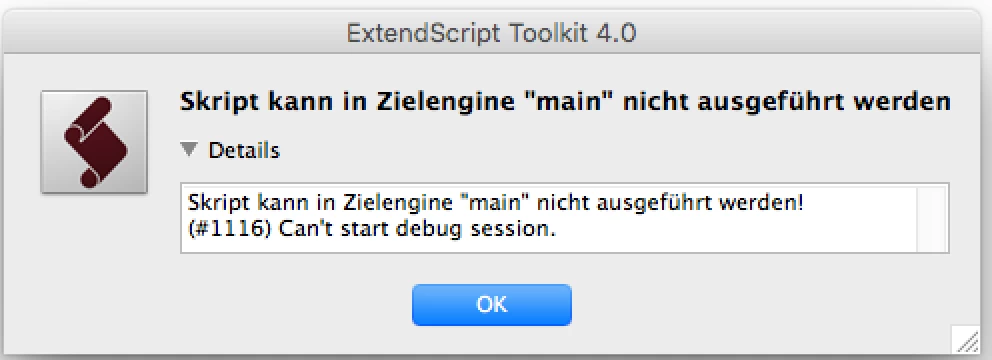
Extendscript Toolkit debugger fails on Mac: Can't start debug session

  • November 20, 2018
  • 15 replies
  • 23636 views

Starting from this morning I get the Error Message "(#1116) Can't start debug session." on my Mac for any target / Application.

ESTK 4.0.0.1

MacOS 10.13.6 (High Sierra)

Scrips are running, but the message is annoying. Any Ideas?

I had some minor security Updates on my Mac today. This guy on debugging - Extendscript Toolkit debugger fails: Can't start debug session - Stack Overflow  has the same problem starting from today. Anyone encountering this problem as well?

This topic has been closed for replies.
Correct answer erinferinferinf

OK, I have a more official fix, please give it a try:

So a possible workaround is to suggest the following to users

1.       Open the file(Mac): “/Applications/Adobe ExtendScript Toolkit CC/ExtendScript Toolkit.app/Contents/SharedSupport/Required/cdic/11BTBackend.jsx”

2.       Search for the value: 604800000 (line reads bt.timeout = 604800000)

3.       Replace that value with 604800 and save

4.       Quit ExtendScript Toolkit and relaunch.

A handful of third-party developers have verified this works.

Here's the cause of the error:

It looks like an issue because of signed 32-bit integer overflow that happens on this date “19 Nov 2018”.

In the implementation in the ESTK jsx file “/Applications/Adobe ExtendScript Toolkit CC/ExtendScript Toolkit.app/Contents/SharedSupport/Required/cdic/11BTBackend.jsx”, there is a timeout specified in milliseconds

“bt.timeout = 604800000;   // a week in milliseconds”.

The current time is(time(NULL)) since EPOCH: 1542783918 seconds.

Adding:  1542783918 + 604800000 = 2147583918(which crosses the range of 32 bit integer(2,147,483,647).)

Looks like it was a mistake putting 3 zeroes at the end because in BridgeTalk code... it expects timeout in seconds and not milliseconds. So bt.timeout should be 604800 and that will fix the overflow issue.

15 replies

Participating Frequently
February 26, 2019

I agreed. Looks really nice.

It is a bit annoying needing to save a temporary script, and mess with the launch json file for a quick ad-hoc script, but I just keep a testing folder on my desktop with a testing json and jsx already there, and seems to help a bit.

I do have an ongoing question regarding scriptUI wich if I can get answered I will be able to move to CS Code 100%

erinferinferinf
Adobe Employee
Adobe Employee
February 25, 2019

As of last Friday, the first release of the ExtendScript Debugger for Visual Studio Code is now available in the VSCode Marketplace. Read more about it on the Adobe Tech Blog. This release is for Mac, the Windows version is still in beta, a stable Windows release will follow in about two weeks.

erinferinferinf
Adobe Employee
Adobe Employee
December 12, 2018

Hi there!

Today we posted a glimpse of the future of ExtendScript development. We're sharing a feature list and screenshots of our upcoming VScode plugin that will replace some of the ESTK functionality:  https://medium.com/adobetech/the-future-of-extendscript-development-a-vscode-plugin-2d8d0172a357

If you'd like monthly email updates about CC developer/script-er, we have also have a newsletter.

Thanks for your patience!

Trevor:
Legend
December 12, 2018

Looks like it will be a good replacement, glad it had jsxbin export

erinferinferinf
Adobe Employee
Adobe Employee
January 25, 2019

For anyone still watching this thread, if you'd like to try out the ESTK VSCode plugin, it is now in prerelease for Mac (Mac only for now, Windows in a couple weeks) you can join the prerelease and give us feedback in the prerelease forum.

erinferinferinf
Adobe Employee
Adobe Employee
November 30, 2018
erinferinferinf
Adobe Employee
erinferinferinfCorrect answer
Adobe Employee
November 21, 2018

OK, I have a more official fix, please give it a try:

So a possible workaround is to suggest the following to users

1.       Open the file(Mac): “/Applications/Adobe ExtendScript Toolkit CC/ExtendScript Toolkit.app/Contents/SharedSupport/Required/cdic/11BTBackend.jsx”

2.       Search for the value: 604800000 (line reads bt.timeout = 604800000)

3.       Replace that value with 604800 and save

4.       Quit ExtendScript Toolkit and relaunch.

A handful of third-party developers have verified this works.

Here's the cause of the error:

It looks like an issue because of signed 32-bit integer overflow that happens on this date “19 Nov 2018”.

In the implementation in the ESTK jsx file “/Applications/Adobe ExtendScript Toolkit CC/ExtendScript Toolkit.app/Contents/SharedSupport/Required/cdic/11BTBackend.jsx”, there is a timeout specified in milliseconds

“bt.timeout = 604800000;   // a week in milliseconds”.

The current time is(time(NULL)) since EPOCH: 1542783918 seconds.

Adding:  1542783918 + 604800000 = 2147583918(which crosses the range of 32 bit integer(2,147,483,647).)

Looks like it was a mistake putting 3 zeroes at the end because in BridgeTalk code... it expects timeout in seconds and not milliseconds. So bt.timeout should be 604800 and that will fix the overflow issue.

nico_1a
Participant
November 21, 2018

This worked for me, thanks a lot.

Participant
November 21, 2018

I am seeing the 'mainengine' 1116 message in Bridge CC 6.1.1.10 and 2017 in os x.

The message does not display as I run jsx scripts in Photoshop (Thankfully).

erinferinferinf
Adobe Employee
Adobe Employee
November 20, 2018

A brief update: We can confirm that you can still run your code after dismissing the error. You can also step through your code, or step into the function line, but you have to dismiss the error each time.

Inspiring
November 20, 2018

Hi,

if I use #targetengine, the error occurs only once, e.g. temporary for debugging #targetengine "debug" for all scripts.

Roland

erinferinferinf
Adobe Employee
Adobe Employee
November 20, 2018

I tried using #targetengine "debug" and it seemed the same as just running the script and dismissing the error the first time. I got the error again the next time I ran the script or stepped forward...

Can you be a little more specific about what you're doing drerol74​?

erinferinferinf
Adobe Employee
Adobe Employee
November 20, 2018

Hi everyone, this is Erin Finnegan, Community Engineer on the CC Developer Ecosystem team.

Many ExtendScript developers are reporting the following error when running ESTK:

Cannot execute script in target engine 'main'!

(#1116) Can't start debug session.

We're aware of this problem and are investigating it now, including the possibility that an expired certificate is the culprit.

For now, the temporary workaround is setting your system clock back to 11/19/2018 or before.

We’ll update you as we make progress on a fix or a workaround.

Loic.Aigon
Legend
November 20, 2018

Hi Erin

thanks a lot for letting us know !

Inspiring
November 20, 2018

Same problem here. There were no updates on OSX or InDesign

OSX 10.12.6

Indesign CS5.5

ESTK 4.0.0.1 or  ESTK 3.0.6.2 - both give the same error

Inspiring
November 20, 2018

If you leave the date with Nov. 20, 2018 and change the time to 4:00 a.m. everything works fine.

As far as I could find out, the problem starts at 4:00:12''.

I couldn't find out yet, what by Jove happend between  4:00:10 and 4:00:12.

Any Idea?

btw: the actual time showed below for this message is not correct, because I didn't reset the correct systemtime

Inspiring
November 20, 2018

Same thing!

Yesterday I could work smoothly. There must be a problem with the last update (?). We work on a solution...

Participating Frequently
November 20, 2018

I don't think it's an update problem. Due to missing user rights, my colleague wasn't even able to do updates. ESTK shows this error in several programs (I tried Photoshop CC 2018 & 19, InDesign CC 2014 and ESTK  itself.)

There wasnt any ESTK update for a long time, right?

Inspiring
November 20, 2018

I have no admin rights either. But every morning est. 10 min. automatic uptates...