


madhavanandad24631746
Known Participant
November 11, 2017
Answered

Font works in some files and not in others
  • November 11, 2017
  • 2 replies
  • 5458 views

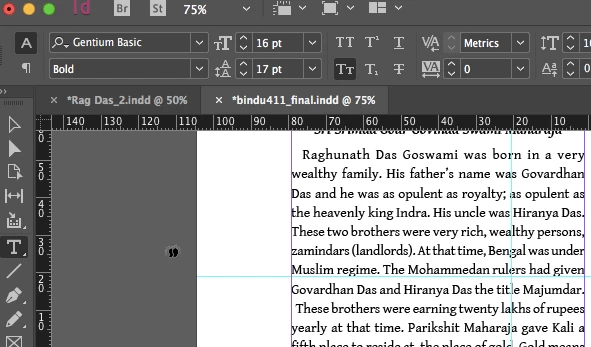
font doesnI'm having problems with a particular font in Indesign. The font (Gentium Basic) works in other programs, it works in other files in Indesign, but when I work on a file that was made on another computer it shows that the font doesn't exist on my machine (which it does). I've tried using Find Font, but it shows the font in brackets as not being installed. I tried rebooting the program and uninstalling the font and re-installing it, none of which have solved the problem.

The strange thing is that if I import the same text into a file that was made on my machine it works fine. I'm attaching two pictures, made on the same machine, with two different files: One in which the font is not recognized, and one where it is.

Does anyone have any suggestions?

We have only a few days to finish our project and get to the press.

Thank you!

This topic has been closed for replies.
Correct answer Barb Binder

Many thanks Jane-e.

Your comment seems to be on track, although, our problem is not yet solved. Yes, the document was packaged. Per your advice, I went to the type menu and indeed there was a Document fonts folder for the fonts used.

It seems locked in to that folder. I'm not able to change fonts to something other than what is there. I tried renaming the Document fonts folder. That didn't work. (see 2 paragraphs down what it does now)

A little background: We wrote our text in in Word using the font Gentium Basic. I don't think it was even conscious, but when our friend did the initial layout, the font got changed to Gentium Book Basic.

Back to the above: After changing the folder name didn't work, I disabled the Gentium Book Basic font. Now when I go to the type menu/fonts it shows "Missing". I want to change Gentium Book Basic to Gentium Basic, but when I try it shows that Gentium Basic is not installed.

It is installed! It is working fine in other programs and even in other Indesign files. But when I try to change to that font in this file, it won't let me.

Is the file somehow locked to the fonts folder that it was packaged with, and if so, is there a way to undo that so I can change fonts?

Many, many thanks to everyone for their kind suggestions.


This thread may help:

Re: Font opened in one document but not in the new one

2 replies

Willi Adelberger
Community Expert
Community Expert
November 11, 2017

You have to have the proper style installed, not only the one style of that font.

madhavanandad24631746
Known Participant
November 11, 2017

I have all versions of the font installed, bold, italic etc. I can change it to a font called, "Gentium Book Basic", which I don't have on my machine. When I do that it makes the text bold. That Gentium Book Basic is what the file was made in on the other machine. What I don't understand is why it won't let me change it to Gentium Basic, instead of Book Basic.

I have also adjusted the styles the problem is not there either.

jane-e
Community Expert
Community Expert
November 11, 2017

I am just trying to think of a reason why. Was the problem document packaged? Is there a Document Fonts folder in the same folder that is offering a font conflict?

When there is a Document Fonts folder in the same folder with the document, it temporarily loads those fonts when the file is open. You can see the listing when your go to the Type menu > Fonts and there will be a folder for Document fonts if there are any.

Does that shed any light on the issue?

amaarora
Community Manager
Community Manager
November 11, 2017

Hi,

In one file i see the Bold Type face while in the other it is Regular,

-Aman