

New Participant
May 12, 2010
Answered

How do I enter hexadecimal codes?

  • May 12, 2010
  • 8 replies
  • 132331 views

I'm trying to change color of text in InDesign and I can't see anywhere for me to enter a hex code. Help! This is insane. I can't find it anywhere.

This topic has been closed for replies.
Correct answer Thornten_Intermesh

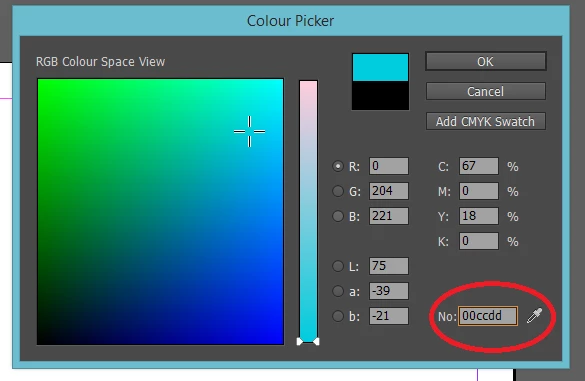
This can be done in CC version of indesign.
8 replies

New Participant
July 29, 2017

I was able to use this website, it converts the Hex codes to CMYK and RGB CMYK to RGB - RGB,CMYK,HEX color codes online converter free

Brainiac
July 29, 2017

Such colour conversion web sites are useless, poisonous junk, written by and for people who are dangerously clueless about colour. Never use them.

Thornten_IntermeshCorrect answer
New Participant
August 5, 2015

This can be done in CC version of indesign.

Inspiring
February 11, 2016

how do you get that window up please? i can only get this one..

Inspiring
February 11, 2016

Double click the greencolour box in your screenshot.


Thank you Kieran

johns76585239
New Participant
July 21, 2015

Try using Adobe Color Themes Online Adobe Color CC and selecting a color in the Color Bar gives you the RGB and its equivalent Hex Value. So, enter the Hex value, take note of its RGB number and use that in InDesign.

But, I agree the lack of a Color Hex field in the Color Wheel in InDesign is ridiculous in early versions.

Deepak_Gupta1
Community Manager
Community Manager
October 15, 2014

Hex Color value feature is now available in InDesign CC 2014 Oct release.

Read following links for detailed description

http://indesignsecrets.com/color-themes-interactive-ebooks-added-indesign-cc-october-2014-release.php

-Deepak

Participating Frequently
April 4, 2011

I'm in the process of trying this out:

http://indesignsecrets.com/create-hexadecimal-color-swatches-in-indesign-for-interactive-documents.php

Larry G. Schneider
Community Expert
May 12, 2010

You have three color modes in ID.   LAB, CMYK or RGB  At least those are the options shown in the flyout for the Color Panel.

Never mind.

Jongware
Community Expert
May 12, 2010
This is insane.

InDesign is a professional document design application ...

How insane does a script sound? (Disclaimer: Written in 5 minutes.)

(Copy, paste into a plain text editor such as Notepad, TextEdit (in plain text mode!), or Adobe's ESTK. Save as "Enter RGB in Hex.jsx" into your User Scripts Folder.)

//DESCRIPTION:Jongware's Quick and Dirty Color Hex Box

// Jongware, 13-May-2010

myDialog = app.dialogs.add ({name:"Add RGB in Hex",canCancel:true});

with (myDialog)

{

     with (dialogColumns.add())

     {

          with (dialogRows.add())

          {

               staticTexts.add ({staticLabel:"Red", minWidth:80});

               redBox = textEditboxes.add({editContents:"00"});

          }

          with (dialogRows.add())

          {

               staticTexts.add ({staticLabel:"Green", minWidth:80});

               grnBox = textEditboxes.add({editContents:"00"});

          }

          with (dialogRows.add())

          {

               staticTexts.add ({staticLabel:"Blue", minWidth:80});

               bluBox = textEditboxes.add({editContents:"00"});

          }

     }

}

if (myDialog.show())

{

     redval = redBox.editContents.toUpperCase();

     grnval = grnBox.editContents.toUpperCase();

     bluval = bluBox.editContents.toUpperCase();

     if (redval.length > 0 && redval.length < 3 && redval.match(/^[0-9A-F]+$/) &&

          grnval.length > 0 && grnval.length < 3 && grnval.match(/^[0-9A-F]+$/) &&

          bluval.length > 0 && bluval.length < 3 && bluval.match(/^[0-9A-F]+$/))

     {

          if (redval.length == 1) redval = "0"+redval;

          if (grnval.length == 1) grnval = "0"+grnval;

          if (bluval.length == 1) bluval = "0"+bluval;

          red = parseInt ("0x"+redval);

          grn = parseInt ("0x"+grnval);

          blu = parseInt ("0x"+bluval);

          try {

               app.activeDocument.colors.add ({space:ColorSpace.RGB, colorValue:[red,grn,blu], name:"RGB"+redval+grnval+bluval});

          } catch (_)

          {

               alert ("Can't add this color (does it already exist?)");

          }

     } else

     {

          alert ("Invalid entry\n"+redval+"\n"+grnval+"\n"+bluval);

     }

}

Jongware
Community Expert
May 12, 2010

-- or, if you prefer entering the full hex code at once, this script (took another 2 minutes):

//DESCRIPTION:Jongware's Quick and Dirty Color Hex Box Part II

// Jongware, 13-May-2010

myDialog = app.dialogs.add ({name:"Add RGB in Hex",canCancel:true});

with (myDialog)

{

     with (dialogColumns.add())

     {

          with (dialogRows.add())

               staticTexts.add ({staticLabel:"RGB"});

          with (dialogRows.add())

               colorBox = textEditboxes.add({editContents:"000000"});

     }

}

if (myDialog.show())

{

     val = colorBox.editContents.toUpperCase();

     if (val.length == 6 && val.match(/^[0-9A-F]{6}$/))

     {

          redval = val.substr(0,2);

          grnval = val.substr(2,2);

          bluval = val.substr(4,2);

          red = parseInt ("0x"+redval);

          grn = parseInt ("0x"+grnval);

          blu = parseInt ("0x"+bluval);

          try {

               app.activeDocument.colors.add ({space:ColorSpace.RGB, colorValue:[red,grn,blu], name:"RGB"+redval+grnval+bluval});

          } catch (_)

          {

               alert ("Can't add this color (does it already exist?)");

          }

     } else

     {

          alert ("Invalid entry\n"+val);

     }

}

New Participant
May 12, 2010

Hi!

I just changed the color of text with

Opened a text box and

Opende

Windows.....color panel....click on the T

Is this what your looking for?

New Participant
May 12, 2010

No, user is talking about hex codes (web colors).

I've never found a place to enter in the hex codes.  Under the color palette you can pull up a web safe color library.  Still no place to enter hex codes, though.