

payalm68947498
Inspiring
January 8, 2019
Answered

How to change Tag Element Name in xml structure?

  • January 8, 2019
  • 1 reply
  • 1112 views

Hi Everyone,

               I want to change tag name after creating tag through scripting.
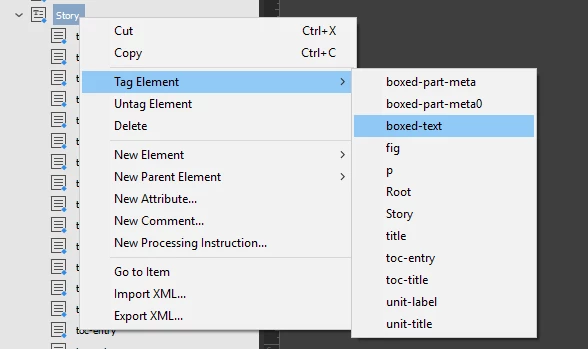
Thank you.....

This topic has been closed for replies.
Correct answer Manan Joshi

Ahh, my bad i did not look into it deeply. Well your case would fail if the selection is a textframe as mine would if the selection is a text. So a more appropriate code that handles both the cases would be

var newItem = app.activeDocument.xmlTags.itemByName("Name") 

if(newItem.isValid)

{

     var a;

     try{

          a = app.selection[0].associatedXMLElements[0]

     }catch(e){}

     try{

          if(!a)

               a = app.selection[0].associatedXMLElement

     }catch(e){}

     if(a)

          a.markupTag = newItem

}

The idea is simply to use try catch block to see if the property exists or not, this should also cater to selection not being tagged as well.

-Manan

1 reply

Community Expert
January 8, 2019

You could use the following

var newItem = app.activeDocument.xmlTags.itemByName("boxed-text")

if(newItem.isValid)

    app.selection[0].associatedXMLElement.markupTag = newItem

Add in the required error checks like the selection is valid or not and so forth.

-Manan

payalm68947498
Inspiring
January 8, 2019

Thank you....

It works when app.selection[0].associatedXMLElement.markupTag = newItem change to

app.selection[0].associatedXMLElements[0].markupTag = newItem,

only difference is associatedXMLElements[0].

Manan JoshiCorrect answer
Community Expert
January 8, 2019

Ahh, my bad i did not look into it deeply. Well your case would fail if the selection is a textframe as mine would if the selection is a text. So a more appropriate code that handles both the cases would be

var newItem = app.activeDocument.xmlTags.itemByName("Name") 

if(newItem.isValid)

{

     var a;

     try{

          a = app.selection[0].associatedXMLElements[0]

     }catch(e){}

     try{

          if(!a)

               a = app.selection[0].associatedXMLElement

     }catch(e){}

     if(a)

          a.markupTag = newItem

}

The idea is simply to use try catch block to see if the property exists or not, this should also cater to selection not being tagged as well.

-Manan