


csavanha
New Participant
May 13, 2019
Question

How to: Input Die lines from a PDF into a layer.

  • May 13, 2019
  • 3 replies
  • 6687 views

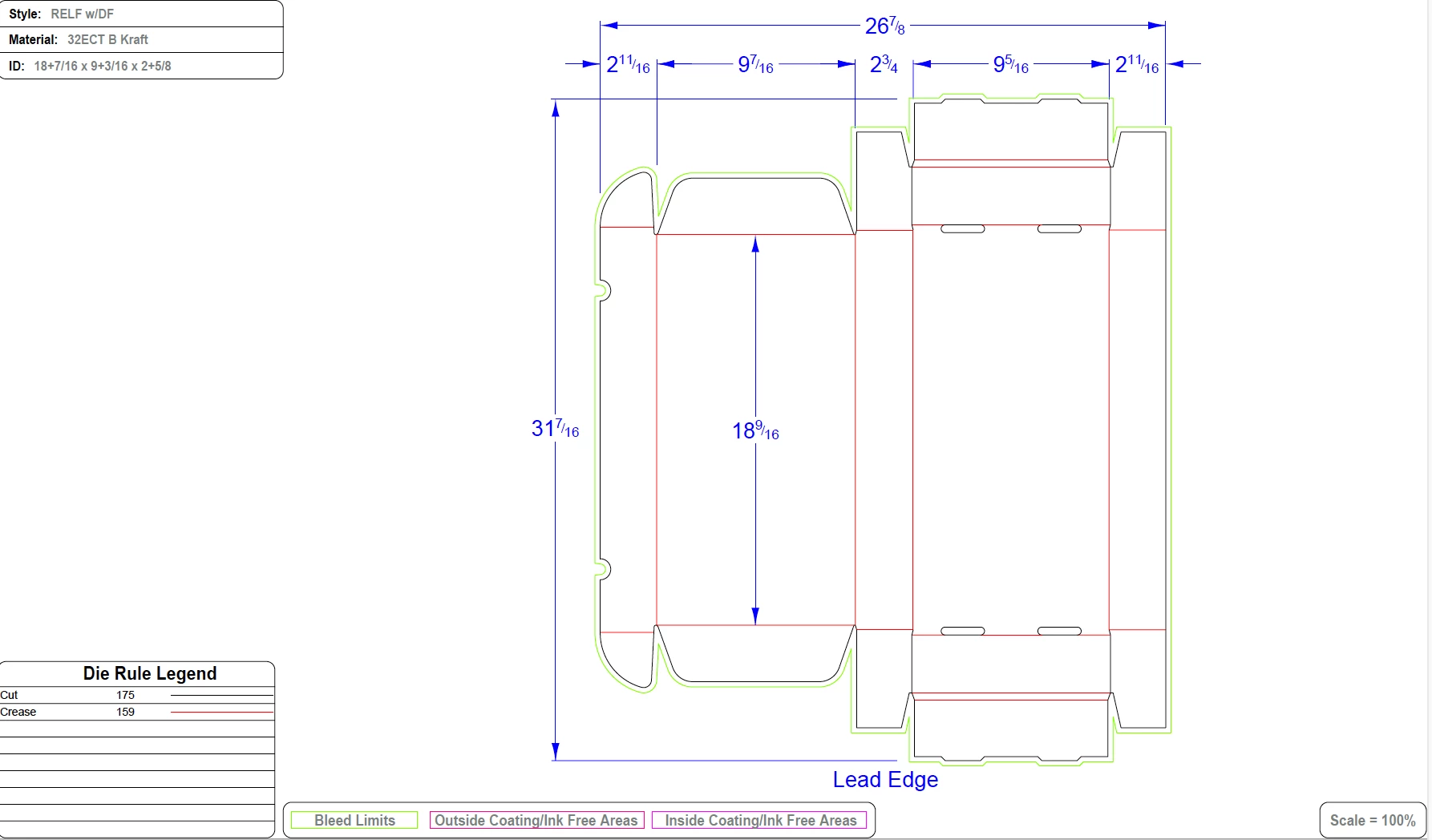
I received a PDF file (see screen grab below) including the die lines for a package I am hoping to design. I am relatively new to InDesign and am curious if there is a way to easily input this information into an illustrator layer, without having to do it manually. Frankly, I wouldn't be sure where to begin when it comes to creating a die line layer so any help or clarification on this matter would be greatly appreciated.
This topic has been closed for replies.

3 replies

Abambo
Braniac
May 14, 2019

The PDF may be layered, so there is a possibility you can simply switch on/off the layers you want.

But also as is, there may be no need to modify anything. Just put the whole graphic on a Indesign layer and use that as a reference when you do your design. Your print service provider will do what is necessary.

The best advice for now is what Scott Falkner said:

But again, communicate with the printer. This is the first and most important rule in printing.
ABAMBO | Hard- and Software Engineer | Photographer
Inspiring
May 14, 2019

Just work for the whole pack design in Illustrator, no need to use Indesign.

Abambo
Braniac
May 14, 2019

You could do the whole work in Illustrator, but this is the Indesign forum, so I suppose OP does his design in Indesign. It’s a slightly different tool.

ABAMBO | Hard- and Software Engineer | Photographer
Scott Falkner
Braniac
May 14, 2019

Were you supplied the dieline by the printer? If so then ask them what they prefer. They might prefer you place the PDF in InDesign as is and their prepress department will take care of the rest. Always talk to the printer and make sure you’re not making any assumptions.

What I would probably do is open the PDF in Illustrator and select just the dieline. I would copy the dieline and place it in InDesign on its own layer; this would be the topmost layer in the file and only contain the dieline. I would stroke the dieline with a custom spot colour, preferably an ugly one that looks nothing like any colour in the file. The colour is not important, what I want is contrast so I can easily see it is there. In the Attributes panel I would make the dieline stroke overprint.

Doing that I would have a dieline that does not affect the printing of any other colour separations and prints on its own plate. The print shop would handle generating the die.

But again, communicate with the printer. This is the first and most important rule in printing.

csavanha
csavanhaAuthor
New Participant
May 14, 2019

Thank you! This was very helpful! The printer company was less than helpful but hopefully taking this step will make conversing with them easier. I appreciate your help and clarity with the steps

Abambo
Braniac
May 14, 2019

csavanha  wrote

The printer company was less than helpful (...)

Well, it's their job to define how the file should arrive ... I always ask the print company and they tell me, when they prefer the file a different way. It's in their own interest.

ABAMBO | Hard- and Software Engineer | Photographer
Jongware
Braniac
May 13, 2019

Did you receive instructions to have these lines in the finished document, or are you merely wanting to use them as guides? If the latter: place it in InDesign on a nonprinting layer and lock it. Draw your art on top.

If the first: then best asked in Illustrator as InDesign cannot change a PDF. True, Illustrator is also not a "general PDF Editor" but you might get lucky.

csavanha
csavanhaAuthor
New Participant
May 14, 2019

Thank you. My solution at the end was just to input as a locked layer but I was hoping to find a way to actually learn how to input the die lines correctly if possible. I will definitely try your advice if I cannot find a solution for inputting the shapes and die lines manually.

Braniac
May 14, 2019

csavanha  wrote

…but I was hoping to find a way to actually learn how to input the die lines correctly if possible.…

Hi csavanha ,

you'd use a spot color for a distinct die line and set the stroke ( and the fill, if fills are applied ) of objects using the die line to overprint. Also follow the naming scheme of the printing company with die lines.

Window > Output > Attributes > [ x ] Overprint Stroke

Regards,
Uwe