November 4, 2016
Answered

How to omit stroke on one side of a text box

  • November 4, 2016
  • 2 replies
  • 15882 views

Hi,

In InDesign 2015.4, is it possible to omit a stroke on one side a text box ?

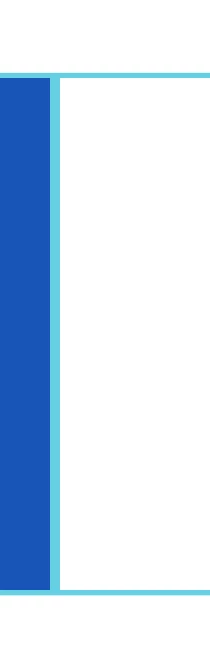
As you can see from the attached screenshot, I have a nice style setup that puts a blue border around text boxes to which it is applied.

Unfortunatley, as you can also see from the attached screenshot, you end up with a double-weight blue in locations where the boxes are butted up against each other.

I've looked through all the style settings but can't seem to find anything that will enable me to tell it to "don't apply stroke to left/right/top/bottom" ?

    This topic has been closed for replies.
    Correct answer Obi-wan Kenobi

    Peter Spier wrote:

    The two methods already mentioned would work, but a better solution might be to use a one-row, two-column table.

    I guess that's what they call .... thinking outside the (text)box. 

    That sounds like a neat option !


    Light-saber hits, for lazy as me! 

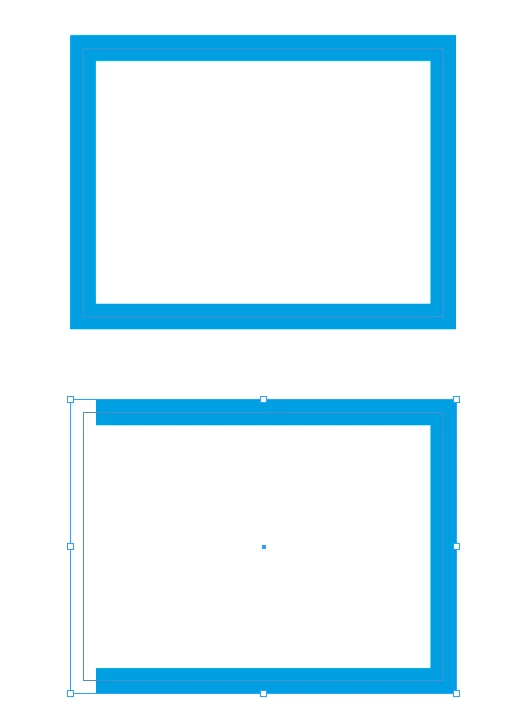
    [sample 10 pts stroke]
    /*

        Written by Michel Allio [ 2016/11/04]

        See:

        https://forums.adobe.com/thread/2231551

        https://forums.adobe.com/thread/2199538


        Comment: If, after running the script, you change the stroke weigth, launch the script again to update!

        + Undo!


        At your own risk!

    */   

    // ----------- Select a stroke -----------

    app.doScript(main, ScriptLanguage.JAVASCRIPT, [], UndoModes.ENTIRE_SCRIPT, "3-Sides Stroke! …");

    function main ()     

    {

    var myDoc = app.activeDocument;

    var savedHorizontalMeasurementUnits = myDoc.viewPreferences.horizontalMeasurementUnits; 

    var savedVerticalMeasurementUnits = myDoc.viewPreferences.verticalMeasurementUnits; 

    myDoc.viewPreferences.horizontalMeasurementUnits = MeasurementUnits.POINTS; 

    myDoc.viewPreferences.verticalMeasurementUnits = MeasurementUnits.POINTS;

    var w = app.selection[0].strokeWeight - 1;

    with (app.selection[0].transparencySettings.directionalFeatherSettings){ 

        applied = true;

        angle = 90;   //  angle 0° => top side  //  angle 90° => left side //  angle 180° => bottom side //  angle -90° => right side

        noise = 0; 

        chokeAmount = 100 ; 

        followShapeMode = FollowShapeModeOptions.LEADING_EDGE;

        //--------------------------

        topWidth = w; 

        bottomWidth = 0;

        rightWidth = 0;

        leftWidth = 0;

        //--------------------------

    myDoc.viewPreferences.horizontalMeasurementUnits = savedHorizontalMeasurementUnits; 

    myDoc.viewPreferences.verticalMeasurementUnits = savedVerticalMeasurementUnits;

    }

    // ___ (^/) ___

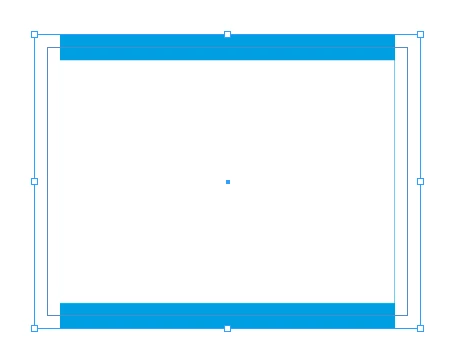
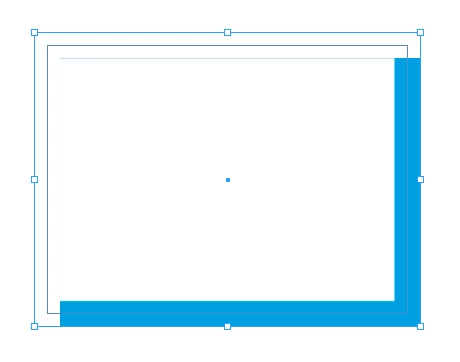
    Variants [angle = 0°]:
        //--------------------------

        topWidth = w; 

        bottomWidth = w;

        rightWidth = 0;

        leftWidth = 0;

        //--------------------------
        //--------------------------

        topWidth = w; 

        bottomWidth = 0;

        rightWidth = 0;

        leftWidth = w;

        //--------------------------
        //--------------------------

        topWidth = w; 

        bottomWidth = 0;

        rightWidth = w;

        leftWidth = w;

        //--------------------------

    As often says my friend pixxxel schubser,

    ENJOY!

    (^/)

    2 replies

    vinny38
    Legend
    November 4, 2016

    Hi

    No such thing in styling options. (would be cool...)

    However, you can delete the right side of your box using direct selection tool.

    Or (what i would do), use the space distribution options, setting negative space value equal to your stroke weight.

    regards

    Edit: Peter is way too fast for me ^^

    Willi Adelberger
    Community Expert
    Community Expert
    November 5, 2016

    There exist some 3rd party plugins to create a specific border. If it is only a single side you want to omit, add an anchor point and delete it immediately.

    Peter Spier
    Community Expert
    Community Expert
    November 4, 2016

    You can remove any one side from the frame using the Direct Select (white arrow) tool, but that probably is not really what you want to do. Another method is to use the distribute spacing command with a negative value in Use Spacing field to compensate for stroke width.

    Can you explain in detail what you are doing?

    November 4, 2016

    Hi Peter,

    Thanks for your super quick reply.

    In relation to more detail, perhaps the fuller screenshot below would help (the seperation between the two boxes is just shown for the clarity of this question, the right/left border "clash" when they're joined is what I'm looking to address).

    Essentially I'm creating a header for a leaflet .

    Peter Spier
    Community Expert
    Community Expert
    November 4, 2016

    The two methods already mentioned would work, but a better solution might be to use a one-row, two-column table.