



Hosun
Inspiring
April 22, 2020
Answered

location of a png file

  • April 22, 2020
  • 9 replies
  • 3757 views

Hi,


While uploading an EPUB file to Apple Books, I encountered an error message below.
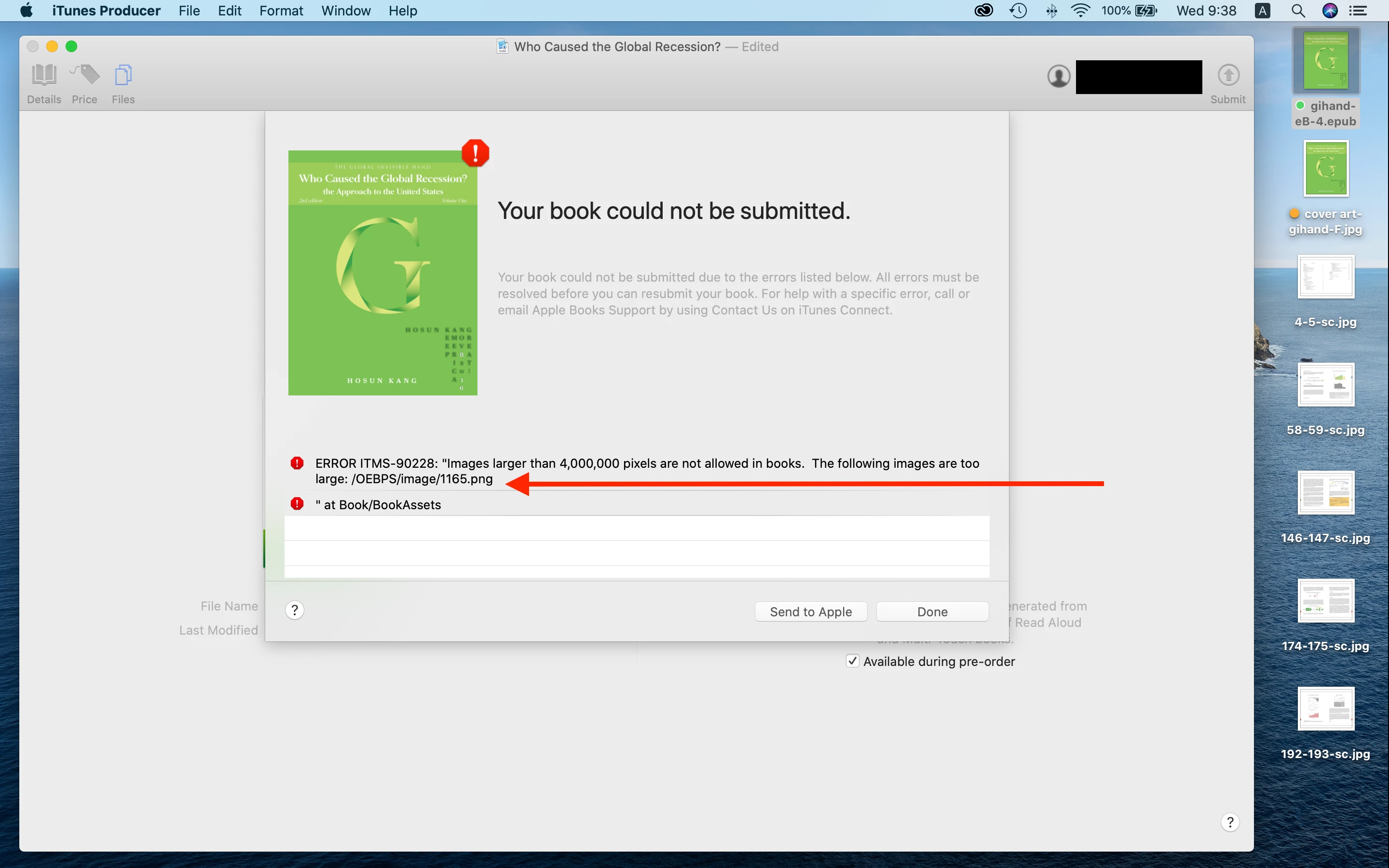


I should reduce the dimension of the file.

But I can't fine out 1165.png.

It is not in the LINKS panel.
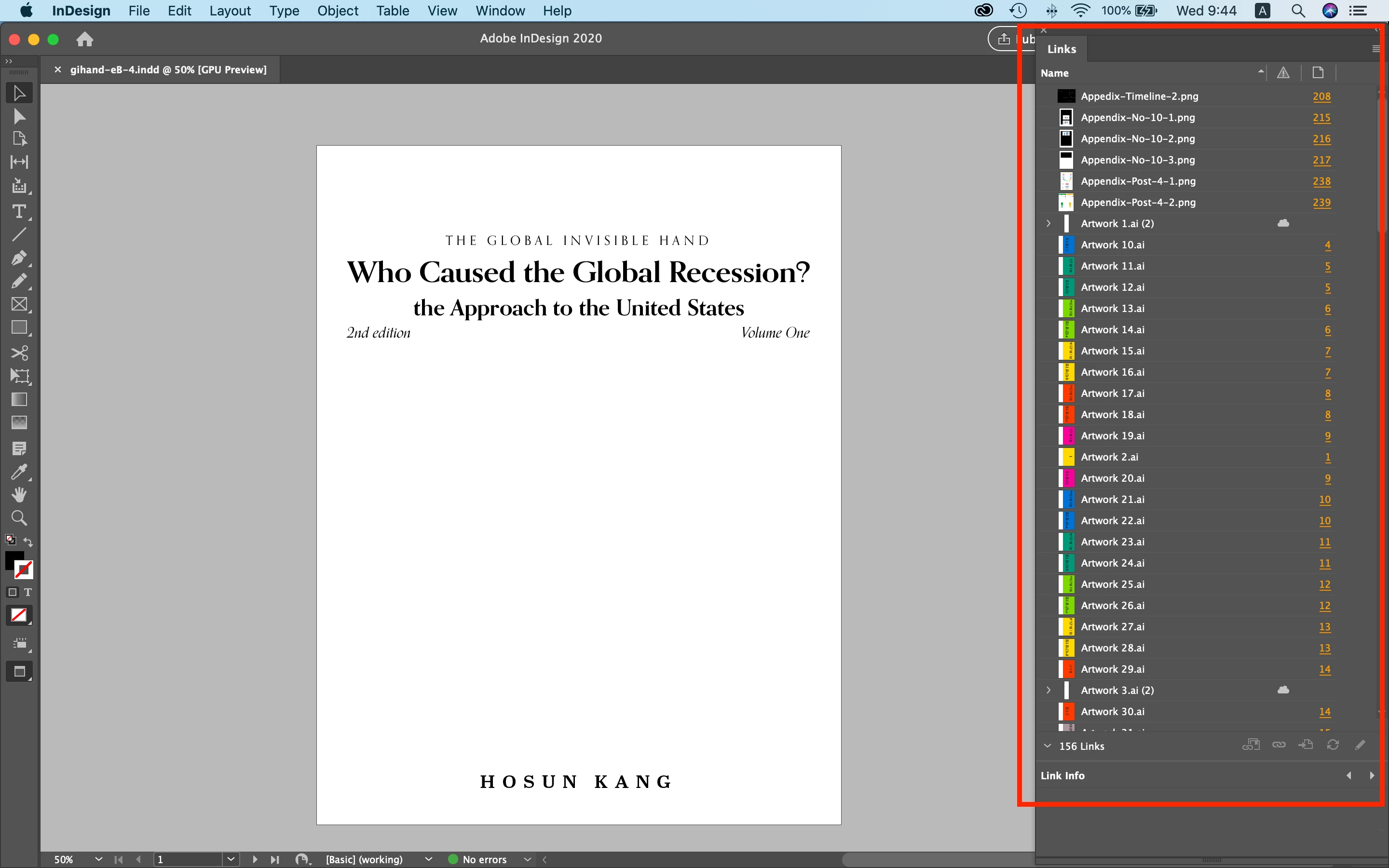


Would you help me find out the location of 1165.png?


Housn Kang
This topic has been closed for replies.
Correct answer rob day

If my EPUB is presented on iPad Pro 12.9" (2732*2048 at 264 ppi), pixel dimension is increased by 24%.


How would my EPUB be presented on iPad Pro?


I just guess font would be between iPhone and Mac basen on 264 ppi.


Housn Kang


Your 2550x1650 pixel spread will have to be scaled or resampled up to fit in the 11.989"  X  7.758" iPad Pro screen, so the effective resolution of your 2550x1650 image would be 212ppi. In the case of the iPad Pro there would be some improvement by working at a smaller page size and exporting at 300ppi to stay under Apple‘s limit, but not much.

9 replies

Hosun
HosunAuthor
Inspiring
April 23, 2020

Hi,


I've just stbmitted EPUB on Apple Books.

With 150ppi, file size halved.


I've learned a lot from you.


Thank you very much for your analysis and help.


Hosun Kang

rob day
Community Expert
Community Expert
April 24, 2020

Unfortunately you have to choose from the 4 preset output resolutions with an epub export. If 200ppi were an option 8.5"x11" would be under the Apple 4,000,000 pixel limit.


You could reduce your page dimension and get a larger pixel dimension under the Apple limit using 300ppi. So if the page is 5.66" x 7.33" the output pixel dimensions at 300ppi would be 1700x2200—3,740,000

rob day
Community Expert
Community Expert
April 27, 2020

Your remarks remind me of one more thing I observed.


From the beginning, my EPUB was presented differently on Mac and iPhone. 

On Mac, color looks a little desuturated and font becomes less crisp with the EPUB at 150ppi and 300ppi.


Does the difference come from the dispaly specifications or EPUB?


Hosun Kang

(Currently, I don't have iPad.)


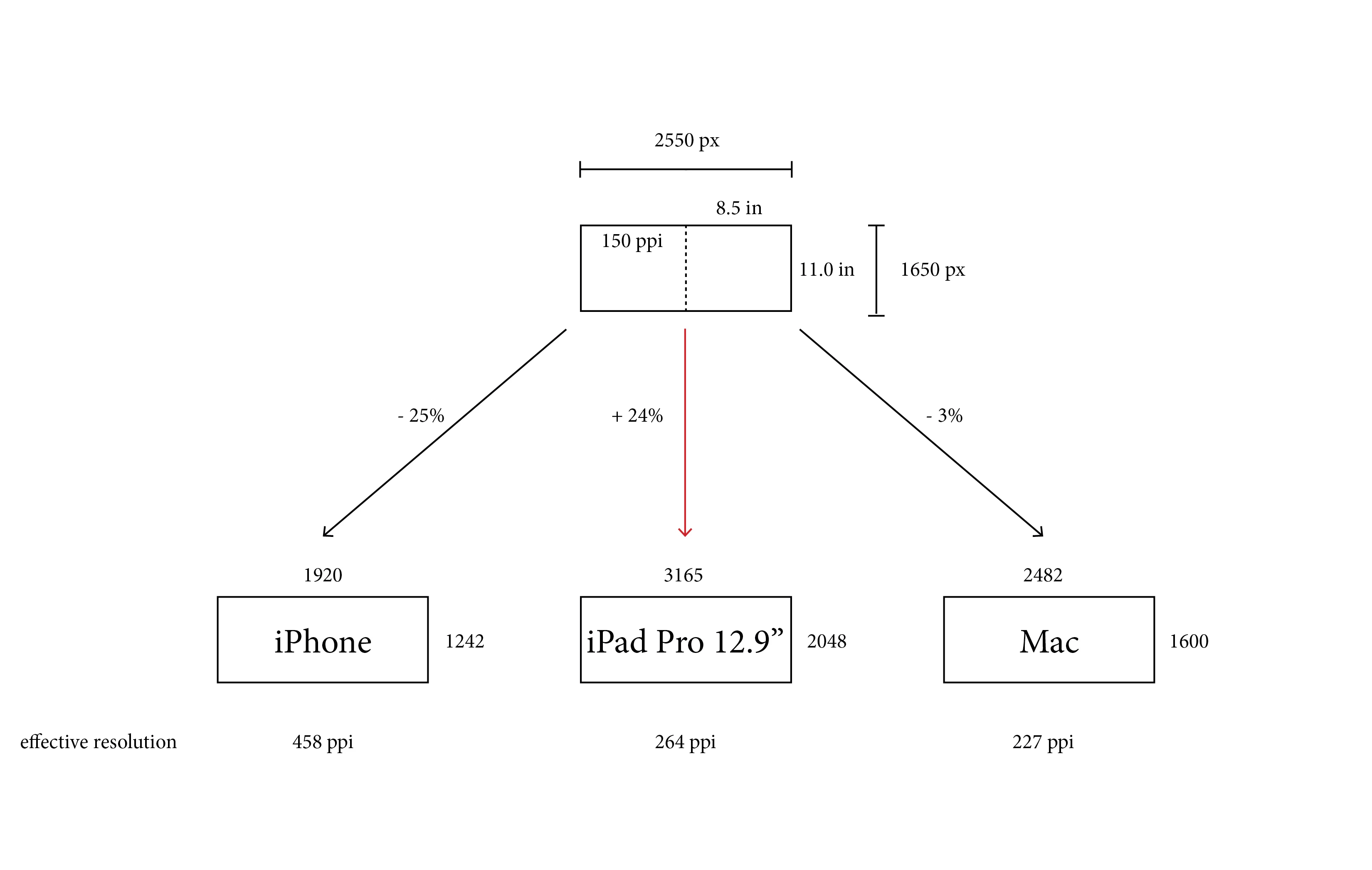
In the case of the iPhone both a 300ppi and 150ppi spread would have to be sampled down to fit the smaller physical screen size. At a 150ppi, the image spread would have a pixel dimension of 2550 x 1650 and would be reduced by 75% in order to fit the phone's 1242 short side pixel dimension (1920x1242). The phone’s effective resolution is 458ppi compared to the MacBook’s 227ppi so the text will be crisper because of the considerably higher effective resolution.


The 2550 x 1650 spread will also have to be reduced to fit the MacBook screen (97%, or 2482 x 1600), but the effective resolution of the display is still much lower at 227ppi and you’ll see that in the text display. If the spread is fitting to the screen, 300ppi wouldn’t have any advantage—there would be a quality difference if you are expecting clients to zoom in.


On Mac, color looks a little desuturated


There’s no color management with epubs, and iOS doesn’t have system level monitor profiling. Images get exported as DeviceRGB (no color profile), so there isn’t a way to manage the display color. The best you can do is set your image and InDesign documents’ profiles to sRGB.


Community Expert
April 22, 2020

And to answer your initial question:

Would you help me find out the location of 1165.png?


You already discovered that there is no 1165.png placed in your InDesign document.

Why then does the exported EPUB contain a 1165.png?

Because InDesign wrote that file on the fly during export into the EPUB file.


Regards,
Uwe Laubender

( ACP )

Hosun
HosunAuthor
Inspiring
April 22, 2020

Firstly, it was 1172.png.

Then, it became 1173.png.

Now, it's 1165.png.


What does it mean?


Hosun Kang

rob day
Community Expert
Community Expert
April 22, 2020

You can open an .epub package by changing the .epub extension to .zip and using a zip compression utility to uncompress the zip archive. Here I’ve used Stuffit Expander to open Reflowable.zip.


The ID file has an image file, a cropped .PDF and a full page .PDF


The assets are stored in the OEBPS>image folder. I exported using 300ppi as the resolution and you can see the full page .PDF got converted into a 2550 x 3300 pixel .png. Uwe is right, the only way to avoid rasterizing vector art would be placing .SVG files. You sould be able to open your .AI files and save them as .SVG.


Community Expert
April 22, 2020

Hi Hosun,

let me throw in another idea:
Is there a chance that you can convert the graphics to SVG files and place the SVGs?

Then InDesign should be able to retain the graphics as vector graphics even when exporting to fixed layout EPUB.

This is a new feature with InDesign 2020.


Read about it here:

https://helpx.adobe.com/indesign/using/import-svg-files.html


Regards,
Uwe Laubender

( ACP )

rob day
Community Expert
Community Expert
April 22, 2020

Hi Uwe, Have you tried exporting a document with placed .SVGs to epub? I just checked using .SVG instead of .PDF and the .SVG still gets rasterized. I don‘t do much epub work so maybe I missing something?

Community Expert
April 22, 2020

Not yet. But there must be some options where you can shield the SVG from rasterizing.

I guess, that's not an auto process. You have to look into the object export options as well.

( No time to try this right now. )


Regards,
Uwe Laubender

( ACP )


Derek Cross
Community Expert
Community Expert
April 22, 2020

What you've produced is a complete mish-mash. IMO you need to go back to square one and learn how to produce a properly formated Reflowlable ePub (which can then be converted to a mobi format for the Amazon Kindle. Your book having so many rasterised images means it will probably cost a lot for the size of file.


(You anchor your images to the text with a Reflwowable ePub, so that's how you keep the those elements together)

Derek Cross
Community Expert
Community Expert
April 22, 2020

Why did you choose FXL ePub for the format for this publication? From what I can see, it looks as if it should be a Reflowable ePub.

Hosun
HosunAuthor
Inspiring
April 22, 2020

In December last year, I was trying to publish my book on Kindle Direct Publishing.

But EPUB was not opened at all in Amazon system.

Fortunately, I found out it was opened with the Books app on my iPhone.


To publish on Apple Books, I bought MacBook Pro in late January and I am here.


My book is about the economy.

There are many graphs and figures, which should be placed with the text correctly.

So, I chose fixed layout.


Hosun Kang

rob day
Community Expert
Community Expert
April 22, 2020

Both fixed and reflowable require a Resolution choice. I think your .AI files are also going to get rasterized on export, so there’s no way around the Apple limit for graphic rich layouts.

Derek Cross
Community Expert
Community Expert
April 22, 2020

You should also bear in mind that the Apple iBooks reader, though a good ereader,  can only be used on an Apple computer or device such as an iPad or iPhone. 

rob day
Community Expert
Community Expert
April 22, 2020

I can see from your Links panel you have some image files that are full page. When you export to EPUB the image resolution you choose is likely exceeding Apple’s 4,000,000 pixel size limit. For example if your page size is 8"x10", choosing 300ppi would exceed the limit 2400 x 3000=7,200,000. Try setting your conversion Settings>Resolution to 150ppi or less.


Hosun
HosunAuthor
Inspiring
April 22, 2020

Hi,


Thank you very much for your analysis.

I might be able to get some clue.


So far, I reduced the dimensions of 6 files, because of the errors about 4M px limit.

They are what you saw at the top in my LINKS panel.

Each file is of full page.


Q1. Do you mean?; even though those 6 files are less than 4M px for each, they cause the problem, when it is exported to EPUB with 300 ppi.


As you sensed, my book is of letter size (8.5"*11.0") and fixed layout.

I exported to EPUB with 300ppi.


Q2. If I reduce the resolution from 300 ppi to 150 ppi, isn't there any issue to the quality of the final outcome?


Hosun Kang


rob day
Community Expert
Community Expert
April 22, 2020

Even if you reduce the pixel dimensions of the placed pngs, a 300ppi version will be included in the ePub package, so I think you’ll have to export using 150ppi in order to get Apple’s acceptance.


Derek Cross
Community Expert
Community Expert
April 22, 2020

There are two kinds of ePub – FXL ePubs (used for publications like illustrated children's books and cookery books) and Reflowable ePubs (used for text-heavy publications, such as novels and biographies).

Validating an ePub is a means of checking the validity of the ePub and indicating possible issues.

Here's a free one: http://validator.idpf.org

And this is a paid-for one, which gives much more information: https://ebookflightdeck.com

Derek Cross
Community Expert
Community Expert
April 22, 2020

Your ePub seems to consist of what would be raster images - If so, it would make it a very large file (apart from other possible issues).

What does it state when you validate the file?

Hosun
HosunAuthor
Inspiring
April 22, 2020

Hi,


Thank you very much for your reply.


Would you explaine what "validate the file" is?


Hosun Kang

Derek Cross
Community Expert
Community Expert
April 22, 2020

Consider taking a LinkedIn Learning online video tutorial on the correct way to create ePubs (you can get 39-days free access): 

https://www.linkedin.com/learning/indesign-cc-2018-epub?trk=share_ios_course_learning