


Participating Frequently
March 7, 2019
Answered

Reducing space between text-wrapped lines in bulleted list?

  • March 7, 2019
  • 2 replies
  • 6145 views

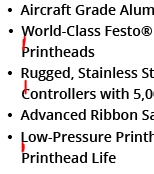
I need to reduce the space between lines in a bulleted list where a text wrap has occurred.  In other words, all the spaces in this screenshot need to be shorter.  Anyone know where I would go to adjust that?  Reducing line space as I normally would (through the character panel) just pulls the entire bullet point section up.
This topic has been closed for replies.
Correct answer SJRiegel

FlexPackPRO  wrote

Unfortunately this approach increases the space between all of the lines.  What I need to do is have slighly less space between word-wrapped lines and each separate bulleted item on the bulleted list.

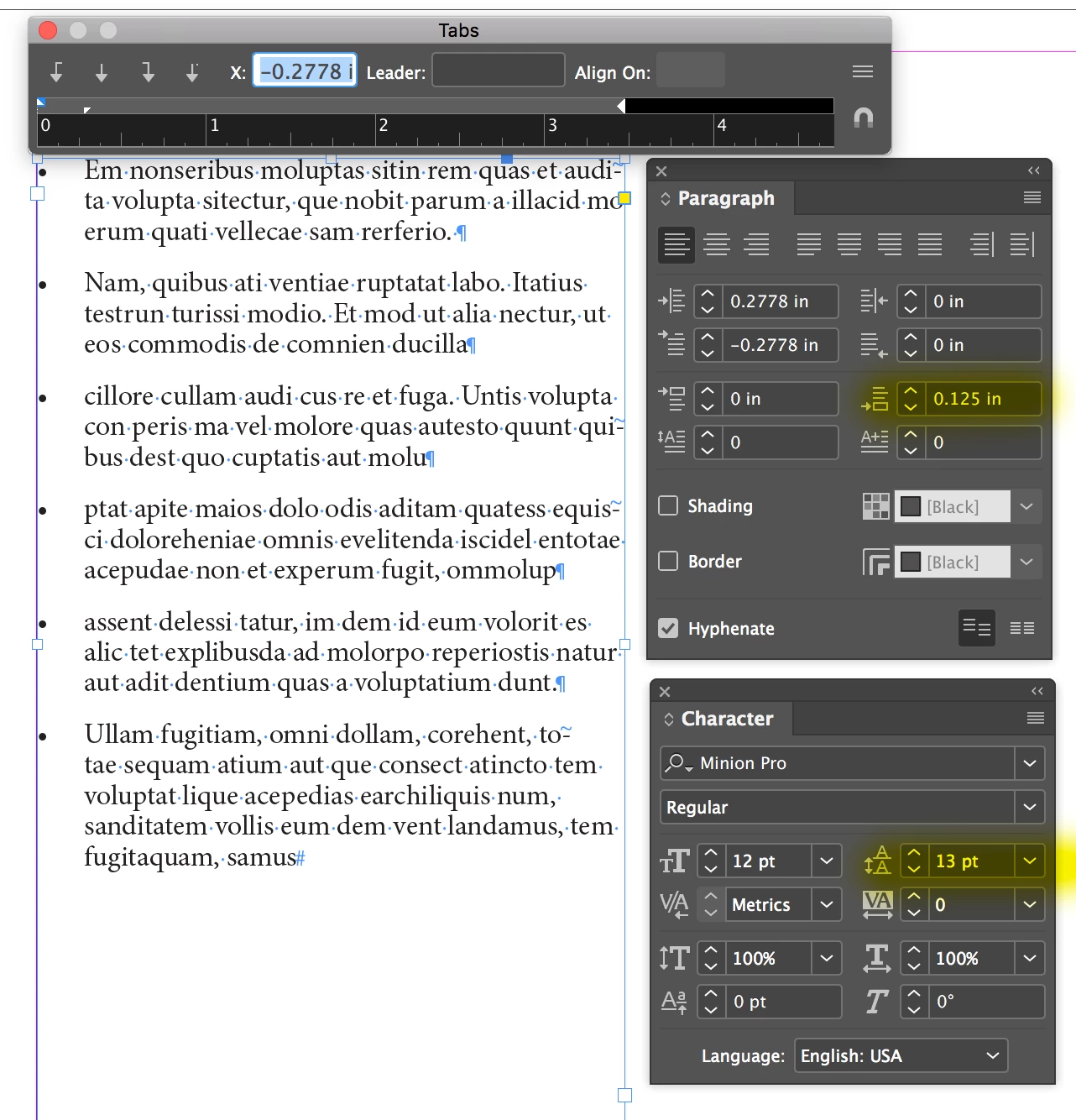
Changing the leading will increase the spacing between all lines. Leave that value alone (in this example, it is 13 pt)

Instead, go into your Paragraph pallet, and increase the Space-After value (in this example, I have set it to .125 in)

This will only add space after a paragraph return, and not between each line of your paragraphs.

If adding to the Space-After value increases all of your line spacing, then you must have paragraph returns at the end of every line. There should only be one return per paragraph.

2 replies

Barb Binder
Community Expert
March 8, 2019

Hi Flexpack:

The Leading value can be accessed in a variety of areas in InDesign. The easiest may be the Character View of the Control panel. Decreasing the value decreases the spacing within the lines of a paragraph.

~Barb

~Barb at Rocky Mountain Training
Participating Frequently
March 8, 2019

Unfortunately this approach increases the space between all of the lines.  What I need to do is have slighly less space between word-wrapped lines and each separate bulleted item on the bulleted list.

SJRiegelCorrect answer
Community Expert
March 8, 2019

FlexPackPRO  wrote

Unfortunately this approach increases the space between all of the lines.  What I need to do is have slighly less space between word-wrapped lines and each separate bulleted item on the bulleted list.

Changing the leading will increase the spacing between all lines. Leave that value alone (in this example, it is 13 pt)

Instead, go into your Paragraph pallet, and increase the Space-After value (in this example, I have set it to .125 in)

This will only add space after a paragraph return, and not between each line of your paragraphs.

If adding to the Space-After value increases all of your line spacing, then you must have paragraph returns at the end of every line. There should only be one return per paragraph.

BobLevine
Community Expert
March 7, 2019

Change the leading in the paragraph style.

Participating Frequently
March 7, 2019

Where would I go to do that?

Bill Silbert
Community Expert
March 7, 2019

You would need to tighten the leading in the character panel which will bring the lines closer together and then increase the space after using the paragraph panel. This will re-add space between the bullets.