


Marina E. Michaels
Known Participant
September 10, 2018
Question

Running headers won't pick up paragraph from previous page

  • September 10, 2018
  • 2 replies
  • 1714 views

I have two running headers defined: one for left-side (even) pages and one for right-side (odd) pages. For the odd pages, I want the header to display the last-used instance of a paragraph style if that style isn't on the page, and otherwise I want the first-used instance if that style is on the page.

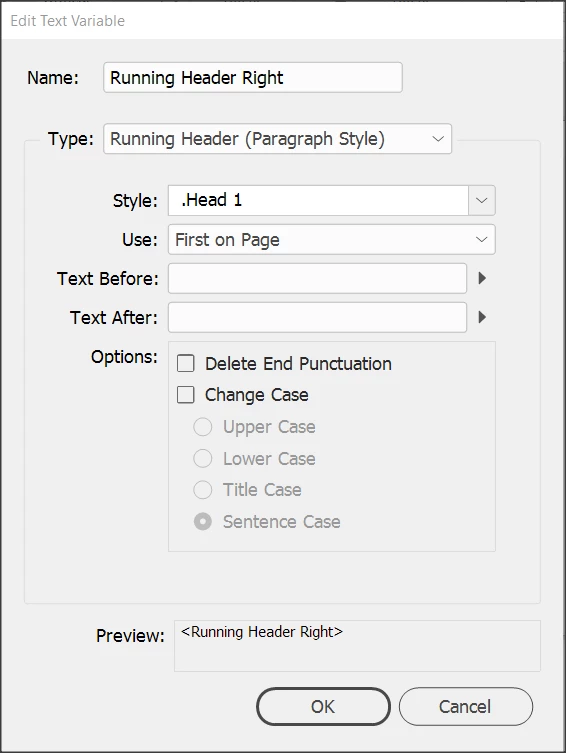
Here are my settings. I've tried both First on Page and Last on Page, neither of which would be satisfactory. With First on Page, I get what I want if the paragraph style is on that page, which is what I want, but no matter what I choose, if that style doesn't appear on the page, the header is empty.

Am I missing something, or is InDesign not capable of doing this? Thanks!
Message was edited by: Marina Michaels Edited for clarity

This topic has been closed for replies.

2 replies

Srishti Bali
Community Manager
Community Manager
October 9, 2018

Hi Marinah,

I would like to know if the suggestions shared by Timothy worked for you, or the issue still persists.

Kindly update the discussion if you need further assistance with it.

Thanks,

Srishti

Marina E. Michaels
Known Participant
February 16, 2019

My apologies for not updating this post.

There were no blank paragraph styles on any page.

When I added text to the page on which the running headers weren't appearing, the running headers appeared. When only a figure (with a caption) was on the page, the headers didn't appear. I suspect this is a bug.

Since we won't have just a figure on a page, I decided not to try to troubleshoot this further.

Adobe Expert
February 18, 2019

Hi Marina,

I cannot see this issue when I'm testing running headers.

Maybe I am doing something different?

Are your text frames with the running header variables are positioned on a master page?

In my tests I positioned them on the pages. Are they perhaps grouped with other elements?


Did you do "Recompose All Stories" after changing some text?

I found that sometimes InDesign needs this to update the contents of text variables.

Read about "Recompose All Stories" here:

https://indesignsecrets.com/force-text-reflow-when-indesign-forgets-to-flow-the-text.php

Did my tests with my German InDesign CC 2019 version 14.0.1.209 on Windows 10.

Regards,
Uwe

TᴀW
Brainiac
October 1, 2018

Hi Marina,

Your settings are correct. The "first on page" option will do what you want -- i.e., pick up the last instance on a previous page, or the first instance on the current page.

So there must be a different reason that you're getting blanks.

The most common reason is simply that you have a blank paragraph on a previous page with the ".Head1" style applied to it. Check if there are any blank paragraph styles on previous pages.

Ariel