


Participant
August 23, 2020
Answered

Trying to add fx to header in text and it’s grayed out!

  • August 23, 2020
  • 5 replies
  • 970 views

Just uploaded latest version within the last few days. Would I have to put the header in its own text box to add bevel and emboss to just those few words? I've used INDD since at least CS3! This is aggravating! Hope you can help!
This topic has been closed for replies.
Correct answer Barb Binder

Hey Barb:


Let's go a different direction. The goal is a quick application of Bevel and Emboss to your heads, right?


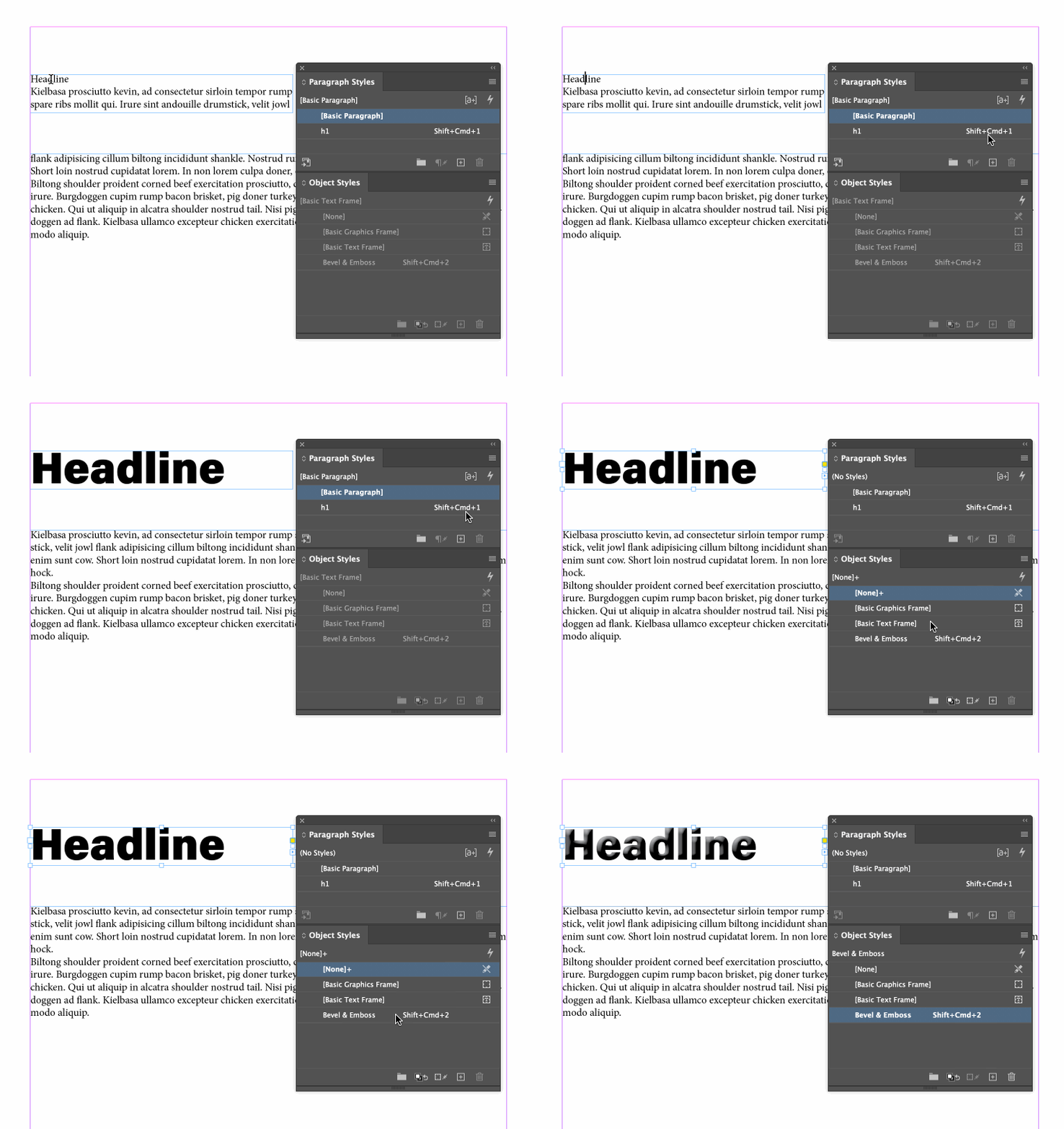
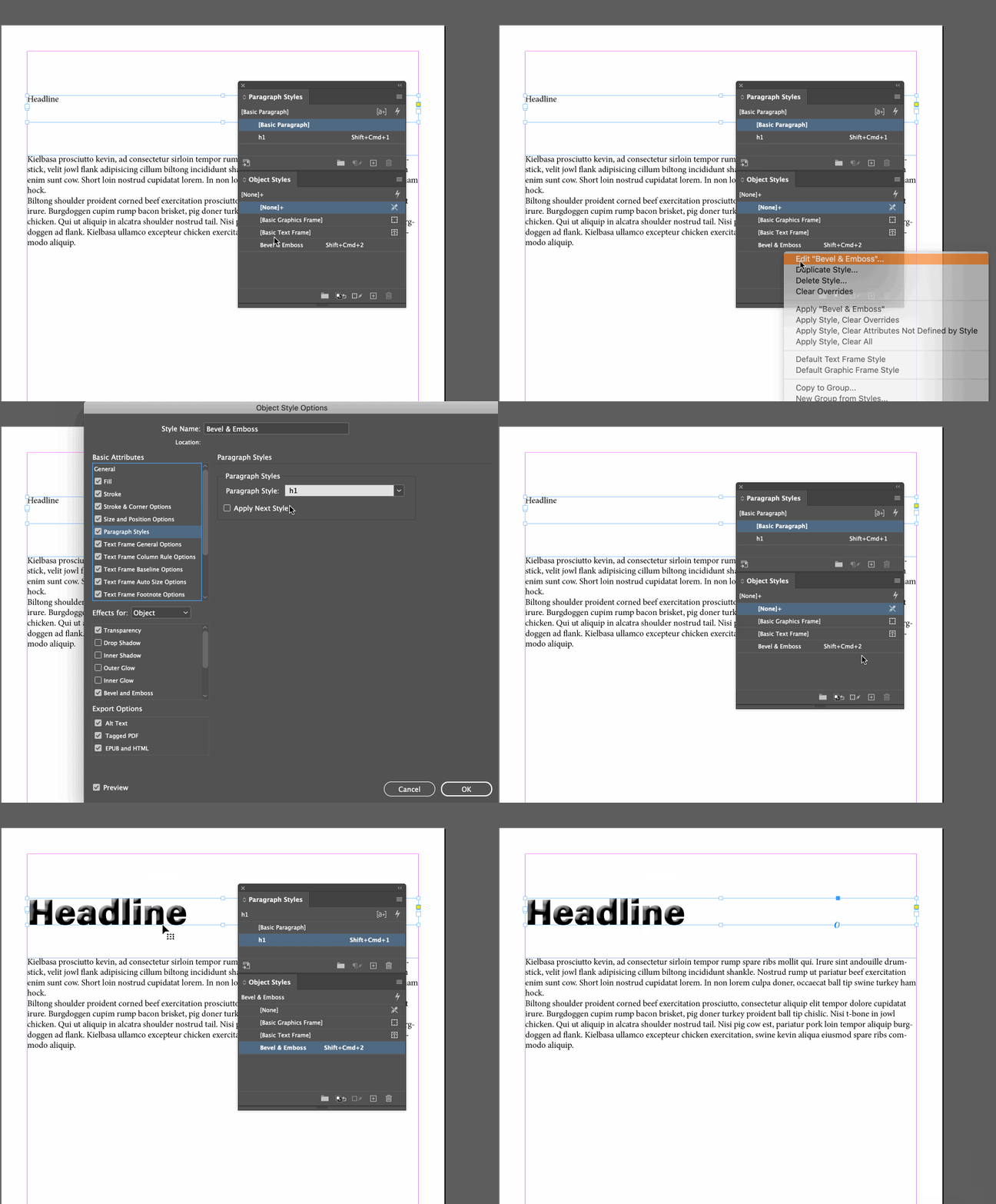
How about defining an object style that will do that for you? In my demo below, I have defined a shortcut for the H1 paragraph style, then I press Esc to move to the Selection tool, and finally tap the shortcut for the object style. 


To really make this quick, you can nest the paragraph style in the object style so that both happen with one shortcut (or click). Note, the head must be in an unthreaded frame for this to work.


~Barb 

5 replies

Barb Binder
Community Expert
Community Expert
August 31, 2020

We are always happy to help, Barb.


~Barb 

~Barb at Rocky Mountain Training
Barb Binder
Community Expert
Barb BinderCommunity ExpertCorrect answer
Community Expert
August 26, 2020

Hey Barb:


Let's go a different direction. The goal is a quick application of Bevel and Emboss to your heads, right?


How about defining an object style that will do that for you? In my demo below, I have defined a shortcut for the H1 paragraph style, then I press Esc to move to the Selection tool, and finally tap the shortcut for the object style. 


To really make this quick, you can nest the paragraph style in the object style so that both happen with one shortcut (or click). Note, the head must be in an unthreaded frame for this to work.


~Barb 

~Barb at Rocky Mountain Training
BarbO BFAAuthor
Participant
August 31, 2020

Thanks, Barb. I appreciate all the time it took to answer my question. In your demo, the headline is in its own text frame which I know will work, so that's the way I'll go. 
Barb O.


Barb Binder
Community Expert
Community Expert
August 26, 2020

Hi Barb:


Your thoughts would be appreciated.

My thought is that this is how it has always worked, which I know doesn't jive with your memory. And who's to say that my memory is correct—I can't test this on any version before CC 2019—but I can say with confidence that this is how it works with 2019 and 2020 because I still have both of those versions installed.


That said, I have been delivering InDesign training since it was released. I just grabbed my CS6 workbook from 2012 and it specifically states that you must select the frame before applying the effects from the Effects panel, and goes on to state that you can not apply these settings with the text selected with the Type tool.


Until this last update, I could click in the headline, H1, of the text box and create a bevel and emboss effect for just those few words, leaving the body of the text in a paragraph style.

Was the last version before your most recent upgrade earlier than CS6? If so, let me know and I'll go grab an earlier workbook. 


~Barb 

~Barb at Rocky Mountain Training
BarbO BFAAuthor
Participant
August 26, 2020
I’ve been preparing this monthly enewsletter for many years and since I
keep my InDesign versions current, it’s possible the original started
before CS6. In order to “solve” this issue, I changed the H1 so it’s minus
the chiseled look! Seems like quitting, though. Yes, I could put the H1 in
its own text box but that has never before been necessary or even
recommended. What about creating a character style instead? That didn’t
work, either. I didn’t try creating an H1 that spans over multiple columns.
I don’t understand why it’s possible to have a headline look entirely
different from the rest of its text and all of a sudden, that difference
doesn’t include a text effect like a bevel. I’m going to try retyping an
article in a new document in the latest version and see what happens. I’ll
also try a reboot!
--
Sent from Gmail Mobile Barbara H Olsher BFA Graphic Designer
Barb Binder
Community Expert
Community Expert
August 25, 2020

Hey Barb:


I don't recall any version of InDesign working that way—I just tested on 2019 (14.0.3) and 2020 (15.1.1)—and they both work the way you are describing. What version are you using, and which version were you using?


~Barb

~Barb at Rocky Mountain Training
BarbO BFAAuthor
Participant
August 25, 2020

I'm on macOS Catalina v. 10.15.6, InDesign 2020 v. 15.1.1. Perhaps the
problem is that the original document has been saved and changed then
resaved every month for quite a while. I'm going to try a new document and
I might have create a new version of this monthly enewsletter. Your
thoughts would be appreciated.
Thanks,
Barb

*Barbara H. Olsher, BFA*
*Graphic Designer for Print*
[This is a public forum. Your phone number was removed for your protection. If you are going to reply through email, please be sure to remove your email signature first.]

Barb Binder
Community Expert
Community Expert
August 23, 2020

Headers and footers are typically added to their own text frames on the master pages, so yes, select the text frame with those words and add the effects that you want. 


~Barb

~Barb at Rocky Mountain Training
BarbO BFAAuthor
Participant
August 23, 2020
Sorry to lead you astray with my old-fashioned lingo! The issue is an
article with a headline in an enewsletter. Until this last update, I could
click in the headline, H1, of the text box and create a bevel and emboss
effect for just those few words, leaving the body of the text in a
paragraph style. Now, evidently, I have to click in the text box, open
Effects and choose “text” in order to apply the bevel and emboss to H1.
Why? Is there a preference I’ve missed? What changed?

--
Sent from Gmail Mobile
Barbara H Olsher BFA
Graphic Designer