TheyRackMultipart201804039331215qg-c8f7b329-4af5-42e3-ba14-bd44aef398bd-279039350.png used to be sorted alphabetically. In version 7.3 the order is random
I agree. Being unable to prioritize your presets (etc) over the unwelcome, canned presets is a major frustration, headache, and productivity killer. I think it is just bizarre that Adobe would choose to design their product in such a manner - and then to expect the established user base to support it is even more bizarre. I'd be happy if they rolled out a product that allow me to do my work my way - like it used to be.
It's been 2 weeks today. There will no doubt be a fix as soon as they possibly can, but you'd be really cross if they released a fix that made things worse, so they'll have to spend a bit of time testing after fixing the worst of these issues. Should such big bugs have slipped through? No. But we all make mistakes. In the meantime, it's very easy to step back to 7.2, so as not to mess up your workflow.
_______________________________________________ Victoria - The Lightroom Queen - Author of the Lightroom Missing FAQ & Edit on the Go books.
I think that there should be some kind of quality control. If they are changing presets functionalities, someone should test if it works as it supposed to... Anyone familiar with presets would spot a bug like that in my opinion. And, it doesn't seem to be a very hard to fix it as it's just a naming issue from what I know.
I agree w/ Damian. I would be more understanding if this were a one-off event. It isn't. And because it isn't a one-off, it is a pattern - apparently supported my management to the detriment of the customers.
Some background: I worked in a Fortune 50 company for many years. My experience there was: One mistake was a learning opportunity, the second mistake was a failure to learn and a performance failure. I think Adobe should be performing to the same standard.
"we all make mistakes"? Sorry but Adobe, with their recent massive profits, should really iron out these problems during the Beta. Makes me think they must be running a very half-hearted and ineffective Beta programme. It's not some small developer with limited resources, it's a huge company that makes huge profits from this software. There is really no excuse for the nightmare that was 7.3.
Presets should be sorting better in the 7.3.1 release launched earlier today. Please give us additional feedback after installing it and reviewing sort order on presets in their various locations.
Hey, Adobe! It's frustrating. After update to 7.3.1 the issue is present yet. Presets not sorting alphabetically, the user can't delete or rename preset, or just call the context menu with a right-click. Remember just when you squeeze the lemon, some juice are flowing through the fingers.
p.s. Oh, and now I can't move collections between the collection sets. Cmon, Adobe, Do something and better do it faster. You raise the cost of subscription and now you kicking desktop users (including professionals) out. Somewhere CaptureOne managers have a party.
Did the Show Lightroom Presets Folder issue not get fixed with this patch? Why when i click the button is it still taking me to the old presets folder? And actually it's not even opening the old presets folder, but the LR folder which contains the old presets...
And why can we still not delete all the default Adobe crud presets which are never needed? In the presets tab in develop, if i click on a preset or folder, the minus button appears active but does nothing... why is this? Why can't i delete presets which i'm not using?
I hate to say it, but it is no better than before.
No renaming or ordering of folders still. The option of creating a folder is gone in the main menu (that’s not what I wanted when I complained it doesn’t work). Adobe folders still stubbornly Stick to the top. (Why?) At least in folder ordering of presets seems not to be random any more.
But what’s with the folders? Here I am, almost ready to jump ship, you release a few great updates that really improve things, and I think all will be well. And then you break something basic. Admin get it, mistakes can happen. So you push out another update with bug fixes. And I think great. Good response. Until I find it didn’t do much for my main problems. Can you at least deprioritize the default folders? They are really in the way. And docoverability should be hurt for newcomers if you do.
> Did the Show Lightroom Presets Folder issue not get fixed with this patch? Why when i click the button is it still taking me to the old presets folder?
No, that button still correctly takes you to where the REST of the Lightroom Presets are stored (like Metadata Presets, etc.). What they need is a second button to take you to the Camera Raw folder. And no, that's not in - this was an emergency hot fix for the biggest issues.
_______________________________________________ Victoria - The Lightroom Queen - Author of the Lightroom Missing FAQ & Edit on the Go books.
Seth, My apologies for such a tardy response. I did decide to quit whining, to roll back to 7.2, and wait for other users to prove that Adobe can release stable, functional software. After rolling back to 7.2, I found that some of the new 7.3 bugs traveled backward with the roll-back - especially in the file management arena. Yes, disappointed again. Then 7.3.1 was released - more dysfunctional software. Remembering the question 'What is the definition of insanity', I am now considering abandoning the "Class CC" platform altogether.
Still not working. If I change the name of a preset (02A. Brightness +.25 to 02A. Brightness +.33, the preset drops out of order to the bottom of the list. The only thing I changed was the end of the preset from +.25 to +.33. This is very frustrating!! Please properly fix!!!
If you remove the ~ at the front of your old presets that will indeed tell Lightroom to re-convert that preset to .xmp, so don't do that unless there is a compelling reason for it.
they are so retarded that they sort alphabetically but not numerically.. who are their engineers, surely any braindead person would realise sort order means ALL sort order not just Alphabetical.
Also, not sure if this has been reported, but if you create a new preset in folder A, then move it in Lightroom to folder B (drag & drop), it stays in folder A when you check the file location in file explorer...
/t5/lightroom-classic-bugs/p-develop-presets-not-sorting-correctly/idc-p/12678447#M29857May 04, 2018
May 04, 2018
Copy link to clipboard
Copied
Ditto that. Renaming presets irreversibly messes up any sort order again.
And if you try to save a preset with a ":", it won't save (and it won't tell you it didn't save either). Oddly, I can re-name a preset with a ":" and it will stick, except, of course it will show up at the bottom of the preset list again...
If anyone is going to fix the preset panel, while you're at it can you incorporate a drag and drop system so users can order their presets/folders the way we want without having to add leading zeros/numbers/letters?
And redesign the terrible spacing/indenting of the preset panel so we can see more of the preset name in the same-sized window. For the love of God even my tool tips for preset names get cut off (if they show up in the first place). Space is valuable here, as preset names need to be somewhat descriptive. We could see 5/8" more of a preset name in the same-sized panel without sacrificing anything if someone would redesign the panel so that: 1) The folder arrows were flush with the left side of the panel (why would they ever start in the middle of the panel anyway??) 2) The preset icons were eliminated (what is the purpose of them anyway??), and preset names start under folder names (1/4" away from left side of panel) 3) Drag/drop sort order were implemented and we no longer have to add a 2-digit minimum number/letter combo to the folder and/or preset names.
/t5/lightroom-classic-bugs/p-develop-presets-not-sorting-correctly/idc-p/12678443#M29855May 04, 2018
May 04, 2018
Copy link to clipboard
Copied
I'm noticing that presets I rename no longer work. They appear to work-hovering over them shows what the preset SHOULD do, but clicking on the preset (and un-hovering) shows that the preset did nothing...
/t5/lightroom-classic-bugs/p-develop-presets-not-sorting-correctly/idc-p/12669435#M26143May 10, 2018
May 10, 2018
Copy link to clipboard
Copied
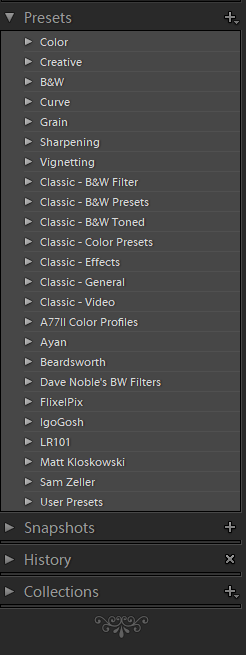
I have updated to LR 7.3.1 running on a Win 7 Professional 64bit OS based machine. My 'Presets' are stock--I have made no changes. They are displayed as follows:
Is this what the panel is supposed to look like? I doesn't appear to be alphabetically sorted to me.









 123
Replies
123
Replies


 AdChoices