
Participating Frequently
August 19, 2021

P: Lightroom Classic: Applying develop preset to multiple images transfer all settings

  • August 19, 2021
  • 36 replies
  • 8579 views


I have a preset for sharpening. When I select multiple images and apply this develop preset there is a weird behaviour. The preset is applied but also all other images get develop settings from the active image in the selection.


This started happening in 10.4. I use this regularly and it never behaved like this.
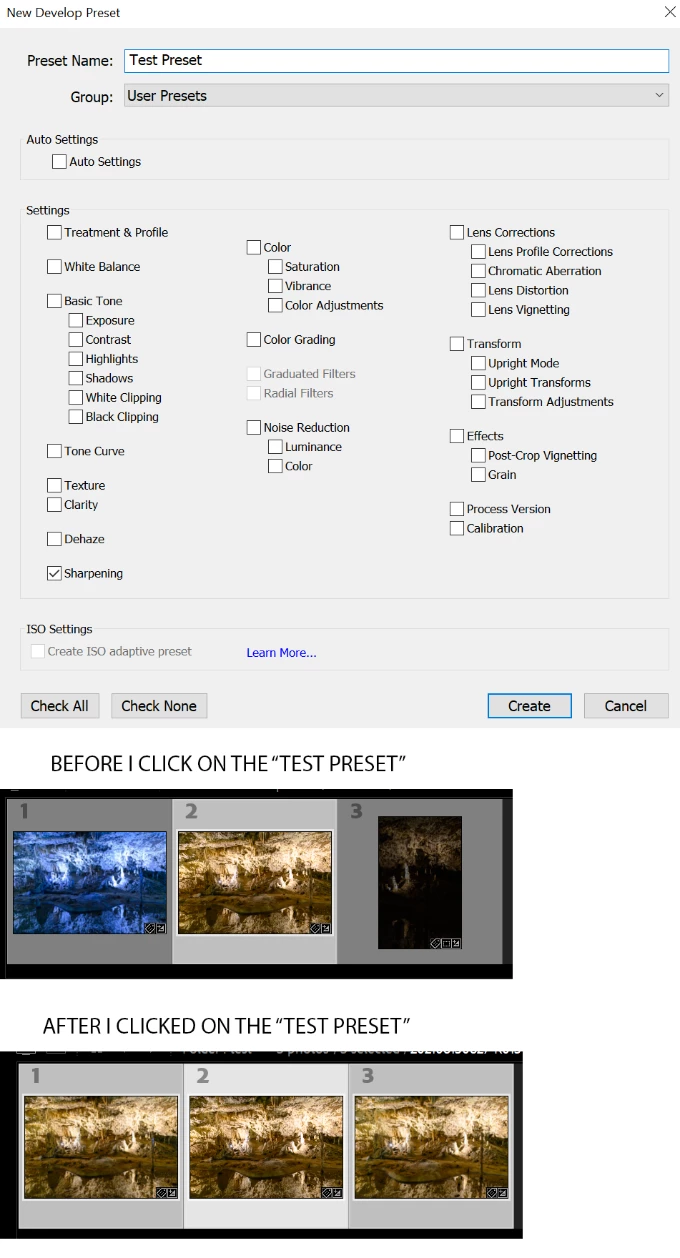


Lightroom Classic version: 10.4 [ 202108071231-af9219b9 ]
License: Creative Cloud
Language setting: en
Operating system: Windows 10 - Business Edition
Version: 10.0.19043
Application architecture: x64
System architecture: x64
Logical processor count: 12
Processor speed: 3,1GHz
SqLite Version: 3.34.0
Built-in memory: 49076,1 MB
Real memory available to Lightroom: 49076,1 MB
Real memory used by Lightroom: 4036,5 MB (8,2%)
Virtual memory used by Lightroom: 5463,4 MB
GDI objects count: 818
USER objects count: 2310
Process handles count: 3956
Memory cache size: 3950,8MB
Internal Camera Raw version: 13.4 [ 872 ]
Maximum thread count used by Camera Raw: 5
Camera Raw SIMD optimization: SSE2,AVX,AVX2
Camera Raw virtual memory: 924MB / 24538MB (3%)
Camera Raw real memory: 932MB / 49076MB (1%)
System DPI setting: 144 DPI (high DPI mode)
Desktop composition enabled: Yes
Displays: 1) 3840x2160
Input types: Multitouch: No, Integrated touch: No, Integrated pen: Yes, External touch: No, External pen: Yes, Keyboard: No

Graphics Processor Info: 
DirectX: Radeon RX 580 Series (27.20.22001.14011)

This topic has been closed for replies.

36 replies

Rikk Flohr_Photography
Community Manager
Community Manager
September 14, 2021

Settings status to Acknowledged


Rikk Flohr: Adobe Photography Org
Participating Frequently
September 14, 2021

I am using Lightroom Classic, latest version on Windows 10. After most recent LR update, whenever I apply a preset to a selection of images, it also crops each image to whatever the dimensions are of the 1st image in the selection.


I usually apply a Noise and Sharpen preset when I have finished editing, where this hasn't happened before!


I know there are workarounds, but I know this shouldn't be happening.

abelgarper
Participant
September 14, 2021

Since the last update, I am experimenting some trouble with the auto sync button.

I use to edit my photos and when I finish, I create a virtual copy opf all of them and I apply a black and white preset. Normally, this action keeps all the parameters of the original photo edited, but with the monochrme profile and the b&w configuration of the preset. The rest still the same in the virtual copy (the same cutout and rotation with the original one).

Now I lose this cutouts and rotations of the original ones, once I apply the b&n preset, with the auto sync button activated.


Is this happening to somebody else?


Thanks,


Abel.

Participant
September 12, 2021

Hi Do you have any idea when this bug will be fixed?

--
HAYDEN PHOENIX
[PII removed by moderator]

ericjgay
Participant
September 8, 2021

I updated to 10.4 this morning. Here's my issue. 

I make black and whites by creating virtual copies, selecting those copies and applying a preset to those copies. The problem now is that all photos will take on all characteristics of the photo that is selected, including things like crop and spot removal. This happens when none of those options are selected on the preset or my sync options. 

GoldingD
Legend
September 8, 2021

Deleted, by myshelf.  Merge of postings make this reply circular. providing link as it where to the merged post.

Participant
September 8, 2021

Please help. I'm lost. So here's what happens...If I go through my images and individually crop say 5 images to the desired crop. When I highlight those images to batch sync a preset they all seem to re-crop to the same crop of last image I cropped. This happens when I apply the preset. I'm lost.

GoldingD
Legend
September 8, 2021

Deleted, by myshelf.  Merge of postings make this reply circular. providing link as it where to the merged post.

Participant
September 7, 2021

Hello,

I notice a problem with copying the settings when the automatic synchronisation in the Development module is activated.
Usually, when I selected multiple photos and enabled automatic sync of development settings, the changes I made to the selected photo were automatically applied to the other photos. Previous changes were not normally copied.
Since a few days, if I activate the automatic synchronization and I use a preset (whatever it is), all the settings of the first photo are applied to the others selected. For example, if I apply a lens correction preset that only affects the "Lens corrections" panel, it will also change the white balance, exposure, highlights, shadows etc. using the settings of the selected photo. More surprisingly, if the white balance is set to "As shot", it will change the white balance of the other photos but it will still show "As shot" even if the value has changed.
Can you tell me if this is a bug in the last update?


JohanElzenga
Community Expert
Community Expert
September 7, 2021

I believe this is indeed a confirmed bug. And I have moved this to the appropriate forum (Lightroom Classic bugs).


-- Johan W. Elzenga
Participant
September 6, 2021
The latest lightroom has an annoying bug.

You do a preset for  only sharpness / denoising.
In previous versions, photos were selected and the preset worked on all selected photos.

Now the preset, apart from its own parameters, changes everything in the photos. WB, Exp, just like the preset works like auto sync.
Michael J. Hoffman
Community Expert
Community Expert
September 6, 2021

Which "latest Lightroom" version do you mean? Please clarify, as versions are constantly changing. It always helps to let us know your system type and OS version as well. 

Also, please explain the process you used for creating and applying the preset, so we can have some clues as to what may be happening. 

Finally, can you post the preset file here for examination? Presets are just text-based XML lists of settings to be applied, so it will be interesting to see if your preset includes more than just noise reduction and sharpness. 

Known Participant
September 5, 2021

Post Merged

---------------------


Release 10.4; Win 10.  When I apply a user reset, the result is either the uncropped version of the previous picture or the last edit of the current picture.  Definitely a bug because did not occur in any previous release.

johnrellis
Genius
September 5, 2021

Adobe is investigating this bug.  While waiting for a fix, see this workaround using the Quick Develop panel:

https://community.adobe.com/t5/lightroom-classic-bugs/p-lightroom-classic-applying-develop-preset-to-multiple-images-transfer-all-settings/idc-p/12345642#M15285 


brautrausch
Participant
August 26, 2021

Before 10.4 it was possible to apply a preset to multiple selected photos with just one click (with Auto-Sync was activated). Since 10.4 this action will not only apply the preset but as well all other settings that were done to the first selected picture (even if they have nothing to do with the preset).

Any idea how to fix this?

johnrellis
Genius
August 27, 2021

A workaround while awaiting the fix: Go to Library Grid view (g). Select the desired photos and then apply the preset using the Saved Preset menu in the Quick Develop panel in the right column.