



johnrellis
Legend
March 28, 2023

P: Searching for ancestor keywords in Keyword List panel shows incorrect results

  • March 28, 2023
  • 4 replies
  • 1929 views

Searching for ancestor keywords in the Keyword List panel shows incorrect results for descendant keywords.  The behavior broke somewhere between LR 10.4 and 12.2.1.


To reproduce on LR 12.2.1:


1. Assign the hierarchical keyword 1 > 2 > 3 to a photo.


2. In the Keyword List's Filter Keywords box, enter "1".


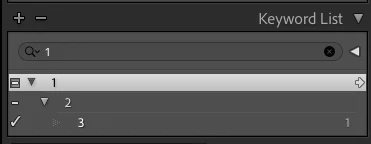
3. In LR 10.4, observe that all the keywords contained by keyword 1 are displayed, that a right arrow appears when you hover over 1, and the correct count is shown next to 3:
 

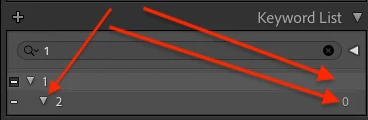
4. But in LR 12.2.1 observe that:

a) keyword 3 is not shown,

b) no right arrow appears when you hover over keyword 1,

c) an incorrect count of 0 is shown for keyword 2 (the panel normally never shows counts for ancestor keywords, only for directly assigned keywords), and

d) the triangle to the left of keyword 2 points down to indicate there are descendants displayed, but the descendants aren't shown:
 

See here for the original report:

https://community.adobe.com/t5/lightroom-classic-discussions/lrc-keyword-panel-list-not-showing-hierarchy/td-p/13685890 


This topic has been closed for replies.

4 replies

johnrellis
Legend
June 14, 2023

I verified that the bug recipe now produces correct results (the same as in LR 10.4).

Rikk Flohr_Photography
Community Manager
Community Manager
June 13, 2023

Greetings all,


Updates for Adobe Photography products have been released.  The June 2023 updates contain a fix for this issue. 

If you do not see the update in your Creative Cloud Application, you can refresh it by hitting [Ctrl/Cmd]+[Alt/Opt]+[ R ].

Note: It may take up to 24 hours for your update to be available in your Creative Cloud app.


Thank you for your patience.

Rikk Flohr: Adobe Photography Org
Rikk Flohr_Photography
Community Manager
Community Manager
March 29, 2023

Thanks for the report, I've merged the previous thread and cross-referenced to the new bug report. 

Rikk Flohr: Adobe Photography Org
Inspiring
March 28, 2023

Most of my keywords are orginized in hierarchies. This includes individuals in families, places, dates (by decades and years), etc. For a long time, when I search for a higher level in the hierarchy in the Keyword panel list, all images with that and the lower levels will show up. In the Filter bar, I have Keyword hierarchies selected. The filter bar is normally closed. In the past, that is how I was able to set hierarchy or flat for browsing or searching in the Keyword panel list. But now when I select a higher level keyword, when Keyword Hierarchies is selected, only that keyword is retrieved, showing it superior keywords. None of its subordinate keywords show up. Yes, I have double checked the Hierarchy status in the filter bar. Why is LRC not showing all subordinates keywords anymore? What has changed? I this a bug?

LrC release: 11.3.1

DClark064
Inspiring
March 28, 2023

I am using ver 12.2.1 on Windows 10.  Hierachical keywords work as they should.

Inspiring
March 28, 2023

Well, I updated to version 12, but it still is not showing subordinates when I find a higher-level locality. If I browse through the list without querying, the hierarchies all show properly, but not when I do a query. It must still be a bug.